
ARCTIC Case Fan Hub
4.7Editor score
Ten PWM ports available
Direct SATA power input
Simple synchronous control
This guide compares the top 10 fan control hubs for PC builds, evaluating port counts, PWM support, ARGB compatibility, and power delivery for optimal cooling
Modern PC builds often require more cooling fans than motherboard headers can support. A fan control hub solves this by centralizing connections and ensuring stable power delivery for high performance airflow.
We evaluated ten top rated hubs based on port capacity, mounting options, and compatibility with standard 12V PWM and 5V ARGB devices. Each model was assessed for build quality and ease of installation.
Every pick includes detailed specs and real world advantages to help you choose the right hub for your case. Prices and availability change frequently so verify details before purchasing.
4.7Editor score
4.6Editor score

4.7Editor score
The following table provides a side by side comparison of all ten models. It highlights critical specifications such as port counts, supported fan types, and unique features like remote controls or magnetic mounting to help you quickly identify the best fit for your specific cooling needs.


The Thermalright ARGB Fan HUB stands out as a versatile solution for builders needing extra headers without sacrificing aesthetics. With a 4.5 star rating it offers reliable power distribution for up to eight fans while supporting both standard PWM and 5V ARGB lighting.
We may earn a commission when you buy through this link, at no additional cost to you.
Its dual support for lighting and cooling allows you to synchronize your fan speeds and RGB effects through motherboard software. The magnetic mounting system ensures it stays secure without blocking airflow or requiring screws that complicate installation in tight cases.
While it does not adjust fan speeds independently this limitation is typical for passive hubs. You rely on motherboard BIOS or software for control. However this is acceptable given the price and the ability to handle high load without voltage loss.
Buy this if you want a simple affordable hub that keeps cables neat. It works well with most standard cases and provides stable performance for long term cooling needs without requiring extra software configuration.
This hub manages both PWM signals for speed and ARGB signals for lighting. It synchronizes effects across multiple devices through a single connection point.
Direct SATA power ensures consistent voltage even with multiple fans running at full speed. This prevents under voltage issues that can cause fans to spin slowly or erratically.
We may earn a commission when you buy through this link, at no additional cost to you.
The ARCTIC Fan Controller is a rare find in the budget category because it offers individual control for each of its ten ports. This means you can fine tune cooling performance for specific zones in your PC case without relying on motherboard headers.
We may earn a commission when you buy through this link, at no additional cost to you.
It delivers up to 2 amps per port which is higher than many competitors. This extra power ensures fans run smoothly even at lower speeds. The native driver support for Windows and Linux makes it compatible with a wide range of monitoring tools.
The main trade off is the lack of RGB integration. If your fans use 5V ARGB you will need separate connections. However for pure cooling performance this hub provides superior flexibility and stability compared to standard splitters.
This is the ideal choice for users who prioritize cooling efficiency over aesthetics. The individual control and high power rating make it suitable for demanding workstations or gaming rigs where airflow management is critical.
Each port allows independent adjustment of fan speed. This flexibility lets you optimize airflow paths without affecting other connected fans.
Built in drivers support both Windows and Linux systems. This ensures seamless integration with software like SpeedFan or HWMonitor for precise monitoring.
We may earn a commission when you buy through this link, at no additional cost to you.
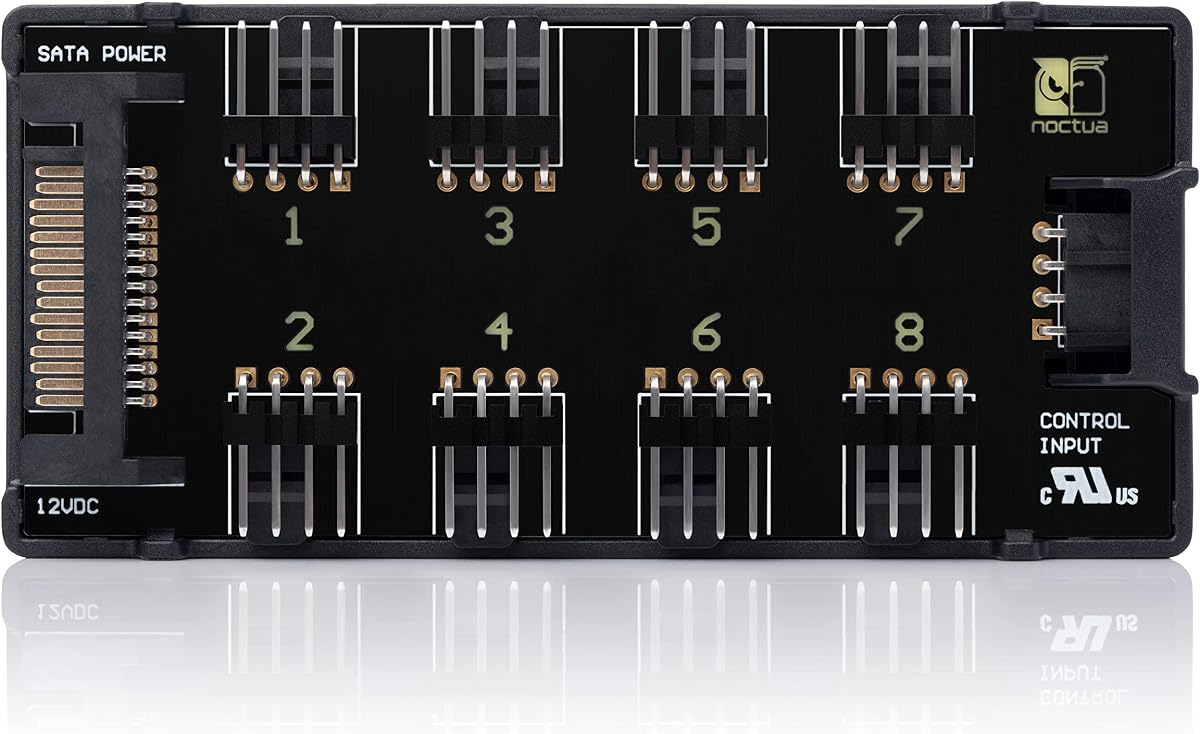
Noctua is known for premium cooling products and the NA-FH1 lives up to this reputation. It features short circuit protection and safety fuses which add a layer of security often missing in budget hubs. This makes it a safe investment for high end builds.
We may earn a commission when you buy through this link, at no additional cost to you.
The hub supports up to 54W via SATA power which is sufficient for most fan configurations. Its magnetic mounting system is robust and keeps the unit secure even during transport or case moves. The included cable ensures easy connection to your motherboard.
While the price is higher than standard hubs the six year warranty justifies the cost. It reflects confidence in the product's longevity. For users who want peace of mind and top tier durability this is a standout choice.
Choose this hub if you value safety and reliability above all else. It is perfect for professional workstations or systems that run 24/7 where component failure is not an option. The warranty provides long term security.
Built in fuses protect against overcurrent and short circuits. This ensures that a faulty fan does not damage the hub or your motherboard.
Combined input options allow for up to 54W total power. This supports a mix of high performance case fans and 5V applications easily.
We may earn a commission when you buy through this link, at no additional cost to you.
This model is designed for simplicity. It expands your system by nine slots beyond the motherboard header. The PWM signal is passed synchronously to all fans. This ensures consistent speeds across your cooling setup without complex wiring.
We may earn a commission when you buy through this link, at no additional cost to you.
The direct SATA power connection eliminates voltage loss. Fans run smoothly at all speeds. The compact size makes it easy to hide in tight spots inside the case. This keeps your build looking clean and organized.
The only limitation is reading RPM from a single fan. If you need individual speed monitoring this might be a drawback. But for most users one read out is enough to confirm cooling performance is working correctly.
This is the best choice for standard builds where budget is a priority. It handles high fan counts efficiently without breaking the bank. If you just need more headers for airflow this hub gets the job done reliably.
All connected fans receive the same control signal. This prevents uneven speeds that could lead to hot spots or airflow imbalance.
Direct power from the supply ensures fans get full voltage. This improves efficiency and lifespan compared to powered by motherboard headers.
We may earn a commission when you buy through this link, at no additional cost to you.
The X12 model offers a massive number of ports in a single device. It supports up to twelve groups of fans. This makes it ideal for cases with extensive cooling requirements or those needing many RGB strips. The white finish helps it blend in light cases.
We may earn a commission when you buy through this link, at no additional cost to you.
It manages both lighting and power efficiently. You can connect PWM fans and 5V ARGB devices simultaneously. The SATA power ensures stable output even when many devices are connected. This prevents flickering or slow spins due to power drops.
Be aware that it does not control colors or speeds independently. You must rely on your motherboard for those settings. This is a trade off for the high port count but acceptable for users who prioritize quantity over custom control.
Buy this if you have a large case with many fans. It simplifies cabling significantly. The high port density and power stability make it a strong contender for complex custom loops or enthusiast setups needing lots of connections.
Supports up to 12 fan groups in one hub. This reduces cable clutter and simplifies management in large chassis.
Connects both standard PWM fans and 5V ARGB lighting. This versatility allows for mixed setups without separate hubs.
We may earn a commission when you buy through this link, at no additional cost to you.
This hub stands out because it includes a remote control. This allows you to adjust lighting effects without using software or BIOS. The front facing panel syncs with your fans to create a unified look. It is convenient for users who want quick visual changes.
We may earn a commission when you buy through this link, at no additional cost to you.
The magnetic mounting makes placement easy. You can stick it on any metal surface inside the case. This flexibility helps keep cables organized. The kit includes all necessary cables for a complete setup right out of the box.
It supports up to nine ports which is sufficient for most standard builds. The power is stable due to direct SATA input. This ensures fans run smoothly and lights stay bright without flickering under load.
Choose this hub if you want ease of use for lighting. The remote adds a layer of convenience that others lack. It is a solid choice for mid range builds that value aesthetics and quick access to color settings.
The included remote lets you change colors and effects instantly. This is useful for showing off your build during events.
Includes all cables needed for setup. This reduces the need to buy extra adapters or wires separately.
We may earn a commission when you buy through this link, at no additional cost to you.
This hub is known for stable output under high load. It supports ten fans easily. The magnetic mount ensures it stays fixed in place without vibration. This stability is crucial for maintaining airflow in noisy or busy cases.
We may earn a commission when you buy through this link, at no additional cost to you.
The compact design allows for easy hiding. You can tuck it behind panels to keep cables hidden. The direct SATA power ensures that fans get consistent energy. This prevents any dips that might cause audible humming or speed fluctuations.
Note that the SATA cable is not included. You will need to source one separately. This is a minor inconvenience but worth considering. The hub itself is durable and designed for long term use.
Buy this for silent and stable cooling performance. It works well for users who want to minimize noise. The ten port count ensures enough expansion for most cases without needing multiple hubs or splitters.
Direct power ensures smooth operation even with full load. This reduces vibration and noise during intense usage periods.
Small footprint fits easily in tight cases. This helps keep the build clean and improves airflow.
We may earn a commission when you buy through this link, at no additional cost to you.
This model is designed for high cable management. It supports eight PWM fans and eight lighting connectors. This makes it perfect for mid tower cases where space is limited. The black finish matches most PC components nicely.
We may earn a commission when you buy through this link, at no additional cost to you.
The compact design helps keep wires tidy. You can connect all fans and lights through one central point. The direct SATA power ensures stable output for both fans and lights. This prevents flickering or inconsistent brightness.
It is simple to install with included adhesives. The hub stays secure without screws. This is great for builders who prefer a non invasive installation. It is safe and ensures long term stability.
Choose this for clean and tidy builds. The high number of connectors in a small footprint is ideal for organized cases. If you want to keep your PC looking neat this hub is a great option.
Supports both fan and lighting connectors. This reduces cable clutter significantly inside the case.
Designed to fit in small spaces. This ensures your build remains clean and organized without bulky components.
We may earn a commission when you buy through this link, at no additional cost to you.
This hub offers multiple control options including a remote and a chassis key. This gives you flexibility on how you want to adjust settings. The chassis key is useful for quick adjustments without opening the case or using software.
We may earn a commission when you buy through this link, at no additional cost to you.
It supports up to ten fans and lighting devices. The magnetic mount ensures easy installation. The compact size keeps wires tidy. The SATA power ensures stable performance even under high load conditions.
The remote control helps with lighting effects easily. You can change colors on the fly. This is convenient for users who like to customize their look frequently. The key provides an alternative for hard to reach setups.
Buy this for maximum control flexibility. The combination of remote and key is unique. It is ideal for users who want quick access to settings without relying on software or motherboard headers for adjustments.
Includes both remote and chassis key for adjustment. This provides flexibility for different user preferences.
Strong magnets hold the unit secure. This ensures the hub stays in place during transport or use.
We may earn a commission when you buy through this link, at no additional cost to you.
This hub is a reliable choice for standard users. It supports eight fan groups with stable output. The compact design keeps your case clean. It works well with most modern motherboards and fan setups.
We may earn a commission when you buy through this link, at no additional cost to you.
The SATA power ensures consistent delivery. This prevents voltage drops that could affect performance. The adhesive installation is simple and safe. It allows you to place the hub where it fits best in your case.
It is important to note that speed control depends on your motherboard. The hub itself does not adjust speeds. This is typical for passive hubs. But it still provides the necessary expansion for multiple fans.
Choose this for stable and reliable expansion. It is a solid budget friendly option that does not compromise on quality. The eight port count is enough for most average builds without needing extra complexity.
Designed for stable operation under load. This ensures consistent fan speeds and cooling performance.
Adhesive mounts make it easy to install. You can place it anywhere without needing screws.
We may earn a commission when you buy through this link, at no additional cost to you.
Choosing the right hub depends on your specific cooling needs and case constraints. This guide outlines key factors to consider.
Check how many fans you need to connect. Some hubs support 8 while others support 10 or 12. Ensure it supports both PWM and ARGB if you need lighting.
Match the port count to your needs to avoid buying excess capacity.
Most hubs use SATA power for stable voltage. Direct power prevents voltage loss compared to motherboard headers. Look for high wattage ratings for safety.
Always ensure your PSU has a spare SATA connector for the hub.
Mounting style affects ease of installation. Some hubs use magnets while others use adhesives. Choose based on your case material and available space.
Magnetic mounts are easier to adjust but require metal surfaces.
Some hubs allow individual control while others sync all fans. If you need separate zones check for individual port controls. Most hubs rely on motherboard settings.
Decide if you need individual control or synchronized speeds.
If you have ARGB fans ensure the hub supports 5V 3-pin connections. Some hubs do not support lighting at all. Check for dedicated RGB headers.
Verify compatibility with your fans to avoid connection issues.
Look for hubs that reduce cable clutter. Slim designs help hide wires easily. Integrated splitters keep things neat compared to separate wires.
Prioritize slim models to maintain good airflow inside the case.
Premium brands offer better protection and longer warranties. Look for safety fuses to prevent damage. A good warranty gives peace of mind.
Invest in quality if your system runs continuously.
Ensure the hub works with your monitoring software. Some need specific drivers or support Linux. Check reviews for reported issues.
This is vital if you use custom monitoring tools.
Connect the SATA power cable first. This ensures the hub receives stable power before the fans connect. Always verify the power is off during installation.
Plug the motherboard header cable into the hub. This connects your fans to BIOS controls. Then attach each fan to a port ensuring correct orientation.
Secure the hub using magnetic or adhesive mounts. Place it where cables do not block airflow. Check all connections are tight and cables are organized.
No, modern hubs with direct SATA power maintain full voltage. Unlike splitters powered by the motherboard they avoid voltage drops. This ensures fans run at full efficiency even under high load.
Only hubs that support 5V 3-pin ARGB can handle these lights. Standard PWM hubs only control fans. Check product specs for lighting compatibility before purchasing.
Exceeding wattage limits can cause safety issues. Always check the total wattage rating of the hub. If you have many fans you may need multiple hubs for safety.
Some hubs require a separate SATA or header cable. Always check the package contents. Buying a spare cable ensures you can complete the installation without delay.
Most hubs sync all fans to one signal. Individual control requires specific models with separate circuits. If you need zones check for individual PWM port support in the specs.
Secure the hub first using magnets or adhesive. Then connect power and the motherboard cable. Finally attach fans to the ports ensuring the cables are organized for airflow.
This guide reviewed ten top hubs. The Thermalright and ARCTIC models offer excellent value. The Noctua NA-FH1 remains a premium pick for safety and warranty.
Prioritize power stability and port counts when deciding. Choose a hub that fits your fan mix and offers reliable delivery. Proper selection ensures long term cooling efficiency.
Prices and stock change often. Verify availability before ordering. This ensures you get the exact model needed for your build.