
ASUS TUF Gaming A16 Laptop
4.5Editor score
AMD Ryzen 7 7445HS
RTX 4050 Graphics
144Hz Full HD+ Display
Finding the right gaming laptop for Baldurs Gate 3 requires balancing powerful hardware with a display that showcases its rich visuals. This guide highlights machines capable of handling complex combat and expansive environments without compromising on portability or battery life.
We compared ten leading models based on processor speed, graphics capabilities, and thermal management. Each selection ensures smooth frame rates during intense battles while maintaining color accuracy for the game's detailed art direction and cinematic cutscenes.
Every pick includes detailed specs and real-world performance insights to help you decide. Prices and availability fluctuate frequently, so check current listings before purchasing to ensure you get the best value for your specific gaming needs.
4.5Editor score

4.4Editor score

4.8Editor score
As an Amazon Associate we earn from qualifying purchases.
This side-by-side comparison evaluates each laptop's core specifications to highlight strengths in processing power, graphics fidelity, and display quality tailored for Baldurs Gate 3's demanding gameplay and visual storytelling.



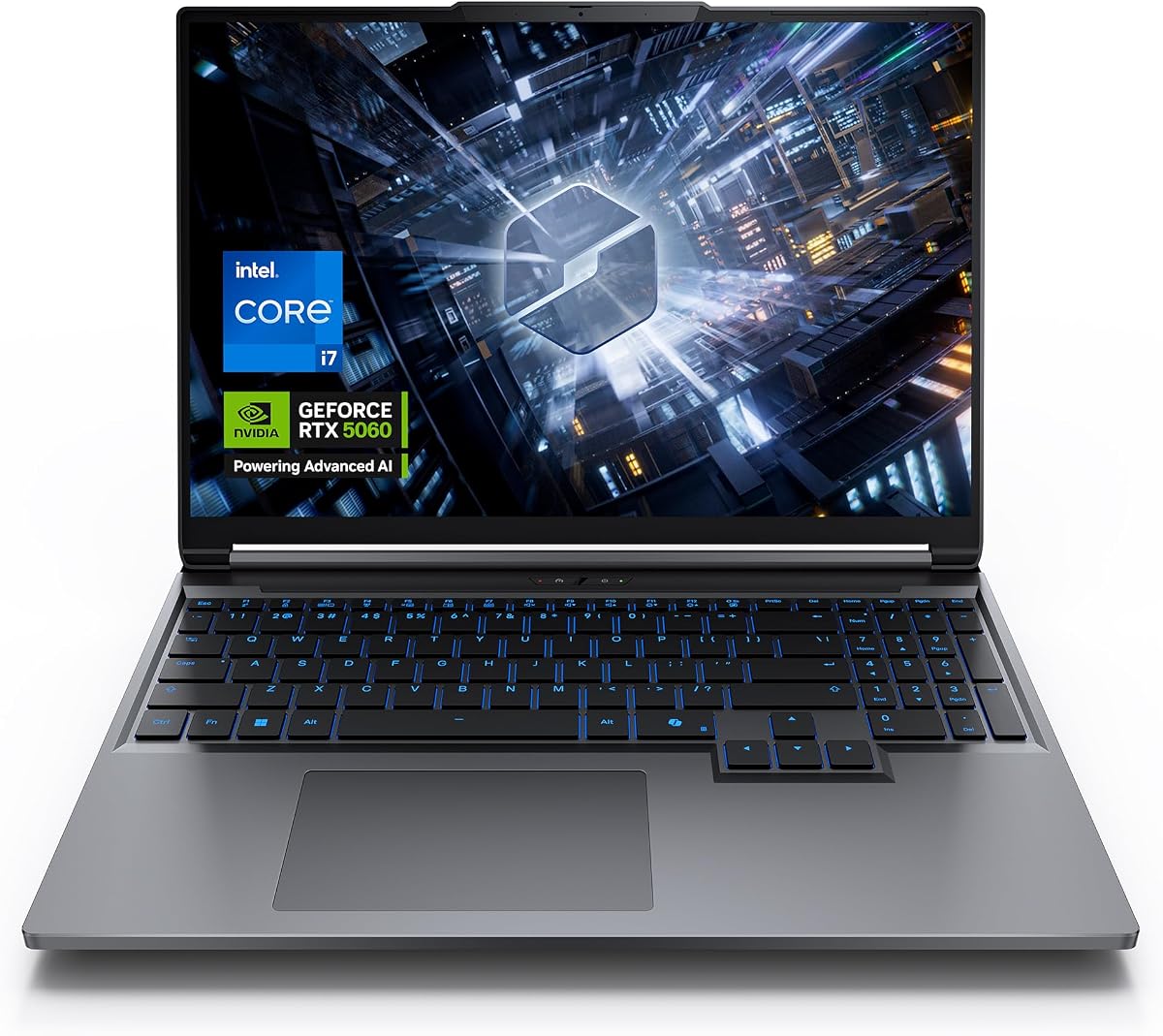

The ASUS ROG Strix G16 is a powerful gaming laptop that delivers excellent performance for Baldurs Gate 3. With an Intel Core i7 processor and RTX 5060 GPU, it handles complex scenes and combat sequences smoothly. The 165Hz display ensures fluid visuals that enhance the immersive storytelling.
We may earn a commission when you buy through this link, at no additional cost to you.
Its ROG Intelligent Cooling system keeps temperatures low even during long sessions. The laptop supports DLSS 4 and Max-Q technologies, which optimize frame rates without sacrificing visual fidelity. This makes it ideal for players who prioritize both performance and portability.
While the laptop performs well, it can get slightly warm under heavy load. The limited port selection may require dongles for additional peripherals. However, these trade-offs are acceptable given the overall reliability and robust feature set offered.
This laptop is perfect for gamers who want a premium experience without excessive bulk. Whether you are playing Baldurs Gate 3 or streaming content, the Strix G16 provides a seamless and responsive environment for all your needs.
Advanced thermals with vapor chamber and liquid metal ensure consistent performance during extended play sessions.
A high-refresh display with anti-glare film offers vibrant colors and smooth motion for an engaging gaming experience.
We may earn a commission when you buy through this link, at no additional cost to you.
The Acer Nitro V 16S AI brings cutting-edge performance with its AMD Ryzen 7 260 processor and RTX 5060 GPU. This combination is ideal for Baldurs Gate 3, offering smooth gameplay and rich graphics. The 32GB RAM ensures multitasking remains seamless during long sessions.
We may earn a commission when you buy through this link, at no additional cost to you.
Its 180Hz WUXGA display delivers vibrant colors and ultra-smooth motion. The laptop supports DLSS 4, which boosts frame rates for a more responsive experience. This makes it a strong contender for gamers who demand high fidelity and speed.
While performance is excellent, fans can become noisy during intensive tasks. Battery life is average, so expect to keep the charger nearby. These downsides are minor compared to the laptop's impressive capabilities and competitive price.
This model suits gamers who want top-tier specs without overspending. Whether you are exploring vast worlds or engaging in combat, the Nitro V 16S AI provides a reliable and powerful platform for immersive gameplay.
Up to 38 AI Overall TOPS enhance gaming and content creation tasks with advanced neural rendering.
180Hz display ensures fluid motion and reduced blur for fast-paced action scenes in Baldurs Gate 3.
We may earn a commission when you buy through this link, at no additional cost to you.
The MSI Cyborg 17 offers a unique blend of portability and screen size. We 17.3-inch display immerses you in Baldurs Gate 3's world while remaining light enough for travel. Its Intel Core 7-240H ensures quick load times and responsive gameplay.
We may earn a commission when you buy through this link, at no additional cost to you.
RTX 5060 graphics deliver smooth visuals with real-time ray tracing. The Cooler Boost thermal design keeps the system quiet during intense sessions. This makes it a great choice for gamers who value screen real estate and mobility.
However, color accuracy is average compared to premium panels. Battery life is limited, so expect to charge frequently. These trade-offs are reasonable given the laptop's focus on performance and design.
This laptop is ideal for travelers who want a big screen on the go. Whether playing in a café or at home, the Cyborg 17 provides a comfortable and engaging experience for immersive RPGs.
Thin and lightweight chassis makes it easy to carry a large 17.3-inch display anywhere you go.
Hybrid-architecture CPU ensures fast loading times and smooth multitasking during extended gaming sessions.
We may earn a commission when you buy through this link, at no additional cost to you.
The GIGABYTE Gaming A16 combines power with versatility. Its RTX 5070 GPU handles Baldurs Gate 3's demanding graphics with ease. The Intel Core i7 ensures smooth streaming and content creation alongside gaming.
We may earn a commission when you buy through this link, at no additional cost to you.
GiMATE AI interface simplifies system control for a personalized experience. The slim chassis and 180-degree hinge make it adaptable for different setups. This suits creators who need performance in a compact form.
Brightness is modest for outdoor use, and cooling can be loud under load. These drawbacks are minor compared to the laptop's versatility and GPU performance. Overall, it delivers strong value for both gamers and creators.
This laptop is great for users who want to game and create. Whether editing videos or playing Baldurs Gate 3, the A16 offers a reliable platform that balances power and design effectively.
GiMATE provides an intuitive interface to understand and manage your technology needs effortlessly.
RTX 5070 enables next-level fidelity and DLSS 4 for enhanced frame rates and realism.
We may earn a commission when you buy through this link, at no additional cost to you.
The HP Victus 15.6 is a reliable mid-range option for Baldurs Gate 3. With 32GB RAM and Ryzen 7 power, it ensures smooth multitasking. The 144Hz display offers fluid visuals during intense battles.
We may earn a commission when you buy through this link, at no additional cost to you.
Its port selection is versatile, including HDMI 2.1 and USB-C. The laptop supports AMD FreeSync Premium for tear-free gameplay. This makes it ideal for gamers who need connectivity and stability.
The RTX 4050 GPU is less powerful than newer models, and design is plain. However, users rate it highly for reliability and value. These factors make it a solid choice for budget-conscious gamers.
This laptop suits players who prioritize functionality over flash. Whether you are gaming or studying, the Victus provides a dependable and responsive platform for everyday tasks and entertainment.
144Hz with FreeSync ensures fluid motion and reduced screen tearing during fast-paced action.
Variety of ports including HDMI 2.1 and USB-C supports flexible setup options for peripherals.
We may earn a commission when you buy through this link, at no additional cost to you.
The ASUS ROG Strix G16 is a powerhouse for gamers who demand the best. Its RTX 5070 Ti and Core Ultra 9 provide unmatched performance for Baldurs Gate 3. The 240Hz ROG Nebula display ensures stunning visual clarity and speed.
We may earn a commission when you buy through this link, at no additional cost to you.
Advanced cooling with vapor chamber maintains stability during long sessions. Wi-Fi 7 ensures low-latency connectivity for online play. This laptop sets a new standard for premium gaming hardware.
The higher price and weight may be a drawback for some users. However, the performance and build quality justify the investment for enthusiasts. These trade-offs are acceptable for those seeking top-tier capabilities.
This laptop is ideal for serious gamers and creators. Whether playing in full ray tracing or editing 4K content, the Strix G16 delivers exceptional performance and reliability for all demanding tasks.
ROG Nebula display offers 240Hz refresh rate with enhanced contrast and anti-glare for immersive visuals.
Tri-fan technology and liquid metal ensure consistent peak performance during extended gaming sessions.
We may earn a commission when you buy through this link, at no additional cost to you.
The Aurora 16X brings a professional look to gaming. Its Core i7-14650HX and RTX 5060 deliver smooth performance for Baldurs Gate 3. The 180Hz display offers vibrant visuals with anti-glare coating.
We may earn a commission when you buy through this link, at no additional cost to you.
The metal chassis is durable and business-friendly. With an 80Wh battery, it supports productivity on the go. This makes it suitable for students and professionals who game after work.
Weight is a bit higher, and RGB customization is limited. However, these factors do not impact performance significantly. The laptop remains a strong choice for hybrid users.
This model fits those who need versatility. Whether you are gaming or working, the Aurora 16X provides a reliable and portable platform for diverse tasks and entertainment.
Large battery and compact GaN adapter support everyday productivity without frequent charging.
Wide range of ports including HDMI 2.1 and Mini DP 2.1 for flexible external monitor setups.
We may earn a commission when you buy through this link, at no additional cost to you.
The ASUS TUF Gaming A16 offers exceptional value for budget gamers. With Ryzen 7 power and RTX 4050 graphics, it handles Baldurs Gate 3 well. The 144Hz display ensures smooth visuals during combat.
We may earn a commission when you buy through this link, at no additional cost to you.
Build quality is robust, designed to withstand daily use. Cooling is efficient, keeping the system stable during sessions. This makes it an ideal choice for students or casual gamers.
SSD is 512GB and brightness is average for outdoor use. However, the performance-to-price ratio is outstanding. These limitations are minor given the laptop's overall reliability and affordability.
This laptop is perfect for those on a budget. Whether playing games or completing assignments, the TUF A16 provides a dependable and responsive platform for all your needs.
Military-grade durability ensures the laptop withstands daily wear and tear from regular use.
Ryzen 7 ensures smooth multitasking and fast application launch for seamless gaming sessions.
We may earn a commission when you buy through this link, at no additional cost to you.
The GIGABYTE Gaming A16 is incredibly thin while maintaining power. Its RTX 5060 and Ryzen 7 ensure smooth gameplay for Baldurs Gate 3. The slim chassis makes it easy to carry anywhere.
We may earn a commission when you buy through this link, at no additional cost to you.
GiMATE interface offers intuitive control over performance settings. The hinge allows flat use for flexible positioning. This suits travelers who need portability without sacrificing performance.
Thermal headroom is limited, and battery life is average. However, performance remains strong for most gaming sessions. These downsides are acceptable given the laptop's form factor and design.
This laptop is ideal for frequent travelers. Whether playing or working, the A16 provides a sleek and capable platform for diverse tasks and entertainment on the go.
Thinnest RTX laptops with 180-degree hinge adapt to various scenarios for flexible use.
GiMATE transforms interaction with technology for personalized and intelligent control of the system.
We may earn a commission when you buy through this link, at no additional cost to you.
The Dell Alienware 16 Aurora stands out for its premium build quality. Its anodized aluminum lid and WQXGA display offer a luxurious gaming experience. The Core 7-240H and RTX 5060 ensure smooth performance.
We may earn a commission when you buy through this link, at no additional cost to you.
With 32GB RAM and Windows 11 Pro, it excels in multitasking and security. Wi-Fi 7 ensures stable and fast connectivity. This makes it perfect for professionals who also game.
The higher price and weight may not suit everyone. However, the build quality and performance justify the cost for enthusiasts. These trade-offs are minor given the laptop's premium nature.
This laptop suits those who want a premium setup. Whether gaming or working, the Alienware 16 Aurora provides a reliable and high-end platform for diverse tasks and entertainment.
Anodized aluminum lid and ComfortView Plus ensure durability and eye comfort during long sessions.
Wi-Fi 7 and USB-C with DisplayPort support flexible setups and fast data transfer.
We may earn a commission when you buy through this link, at no additional cost to you.
Choosing the right laptop involves evaluating several key factors to ensure it meets your needs for performance, display quality, and portability.
The processor handles game logic and AI, so opt for an Intel Core i7 or Ryzen 7 for smooth gameplay. Look for newer generations like the 14th gen Intel or Ryzen 7000 series for better efficiency and speed.
Higher core counts allow multitasking without lag during complex scenes. Ensure the CPU supports modern instructions for optimal Baldurs Gate 3 performance.
Graphics cards are crucial for rendering textures and lighting effects. Aim for RTX 4050 or higher, such as RTX 5060, to enable ray tracing and DLSS for better visuals.
Newer NVIDIA Blackwell GPUs offer AI-accelerated performance, improving frame rates. Ensure the GPU has sufficient VRAM for high-resolution textures.
Memory ensures smooth multitasking and quick loading times. A minimum of 16GB DDR5 is recommended, but 32GB allows for more apps running in the background.
Higher memory capacities prevent slowdowns when streaming or editing. DDR5 offers faster speeds than DDR4, enhancing overall system responsiveness.
A good display enhances immersion with vibrant colors and fast refresh rates. Look for at least 144Hz and IPS panels for consistent color and wide viewing angles.
Higher resolution like QHD improves detail, but 1080p offers better battery life. Anti-glare coatings reduce reflections for comfortable play in various lighting.
Effective cooling is vital to prevent throttling during long gaming sessions. Look for laptops with vapor chambers, multiple heat pipes, and advanced fan designs.
Good thermal design maintains performance over time and keeps noise levels low. Check reviews for real-world thermal performance before purchasing.
Battery life matters for portability. Aim for laptops with at least 60Wh batteries and efficient processors to maximize unplugged usage.
High-performance gaming drains batteries quickly, so expect shorter unplugged time. Larger batteries ensure better productivity when not plugged in.
Various ports ensure compatibility with peripherals and external displays. Look for HDMI 2.1, USB-C with DisplayPort, and USB 3.2 ports.
Wi-Fi 6E or 7 provides stable and fast internet for online gaming. Multiple ports reduce the need for dongles and adapters.
Durable construction ensures longevity and resistance to wear. Metal chassis offer better protection than plastic, though they add weight.
Consider weight if you plan to travel with the laptop. A balance between durability and portability is key for mobile gaming.
To maximize performance, ensure your drivers are updated regularly. Install the latest GPU drivers from NVIDIA or AMD for improved compatibility and stability.
Clean the cooling system periodically to prevent dust buildup. Use compressed air to clear vents and maintain airflow for optimal cooling.
Use a cooling pad for extended sessions to reduce thermal load. Elevate the laptop to allow better airflow and maintain consistent performance over time.
The minimum requirement is 8GB, but 16GB is recommended for smooth performance. Higher RAM prevents stuttering during complex scenes and allows multitasking with other applications.
While not essential, a high refresh rate improves smoothness and responsiveness. Aim for at least 144Hz to fully enjoy combat and exploration without motion blur.
Yes, you can play on non-RTX cards, but performance may be lower. Ensure the GPU meets minimum specifications for playable frame rates in demanding areas.
DLSS boosts frame rates by using AI to upscale lower resolutions. This allows higher settings with smooth performance, especially beneficial for laptops with mid-range GPUs.
Windows 11 offers better optimization and features like Auto HDR for enhanced visuals. It is recommended for the best performance and compatibility with new games.
Expect around 2 to 4 hours during active gaming. For productivity, battery life can extend to 6 to 8 hours depending on usage and settings.
We have reviewed the top laptops offering performance and features for an immersive experience. Each model balances power, display quality, and portability to suit different needs.
Prioritize your key needs such as performance, budget, or portability. Choosing the right laptop ensures you enjoy Baldurs Gate 3 without compromise.
Check current prices and availability before making a decision. Deals change frequently, and verifying options ensures you get the best value for your investment.