
Thrustmaster T-Flight Hotas X
4.5Editor score
Detachable throttle design
Adjustable stick resistance
Plug and play ready
Discover the top Hotas or Joystick for Elite Dangerous controllers tested for precision and comfort in this comprehensive guide comparing ten real options.
Finding the right Hotas or Joystick for Elite Dangerous can transform your space flight experience from a simple gaming session into a full immersive simulation. You need precise controls that respond quickly to your commands while offering enough programmable buttons to manage complex ship systems without ever touching your keyboard. This guide helps you navigate the vast market of flight controllers to find the perfect fit for your cockpit setup and piloting style.
We have analyzed ten real products based on their build quality, sensor accuracy, programmability, and compatibility with Elite Dangerous. Our comparison looks at everything from budget-friendly starters to high-end military replicas. Each entry is evaluated on how well it handles the specific demands of deep space exploration, combat scenarios, and trading runs. We focus on user feedback and technical specs to ensure you get a controller that lasts.
Each pick in this list shows you the key strengths and potential trade-offs of the device so you can make an informed decision. We highlight specific features like hall effect sensors, detachable throttles, and ergonomic designs that matter most for long flight sessions. Keep in mind that prices and availability can change frequently so always check the current listing before finalizing your purchase for your virtual cockpit.
4.5Editor score

4.0Editor score
4.6Editor score
This side-by-side comparison breaks down the ten leading flight controllers to help you decide which Hotas or Joystick for Elite Dangerous fits your needs and budget best.




The Logitech G X56 H.O.T.A.S stands out as a top contender for Elite Dangerous pilots seeking deep control over their spacecraft. With over one hundred eighty nine programmable controls and hall effect sensors, this system offers the precision needed for complex ship management without reaching for a keyboard. Its twin throttle design allows for independent engine control which is rare at this price point.
We may earn a commission when you buy through this link, at no additional cost to you.
Key strengths include the adjustable spring system that lets you tailor the stick force to your preference and the RGB lighting that helps identify functions in dark cockpits. The mini analog stick control surfaces provide additional axes for gimballed weapons making combat maneuvers intuitive. Software support is robust allowing detailed macro creation for specific Elite Dangerous systems.
Trade-offs involve the large physical footprint requiring a dedicated desk area and the higher cost compared to entry models. The dual USB requirement can strain ports on older PCs. However these limitations are acceptable for users prioritizing full scale simulation control over portability or budget constraints.
This controller is ideal for serious simmers who want professional grade hardware. It suits pilots flying multi-engine ships or those who use VR for immersive experiences. If you value customization and tactile feedback the X56 delivers a premium experience worth the investment for long term use.
Hall effect sensors ensure smooth accurate input without mechanical wear so your calibration stays consistent over time.
Separate throttle sticks allow independent engine management which is crucial for realistic multi engine aircraft simulation.
We may earn a commission when you buy through this link, at no additional cost to you.
The Thrustmaster T-Flight Hotas X delivers excellent value for new pilots entering Elite Dangerous. It features a detachable throttle and adjustable stick resistance ensuring you can customize the feel without spending a fortune. The ergonomic design with a wide hand rest reduces fatigue during long trading or exploration sessions.
We may earn a commission when you buy through this link, at no additional cost to you.
Strengths include the ability to swap profiles on the fly and built-in memory that saves your settings. The resistance dial allows fine tuning of stick tension for smooth maneuvers. Its plug and play setup means you can start flying immediately without complex driver installation.
While it lacks the advanced sensors of higher end models the precision is sufficient for most combat and trading needs. The plastic build feels less robust than metal options but remains durable for home use. These trade-offs are reasonable given the accessible price point.
This controller is perfect for beginners or those with limited desk space. It works well for single throttle ship setups and offers a comfortable entry into flight simulation. If you want a reliable controller that is easy to use the Hotas X is a strong recommendation.
The wide hand rest and natural throttle shape keep your hands positioned correctly to prevent strain during extended play.
Detach the throttle for lap use or keep it connected for a compact desktop setup to suit your room layout.
We may earn a commission when you buy through this link, at no additional cost to you.
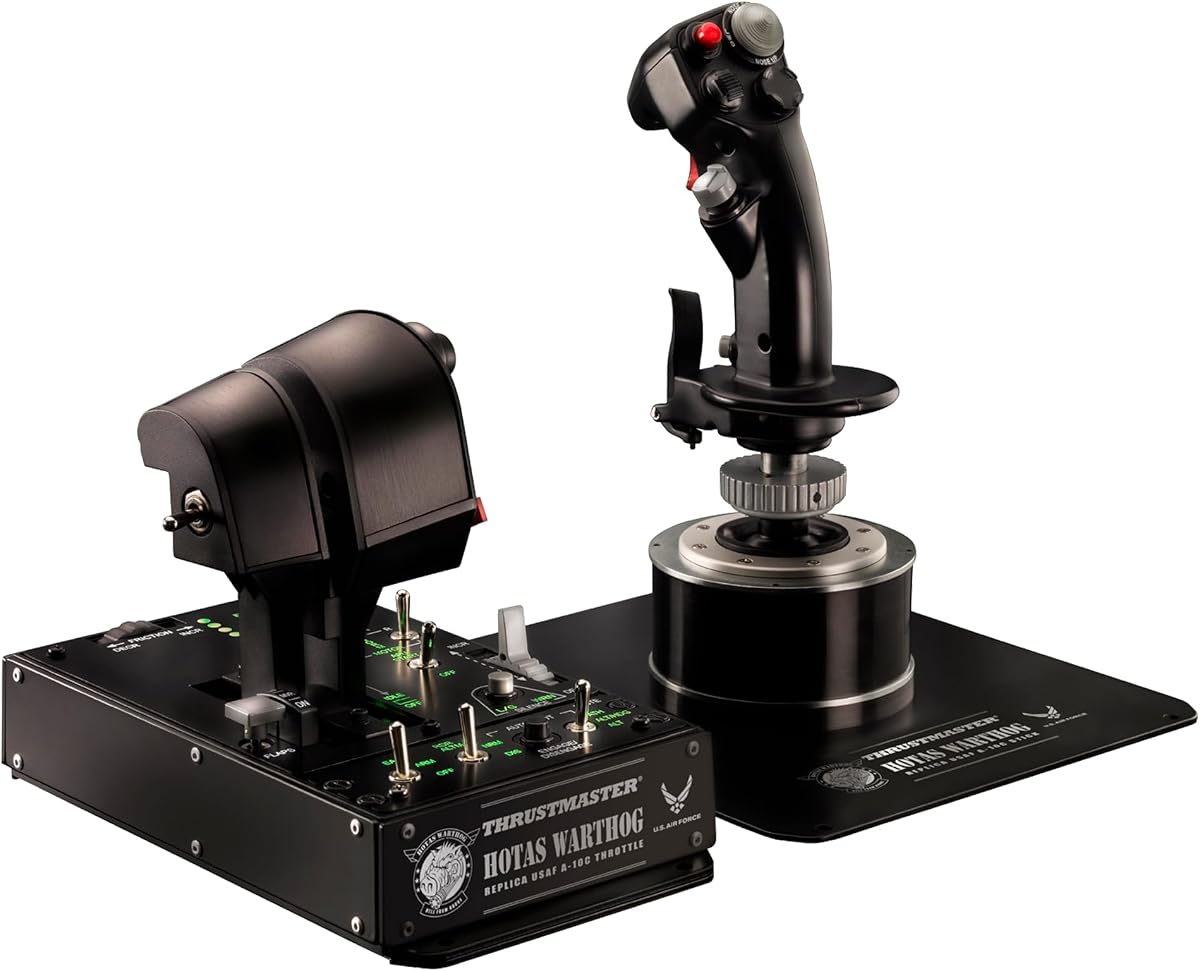
The Thrustmaster HOTAS Warthog is the gold standard for military grade flight simulation. Its all metal construction and dual throttle system mimic real fighter jet controls offering unmatched realism. With fifty five programmable buttons and hall effect sensors it provides the control depth needed for complex combat scenarios in Elite Dangerous.
We may earn a commission when you buy through this link, at no additional cost to you.
Key strengths lie in the independent throttle handles allowing precise engine management which is vital for large ships. The H.E.A.R.T. technology ensures zero drift and long lasting accuracy. The dual rudder options and hat switches give you full command over your ship without touching a keyboard.
The main trade-off is the substantial size and weight which requires a sturdy desk and ample space. The price is high but reflects the industrial build quality and durability. These constraints are acceptable for enthusiasts seeking a permanent high fidelity cockpit setup.
This system is best for dedicated simmers who prioritize authenticity and durability. It suits pilots flying large vessels or engaging in intense PvP combat. If you want the most realistic experience possible the Warthog is the definitive choice for Elite Dangerous.
Each throttle can be adjusted independently simulating real jet engine management for enhanced immersion and control.
Magnetic sensors provide precise input that does not degrade over time ensuring consistent performance for years.
We may earn a commission when you buy through this link, at no additional cost to you.
This bundle combines the Logitech G X56 with Pro Flight Rudder Pedals for a complete control solution. It provides all the precision sensors and programmability needed for Elite Dangerous. The addition of pedals adds a third axis of control making landings and banking maneuvers more realistic than stick alone.
We may earn a commission when you buy through this link, at no additional cost to you.
Strengths include the adjustable tension dial on the pedals allowing you to mimic light aircraft or heavy jet responses. The rudder control complements the X56 to twin throttles for full six degrees of freedom. The RGB lighting and software integration create a cohesive experience.
The price is high and the physical footprint is large requiring significant desk real estate. You may need a dedicated area for the pedals. However for those seeking a full cockpit setup the convenience of a bundled package is valuable.
Ideal for serious simmers upgrading from a single stick. This suits pilots flying cargo or combat ships requiring frequent landing. If you want a unified high quality setup the bundle saves time and ensures compatibility across all components.
Adding rudder pedals gives you full pitch roll and yaw control for realistic aircraft banking and landing.
The pedals feature toe brakes and adjustable tension to match your aircraft weight and flight simulation needs.
We may earn a commission when you buy through this link, at no additional cost to you.
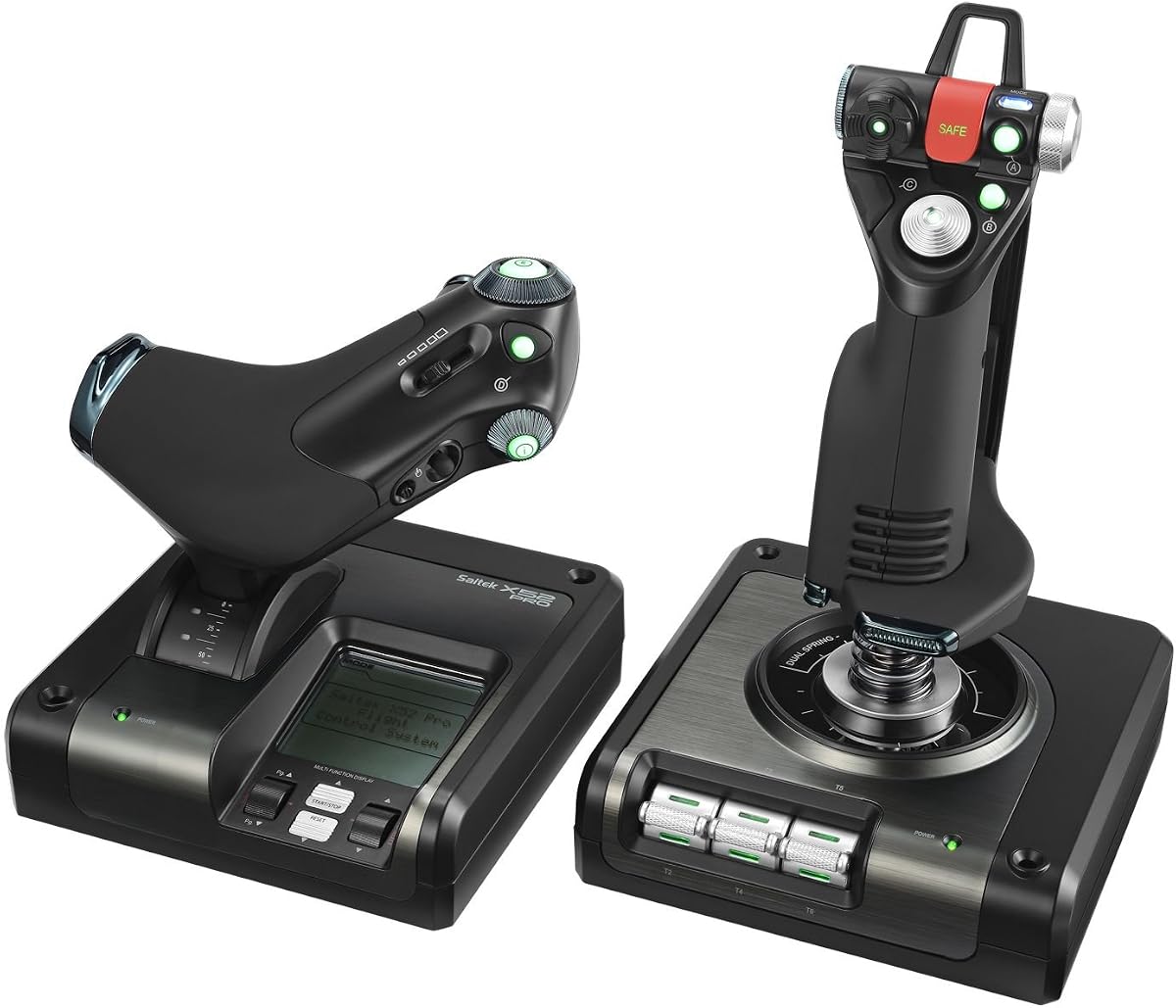
The Logitech G X52 is a compact yet powerful HOTAS system for Elite Dangerous. It features magnetic non-contact sensors for high durability and precision. The multifunction LCD display lets you view commands without alt tabbing which is a huge benefit for intense combat sessions.
We may earn a commission when you buy through this link, at no additional cost to you.
Key strengths include the 282 programmable commands allowing extensive customization for ship systems. The 3D twist with rudder lock is essential if you already have pedals and want to avoid accidental inputs. The grip system ensures comfort during long flights.
Trade-offs involve the integrated throttle which some pilots find less precise than a dual stick setup. The lack of separate throttle limits independent engine management. However the display and compact design make it suitable for smaller desks.
This controller is perfect for pilots who prioritize on-device information and space efficiency. It suits those using a rudder setup or flying single throttle ships. If you need to monitor ship status quickly the LCD display makes the X52 a smart choice.
The LCD screen shows programmed commands so you can check settings without leaving your flight view.
Non-contact magnetic sensors reduce wear and ensure consistent accurate input over years of use.
We may earn a commission when you buy through this link, at no additional cost to you.
The Thrustmaster T-Flight Hotas One offers versatility for pilots who play on multiple platforms. It works seamlessly on PC for Elite Dangerous and Xbox for other sims. The adjustable resistance and detachable throttle provide customization for different play styles and desk spaces.
We may earn a commission when you buy through this link, at no additional cost to you.
Strengths include the expandable ecosystem allowing future upgrades like rudder pedals. The ergonomic button placement and responsive trigger ensure smooth control. Its plug and play design means minimal setup time is required.
Trade-offs are simpler materials and fewer programmable buttons than premium models. The feel is less tactile than metal options. However for multi-platform users or budget conscious buyers it remains a reliable choice.
This controller is best for casual pilots or those sharing gear across consoles. It suits those needing a compact setup or planning future upgrades. If you want a flexible starter stick the Hotas One provides solid performance for its price.
Seamless support for PC and Xbox allows you to use the same hardware across different flight simulation titles.
The S.M.A.R.T. rail system enables future attachment of rudder pedals for enhanced flight realism.
We may earn a commission when you buy through this link, at no additional cost to you.
This standalone version of the Warthog stick offers premium build quality without the twin throttle handles. The all-metal handle provides a secure grip and heavy feel that resists movement during combat. With nineteen action buttons and hall effect sensors it delivers precision control.
We may earn a commission when you buy through this link, at no additional cost to you.
Strengths include the free software for drag-and-drop programming across basic to advanced levels. The multiple hat switches allow detailed control over ship systems without keyboard access. The weighted design ensures stability on any desk surface.
Trade-offs involve needing a separate throttle for full control which can increase overall cost. The stand-alone stick is designed for pilots with existing setups. However for those who value build quality the experience is unmatched.
This is ideal for pilots expanding a cockpit with a separate throttle or rudder. It suits users who want the Warthog feel without the full base. If you need a high-quality stick for detailed combat the Warthog handle is a great pick.
A metal detachable handle provides a premium weighted feel that remains stable during intense maneuvers.
Drag-and-drop software allows detailed customization of every button and axis for specific ship control needs.
We may earn a commission when you buy through this link, at no additional cost to you.
The Logitech G Saitek X52 Pro is a professional-grade system with progressive throttle and illuminated buttons. It uses non-contact technology for durability and includes a display for command checks. The adjustable handle suits various hand sizes ensuring comfort during long flights.
We may earn a commission when you buy through this link, at no additional cost to you.
Strengths include the progressive throttle which adds resistance for afterburner modes and detents for idle. The illuminated buttons help identify controls quickly in dark environments. The handle adjustment ensures ergonomic fit for different users.
Trade-offs include fewer buttons than the X56 and older software support. The build quality is solid but not as modern as newer releases. However for those who prefer the X52 style it remains a capable tool.
This controller is best for pilots who want a proven system with tactile feedback. It suits those who need adjustable handle ergonomics and illuminated controls. If you value simplicity and reliability the X52 Pro offers a stable experience.
Throttle resistance allows for realistic engine management with detents marking key engine positions.
Five handle positions accommodate all hand sizes ensuring you can play comfortably for hours.
We may earn a commission when you buy through this link, at no additional cost to you.
The Thrustmaster T.FLIGHT HOTAS NEO offers immersive vibration feedback and hall effect sensors for precise control. It supports PC and consoles providing flexibility for different setups. The detachable throttle and dual rudder system enhance realism for combat pilots.
We may earn a commission when you buy through this link, at no additional cost to you.
Strengths include the built-in vibration motor that lets you feel impacts and turbulence. The H.E.A.R.T. technology ensures long-lasting accuracy without drift. The ergonomic buttons suit various aircraft types and flight styles.
Trade-offs involve limited official Elite Dangerous support compared to older models and potential annoyance from vibration. The console focus may limit some PC software features. However the tech is still robust for general use.
This controller is best for those who value feedback and cross-platform play. It suits pilots on new hardware or those who enjoy vibration immersion. If you want a modern feel with Hall effect accuracy the NEO is a solid option.
Built-in motor lets you feel missile impacts and turbulence for a tactile cockpit experience.
Proprietary H.E.A.R.T. sensors ensure surgical accuracy that does not degrade over time.
We may earn a commission when you buy through this link, at no additional cost to you.
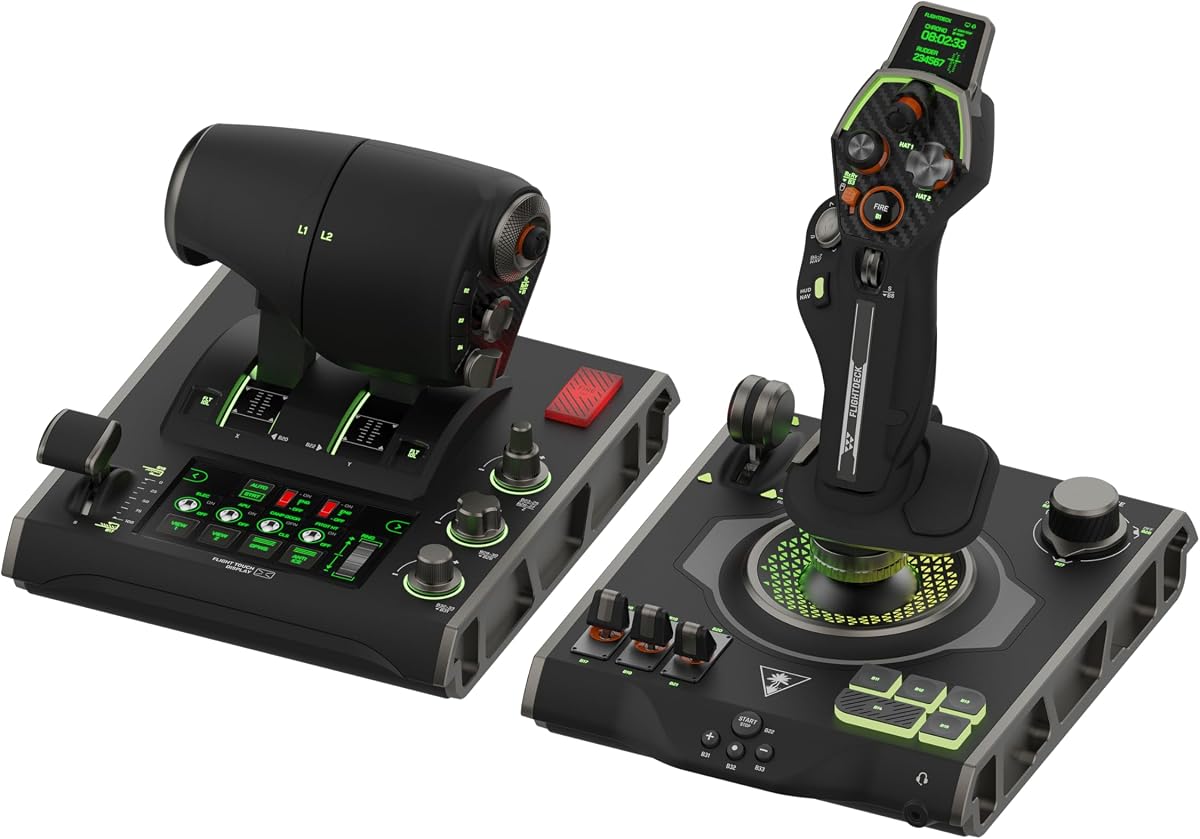
The Turtle Beach VelocityOne Flightdeck introduces a world-first flight touch display for next-gen control. It features an OLED head-up display and over one hundred thirty nine programmable buttons. The hall-effect controls ensure precision and durability for complex flight missions.
We may earn a commission when you buy through this link, at no additional cost to you.
Strengths include customizable OLED HUDs for custom ship information and haptic throttle detents for precise engine control. Adjustable stick height accommodates all hand sizes. The Flight Hangar app provides robust product customization.
Trade-offs involve its newness and potential software maturity issues compared to established brands. The price is high for a newer product. However the digital features offer unique advantages for custom ship layouts.
This controller is best for tech-forward pilots wanting digital HUDs. It suits users seeking a modern cockpit with high button count. If you want to customize displays and have many controls the VelocityOne is a compelling choice.
The world's first flight touch display lets you manage systems directly on the controller interface.
Customizable OLED HUD lets you show flight data without blocking your view of the screen.
We may earn a commission when you buy through this link, at no additional cost to you.
Choosing the right Hotas or Joystick for Elite Dangerous requires evaluating several technical and ergonomic factors that impact your flight simulation experience.
High-quality controllers use hall-effect or magnetic sensors to ensure accurate inputs without mechanical wear. These sensors prevent drift and guarantee consistent performance during long sessions. Look for hall-effect technology to maintain precision over years of active use.
Prioritize controllers with hall-effect sensors to ensure reliable accurate control that does not degrade over time.
Elite Dangerous ships have many systems requiring quick access to buttons. A higher button count reduces reliance on keyboard mappings and streamlines complex maneuvers. Aim for at least twenty programmable actions to cover essential flight and weapon controls.
Choose a controller with enough programmable buttons to manage your ship systems without switching devices.
Single throttle designs are compact while twin throttles allow independent engine control. Twin throttles add realism for multi-engine aircraft but take up more desk space. Decide based on whether you value compactness or detailed engine management.
Select single or twin throttles based on your preference for compactness or detailed engine management.
Comfortable grip and hand rests reduce fatigue during long flights. Adjustable handle positions or soft-touch materials improve usability. If you have specific hand size needs look for controllers with grip customization options.
Look for ergonomic grips and adjustable handle positions to ensure comfort during extended flight sessions.
Metal constructions offer durability and a premium feel compared to plastic. Metal parts add weight which can stabilize the controller on your desk. Higher-end options often use metal for enhanced longevity.
Consider metal builds for better durability and weight distribution on your desk setup.
Robust software allows deep customization of buttons axes and profiles. Some controllers offer drag-and-drop programming for easy setup. Ensure the software supports macros or scripts for complex ship interactions.
Check for strong software support that lets you customize buttons and macros easily.
Verify USB requirements and operating system support for your PC. Some bundles include pedals needing extra ports. Ensure your system can handle the controller load without conflicts.
Confirm USB and system compatibility before purchase to avoid connection issues.
Features like RGB lighting OLED displays or vibration feedback enhance immersion. Vibration helps convey impacts but may distract some users. Displays can show ship status without switching windows.
Evaluate extra features like displays or lighting to determine if they add value to your setup.
Begin by installing the manufacturer software to map buttons to Elite Dangerous commands. Use the software to set profiles that match different ship roles like fighter or trader. Calibrate the axes to ensure accurate centering before starting flights.
Maintain the controller by keeping it away from dust and liquids. Wipe buttons and sticks with a soft cloth to prevent grime buildup. If the controller has adjustable springs periodically check them for proper tension.
Store the controller in a cool dry place when not in use. Avoid leaving it in direct sunlight which can warp plastic components. If using detachable parts ensure they are securely reattached before gaming sessions.
The Thrustmaster T-Flight Hotas X is ideal for beginners due to its affordable price and plug-and-play setup. It offers enough buttons for basic ship control and comfortable ergonomics. You can upgrade later as your skills improve without breaking the bank.
Rudder pedals are not mandatory but enhance realism for landing and banking. For most pilots a joystick with rudder control is sufficient. Pedals add a third axis which is helpful for large cargo ships or serious simulation enthusiasts.
Ideally you need at least twenty to thirty buttons to map essential ship systems without keyboard access. High-end models offer over fifty buttons for complex control layouts. More buttons allow deeper immersion and reduce reliance on mouse or keyboard.
Yes hall-effect sensors use magnets to detect movement avoiding mechanical contact. This prevents wear and ensures consistent accuracy over time. Traditional potentiometers can drift but hall-effect systems remain precise for years of use.
Some controllers like the Thrustmaster T.FLIGHT HOTAS NEO support both PC and consoles. Check the product specs for console compatibility since not all Elite Dangerous setups support external hardware on Xbox. PC offers the most flexible controller options.
Stick drift is often caused by worn potentiometers but hall-effect sensors do not drift. If your controller has hall-effect sensors calibrate the software to fix offset. For others check for debris or consider replacing the unit if under warranty.
Twin throttles allow independent engine control which adds realism for multi-engine ships. However single throttles work well for most vessels and save desk space. If you fly freighters often twin throttles provide better engine management.
Premium controllers like the Warthog require significant desk real estate and stability. Compact models like the X52 fit smaller desks but offer fewer buttons. Measure your available space before choosing a unit to ensure a proper fit.
The Logitech G X56 and Thrustmaster T-Flight Hotas X top our list for offering distinct value. The X56 provides advanced control for professionals while the Hotas X suits budget-conscious pilots seeking quality.
Prioritize hall-effect sensors and ergonomic comfort to ensure long-term usability. Consider your budget and desk space when choosing between compact or full-sized setups.
Remember to check current prices and availability as these vary often. Investing in the right controller will transform your Elite Dangerous experience into a true flight simulation.