
Sabrent 74 in 1 Internal Reader
4.0Editor score
Supports 74 memory card types
Includes USB 2.0 port
Internal power connector included
This guide compares the top internal media card readers for desktop PCs, evaluating speed, compatibility, and build quality to help you choose the right
An internal media card reader provides seamless access to memory cards without cluttering your desktop with external devices. It integrates directly into your PC case for reliable data transfer.
We evaluated ten top models based on interface speed, card format support, and installation ease. Each product offers unique features tailored for different user needs and system configurations.
Each pick highlights key strengths and limitations to guide your decision. Prices fluctuate often, so verify current listings before purchasing to ensure you get the best value available today.
4.0Editor score

4.5Editor score

5.0Editor score
The following table compares key specifications across all ten selected internal media card readers to help you identify the model that best fits your desktop setup and workflow needs.


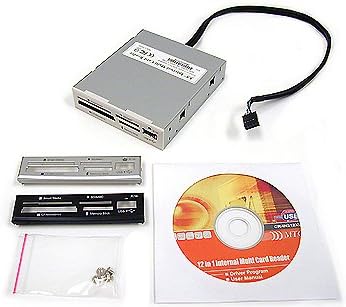
The Sabrent 74 in 1 Internal Flash Media Card Reader/Writer stands out as a highly versatile option for users needing access to numerous card formats. With support for 74 different types of memory cards, it covers almost every legacy and modern format you might encounter.
We may earn a commission when you buy through this link, at no additional cost to you.
Its compatibility spans Windows ME through Windows 8, Linux, and Mac OS X, making it a flexible choice across operating systems. The internal power connector ensures stable operation by providing sufficient power for external USB devices connected via its additional USB 2.0 port.
While the USB 2.0 interface limits transfer speeds compared to newer standards, the value proposition is strong for budget-conscious buyers. Some cards may require adapters, but the sheer range of native support reduces the need for additional hardware.
This reader is ideal for users managing diverse media libraries on a tight budget. It offers reliable functionality without demanding high-end system resources, making it a practical choice for general desktop tasks and occasional file transfers.
Supports M2, XD, SD, SDHC, SDXC, MMC, Micro SD, CF, MD, and MS formats ensuring broad compatibility.
Includes an internal power connector to ensure the USB HUB has sufficient power for external devices.
We may earn a commission when you buy through this link, at no additional cost to you.
The StarTech Internal Card Reader USB 3.0 offers professional-grade performance with UHS-II support and simultaneous access to four different card slots. This makes it an excellent choice for videographers and photographers who need fast, efficient data transfers.
We may earn a commission when you buy through this link, at no additional cost to you.
Its USB 3.0 interface ensures high-speed transmission, while the front-facing port provides easy access without reaching behind the case. The reader supports a wide array of formats including CompactFlash, SD, MemoryStick, and xD Picture cards.
Designed for IT professionals, it is TAA compliant and backed by a 2-year warranty with 24/5 support. The OS-independent design works seamlessly across Windows, macOS, and Linux systems.
This reader is perfect for high-volume content creators needing reliable performance. While it costs more than basic models, the speed and multi-slot capability justify the investment for serious users.
USB 3.0 and UHS-II support enable rapid file transfers for large media files.
TAA compliant design with 2-year warranty and 24/5 multilingual support.
We may earn a commission when you buy through this link, at no additional cost to you.
The Vantec Link USB 3.0 Multi-LUN Memory Internal Card Reader delivers top-tier performance with support for massive CF capacities up to 144PB. Its quad data access technology enhances transmission rates for Memory Stick cards significantly.
We may earn a commission when you buy through this link, at no additional cost to you.
It supports a comprehensive range of memory types including SD, MMC, eMMC, and xD-Picture cards. The USB 3.0 interface ensures fast data transfer rates suitable for professional workflows.
With a perfect 5.0 rating, users praise its reliability and extensive compatibility. The built-in USB header simplifies installation while maintaining clean cable management inside the PC case.
This reader is ideal for professionals managing large media archives. Its advanced features and high capacity support make it a standout choice for demanding environments.
Supports CompactFlash up to 144PB ensuring future-proof storage compatibility.
Quad data access for MS PRO-HG cards significantly boosts transmission rates.
We may earn a commission when you buy through this link, at no additional cost to you.
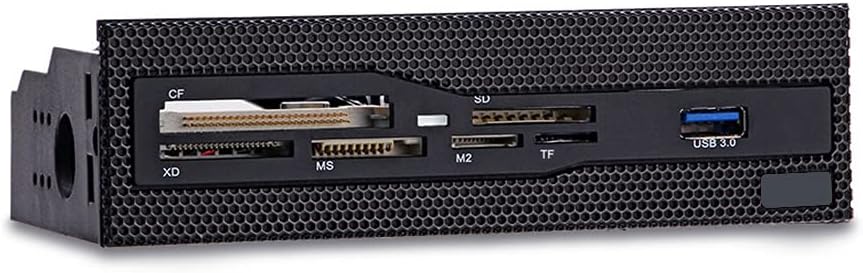
This 5.25 Internal Card Reader features a USB 3.0 interface for efficient and easy data transmission. Its durable design integrates well with cases featuring front mesh panels.
We may earn a commission when you buy through this link, at no additional cost to you.
The copper-plated card slots ensure stability during transmission, enhancing longevity. It supports common formats like CF XD MS M2 TF, covering essential needs for most users.
Installation is straightforward for 5.25 drive bays. The grid panel design adds a modern touch to your desktop setup.
A good option for those seeking speed and durability in a standard 5.25 inch format.
Copper-plated card slots ensure stability during transmission and extend device lifespan.
We may earn a commission when you buy through this link, at no additional cost to you.
This media dashboard combines a USB 3.0 hub, eSATA, audio jacks, and a multi-format card reader. It provides comprehensive connectivity options for PC builders needing front-panel access.
We may earn a commission when you buy through this link, at no additional cost to you.
The USB 3.0 hub delivers 5Gbps bandwidth, accelerating file transfers. Dedicated audio jacks eliminate the need to reach behind the chassis.
It supports simultaneous multi-card access, increasing workflow efficiency. The ABS plastic construction ensures durability for custom builds.
Ideal for enthusiasts requiring expanded I/O options and media access in one unit.
Includes USB 3.0 hub, eSATA, and audio jacks for complete front-panel functionality.
We may earn a commission when you buy through this link, at no additional cost to you.
The TCC-QL5E offers a multifunction dashboard with USB 3.0, SATA, and e-SATA ports. It provides high transfer speeds and efficient workflow improvements.
We may earn a commission when you buy through this link, at no additional cost to you.
Audio ports solve the inconvenience of rear chassis plugs. The built-in card reader supports SD, MMC, CF, MS, and M2 formats.
LED indicators display power and hard disk status. Cable management is comprehensive with dedicated connectors for each function.
A robust solution for users needing extensive connectivity options and media access.
Front speakers, microphone, and e-SATA ports improve usability and transfer efficiency.
We may earn a commission when you buy through this link, at no additional cost to you.
This Sony internal reader offers 17-in-1 memory card support with reliable performance. It includes both black and ivory faceplates for flexible aesthetics.
We may earn a commission when you buy through this link, at no additional cost to you.
Compatibility with Windows Vista and XP Home/Professional ensures broad legacy support. Drive Letter Recognition Software simplifies identification.
The internal design keeps your desk clutter-free. It is a dependable choice for users valuing brand reputation.
Best suited for standard desktop environments needing straightforward memory access.
Includes black and ivory faceplates to match various PC case designs.
We may earn a commission when you buy through this link, at no additional cost to you.
This All-In-One internal card reader provides reliable high quality performance in a compact 2.5 inch form factor. It comes with black, silver, and white bezels.
We may earn a commission when you buy through this link, at no additional cost to you.
The retail packaging ensures secure shipping. Its design focuses on essential memory card access for daily tasks.
Ideal for users needing a straightforward internal solution without advanced features. The high rating reflects its consistency.
A practical choice for simple, effective memory card integration.
Includes black, silver, and white bezels to match your PC build theme.
We may earn a commission when you buy through this link, at no additional cost to you.
The Akasa AK-ICR-07 is a 6-port media card reader designed for front placement. It features dedicated ports for adapters to eliminate the need for microSD or M2 adapters.
We may earn a commission when you buy through this link, at no additional cost to you.
Compatible with SDHC cards, it handles high capacity storage. Two front fascia panels allow color customization.
LEDs indicate power, card presence, and transfer status. An extra USB port adds convenience for mobile device connections.
Perfect for users seeking flexible aesthetics and easy access.
Dedicated adapter ports eliminate the need for separate adapters for microSD or M2.
We may earn a commission when you buy through this link, at no additional cost to you.
This MTG internal card reader supports 22-in-1 media formats with a sturdy metal case. It offers up to 4.5 MB per second data transfer speed.
We may earn a commission when you buy through this link, at no additional cost to you.
Hot swappable and plug-and-play capabilities simplify usage. It supports CF, Microdrive, SmartMedia, SD, MMC, and Memory Stick cards.
Includes beige, black, and silver color bezels for swapping. Four slots can be used simultaneously for efficient data exchange.
A budget-friendly option for standard desktop memory access.
Metal case fits 3.5-inch drive bay for durable and stable installation.
We may earn a commission when you buy through this link, at no additional cost to you.
Selecting the right internal media card reader involves evaluating speed, compatibility, and physical fit within your PC case.
USB 3.0 offers significantly faster transfer speeds than USB 2.0, which is crucial for handling large video files or high-resolution photos. For professional workflows, prioritize UHS-II support to minimize waiting times during data transfer.
Always verify that your motherboard has the corresponding header to support the chosen interface speed.
Ensure the reader supports the specific memory cards you use. Common formats include SD, microSD, CF, and Memory Stick. Some models include adapters for multiple formats, increasing versatility.
Check the supported formats list carefully to avoid needing external dongles for legacy or niche cards.
Internal readers come in 3.5-inch and 5.25-inch sizes. Match the reader to an available bay in your PC case. Some models offer dual or interchangeable bezels for flexibility.
Measure your available space before purchasing to ensure a proper fit without blocking other components.
Confirm the device is OS-independent or explicitly supported by your operating system. Most modern readers work with Windows, macOS, and Linux without extra drivers.
Look for plug-and-play capabilities to streamline installation and avoid driver issues.
Metal cases often provide better durability and heat dissipation than plastic alternatives. Check for robust connectors and internal power options for stability.
High-quality construction ensures longevity, especially if the reader will be used frequently.
Some readers include extra USB ports, audio jacks, or eSATA connectivity. These features can reduce the need for external hubs.
Consider whether these extras align with your workflow or if they add unnecessary complexity.
Models allowing access to multiple cards at once speed up file transfers between cards. This is valuable for professionals managing content from different sources.
Check if simultaneous access excludes same-type media, which might limit flexibility.
Professional-grade devices often come with extended warranties and support. IT buyers may prefer TAA-compliant products for enterprise environments.
Review the warranty period and customer support availability before finalizing your purchase.
Install the reader in an available drive bay following the manufacturer's instructions. Connect the internal power cable and header cable securely to your motherboard.
Insert your memory cards into the appropriate slots until they click. Ensure the card is oriented correctly to avoid damage.
Eject cards safely through the operating system before removal to prevent data corruption. Regularly inspect the slots for dust to maintain optimal performance.
Most internal card readers draw power directly from your motherboard or PSU via internal connectors. However, some high-speed models may require a dedicated power cable for stability.
Internal readers often provide more stable connections and avoid USB bus bottlenecks common with hubs. They offer comparable speeds but with cleaner cable management.
Yes, many models support macOS. Check the compatibility list to ensure the reader is fully supported without requiring third-party drivers.
If your case has no internal bays, consider an external reader instead. Alternatively, you may need to replace a 3.5-inch slot with a reader using mounting brackets.
Some readers include adapters for formats like microSD or M2. If you frequently use these smaller cards, models with integrated adapters save space.
Use compressed air to blow dust out of the slots periodically. Avoid inserting cards with bent edges to prevent internal damage.
We highlighted the Sabrent budget option, StarTech premium choice, and Vantec high-performance model as top contenders. Each offers distinct benefits tailored to different user needs and priorities.
Focus on interface speed and card compatibility when deciding. A model supporting your specific formats ensures you avoid unnecessary adapters or workflow interruptions.
Prices fluctuate regularly, so review current listings before purchase. Check warranties and return policies to ensure long-term satisfaction with your chosen solution.