
ASRock A520M-ITX/AC
4.3Editor score
Supports 3rd Gen AM4 Ryzen
WiFi and Bluetooth included
Affordable entry level price
This guide compares the top 10 AMD Mini ITX motherboards for AM4 and AM5 platforms, evaluating power delivery, connectivity, and thermal performance for small
Building a compact PC requires a reliable Mini ITX motherboard that balances performance with size. Choosing the right board ensures your AMD processor runs smoothly without overheating in tight cases.
We evaluated ten top-rated models based on power delivery, connectivity options, and thermal design. Our analysis covers both AM4 and AM5 platforms to help you find the perfect fit.
Each selection highlights key strengths and trade-offs to guide your decision. Note that pricing fluctuates often, so verify current offers before purchasing to secure the best value for your budget.
4.3Editor score
4.3Editor score

4.2Editor score
The following table provides a side-by-side comparison of all ten selected Mini ITX motherboards. Review the specifications to identify which model best matches your specific AMD processor and build requirements.


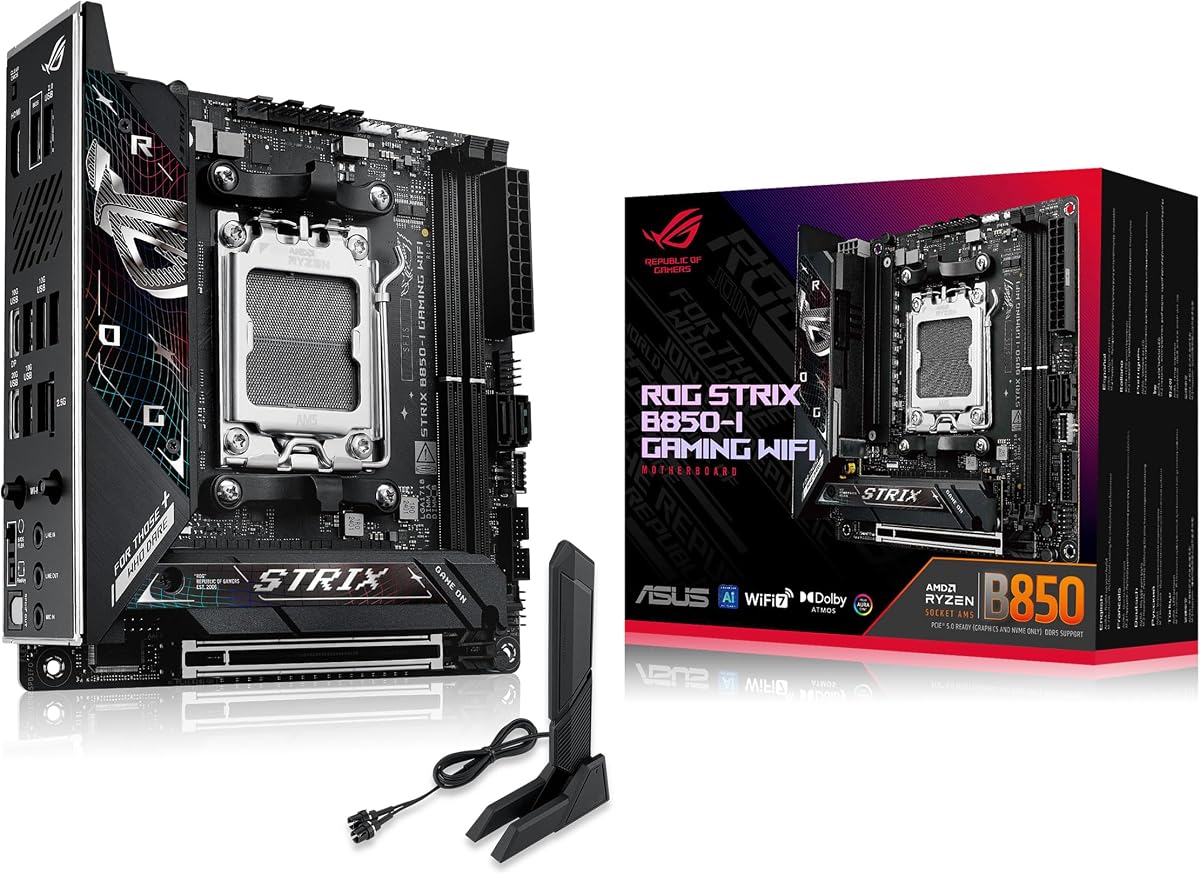
This ASUS board stands out as a top tier choice for AM5 users seeking performance in a small case. Its 4.3 star rating reflects solid reliability and feature richness for gaming and productivity.
We may earn a commission when you buy through this link, at no additional cost to you.
The 10+2+1 power stages deliver stable power for Ryzen 9000 series chips. AI Overclocking and AI Networking make advanced tuning accessible without deep technical knowledge.
While it costs more than budget options, the thermal design prevents throttling under load. Two PCIe 5.0 M.2 slots ensure future-proof storage speeds for heavy workloads.
Buy this if you want cutting edge AM5 features in ITX form. It balances power and efficiency well for enthusiasts building compact high-performance systems.
AI tools help users optimize performance and network settings automatically.
Integrated I/O cover and thermal pads keep VRMs cool during stress.
We may earn a commission when you buy through this link, at no additional cost to you.
This Gigabyte board offers essential ITX features at an accessible price. With 4.4 stars, it proves reliable for basic builds using older Ryzen AM4 processors effectively.
We may earn a commission when you buy through this link, at no additional cost to you.
The 6 phase PWM delivers steady power for non-overclocked use. Intel WiFi and Bluetooth ensure wireless connectivity without extra dongles in small enclosures.
It lacks high speed PCIe support but suits general computing well. Q-Flash Plus allows BIOS updates without a CPU installed if needed.
Ideal for budget focused SFF builds needing wireless connectivity. It provides good value for standard tasks without unnecessary premium features.
Perfect for casual users needing a compact and affordable solution.
Integrated wireless modules keep your setup tidy and functional.
We may earn a commission when you buy through this link, at no additional cost to you.
This premium ASUS board targets serious enthusiasts wanting maximum AM5 potential. Its 4.2 rating reflects robust engineering designed for heavy AI and gaming workloads.
We may earn a commission when you buy through this link, at no additional cost to you.
The 10+2+1 power stages support 110A per stage ensuring stability. USB4 ports and Dynamic OC Switcher offer cutting edge control for power users.
Cost is higher but justified for users needing top speed. AI tools simplify complex tuning while keeping system temps in check.
Choose this for ultimate performance in a small chassis. It delivers flagship features suitable for demanding applications and future needs.
AI helps optimize cooling and overclocking automatically for users.
High bandwidth USB4 ports enable fast data transfer and docks.
We may earn a commission when you buy through this link, at no additional cost to you.
ASRock offers a competent AM5 ITX option with this B650 model. The 4.1 rating indicates stable performance for everyday gaming and productivity workloads.
We may earn a commission when you buy through this link, at no additional cost to you.
It features an 8+2+1 power phase design ensuring consistent CPU power. PCIe 5.0 M.2 support allows for lightning fast NVMe storage speeds.
Setup is easy with BIOS Flashback for safe updates. It balances cost and performance for users upgrading to newer Ryzen chips.
Select this for a balanced AM5 build without excess cost. It provides all necessary modern features for a compact desktop setup.
PCIe 5.0 M.2 slot ensures top tier data transfer speeds.
BIOS Flashback simplifies firmware updates without hardware changes.
We may earn a commission when you buy through this link, at no additional cost to you.
MSI delivers a high performance board aimed at memory speed enthusiasts. With 4.4 stars it excels in overclocking capabilities for DDR5 RAM.
We may earn a commission when you buy through this link, at no additional cost to you.
The VRM design handles 90A per stage for steady power. 5G LAN and WiFi 7 ensure top tier network performance in compact cases.
Cooling features like Frozr Guard maintain stability under load. It supports cutting edge PCIe graphics cards and storage drives effectively.
Buy this for maximum RAM speed and network performance. It suits users prioritizing data throughput and high frequency memory.
DDR5 memory boost allows extreme speeds for faster compute.
5G LAN supports ultra fast internet and local transfers.
We may earn a commission when you buy through this link, at no additional cost to you.
This B550 board remains a favorite for AM4 users upgrading older rigs. The 4.3 rating shows consistent performance for gaming and streaming.
We may earn a commission when you buy through this link, at no additional cost to you.
6+2 power phase and extended heatsinks handle heat well. WiFi EZ Plug simplifies antenna installation in tight enclosures easily.
It lacks AM5 support but covers all AM4 needs well. USB-C ports and PCIe 4.0 offer modern connectivity standards for peripherals.
Ideal for existing AM4 owners needing a compact upgrade. It provides strong performance without moving to a new platform.
Extended VRM heatsinks ensure steady operation under stress.
EZ Plug and Q Flash simplify assembly and maintenance.
We may earn a commission when you buy through this link, at no additional cost to you.
This B550 model provides a straightforward path for AM4 builds. With 4.3 stars it offers dependable performance for standard computing needs.
We may earn a commission when you buy through this link, at no additional cost to you.
Wireless connectivity is included via Intel WiFi and Bluetooth. It supports a range of Ryzen processors for flexible upgrades.
Basic design keeps costs down without sacrificing core functions. It suits users who prioritize stability over extra ports or RGB.
Select this for a reliable entry level AM4 ITX board. It delivers essential features without unnecessary complexity for most users.
Realtek HD audio provides clear sound for multimedia.
Supports multiple Ryzen generations for easy upgrades.
We may earn a commission when you buy through this link, at no additional cost to you.
A cost effective choice for basic ITX builds using older Ryzen chips. The 4.3 rating confirms reliability for everyday office and gaming tasks.
We may earn a commission when you buy through this link, at no additional cost to you.
It includes WiFi and Bluetooth essential for wireless setups. While limited to PCIe 3.0 it covers all essential connectivity ports.
Lacks advanced features but serves basic users well enough. It supports future Ryzen processors allowing for minor upgrades.
Choose this for tight budget office or home builds. It provides essential features at a low price point.
Saves money for those needing a functional compact PC.
WiFi and Bluetooth keep the build free of cables.
We may earn a commission when you buy through this link, at no additional cost to you.
This Gigabyte board offers a new AM5 option at a competitive price. The 3.6 rating suggests it works but may lack polish.
We may earn a commission when you buy through this link, at no additional cost to you.
It includes WIFI7 and dual M.2 slots for fast storage. The 5-year warranty adds value for long term ownership.
Power delivery is adequate for standard CPUs but limits extreme overclocking. Thermal guards protect storage but could be stronger.
Consider this if warranty and price matter most for AM5. It covers basics but may need extra cooling care.
5-year warranty offers peace of mind for buyers.
WIFI7 and USB-C provide modern high-speed connections.
We may earn a commission when you buy through this link, at no additional cost to you.
This X870 board targets builders seeking white aesthetics and modern features. The 3.9 rating indicates decent performance but room for improvement.
We may earn a commission when you buy through this link, at no additional cost to you.
Supports Ryzen 9000 series and offers 5-year warranty. EXPO memory support allows easy DDR5 optimization for speed.
Features are strong but ratings lag behind top picks. Aesthetic value drives its appeal for themed gaming builds.
Ideal for white themed builds needing AM5 capability. It balances looks and function for specific style preferences.
White aesthetics help match custom PC builds and cases.
EXPO support ensures DDR5 runs at rated speeds.
We may earn a commission when you buy through this link, at no additional cost to you.
Selecting the right Mini ITX motherboard involves balancing socket type, power delivery, and connectivity to match your AMD processor needs.
Ensure the board matches your CPU generation like AM4 or AM5. AM5 supports DDR5 and PCIe 5.0 while AM4 uses DDR4 and PCIe 4.0.
Check the vendor support list before buying to guarantee your specific Ryzen chip works correctly.
VRM phases and amperage determine how well the board sustains CPU loads. High end chips need robust power phases to avoid throttling.
Look for boards with multiple power stages and heatsinks for stable performance under stress.
ITX boards have only two DIMM slots so speed and capacity matter more. Check supported frequencies and dual channel capabilities.
Choose DDR5 for AM5 builds to leverage modern memory technology and bandwidth.
Mini ITX boards often have fewer M.2 slots so pick wisely. PCIe 5.0 M.2 slots offer future proof speeds for NVMe drives.
Ensure the board supports at least one fast M.2 slot plus SATA if needed.
Integrated WiFi 6 or 7 plus Ethernet ensures reliable networking. Look for 2.5G LAN or higher for fast local transfers.
Antenna design and EZ plug features help maintain signal strength in compact cases.
Smaller boards trap heat so VRM and M.2 heatsinks are vital. Check thermal padding and airflow paths in reviews.
Proper cooling prevents performance loss during long gaming sessions or rendering.
Confirm the motherboard dimensions fit your PC case mounting points. Some ITX boards have tall heatsinks or rear I/O layouts.
Measure your case clearance to avoid conflicts with GPU and cables during assembly.
Longer warranty periods signal manufacturer confidence in build quality. Check return policies and support channels before buying.
A five-year warranty provides better long-term protection for your investment.
Install the motherboard on standoffs in your case using the included screws. Connect the 24-pin and CPU power cables first before installing components.
Clear the CMOS jumper to reset BIOS settings if using new CPUs or overclocking. Flash the BIOS with the latest file for best compatibility.
Keep vents clear of dust using compressed air periodically. Monitor temperatures in BIOS to ensure cooling keeps components within safe limits.
No, AM5 platforms strictly require DDR5 memory. AM4 boards support DDR4. Be sure to buy the correct RAM type for your chosen motherboard socket.
ITX boards require custom engineering to fit components into a smaller space. The manufacturing complexity and specialized parts drive higher prices compared to standard ATX models.
Not yet for most users as current GPUs do not saturate PCIe 4.0. However, PCIe 5.0 ensures future compatibility with upcoming hardware upgrades.
WiFi 7 offers faster speeds, lower latency, and better bandwidth than WiFi 6. It ensures your small build stays competitive for networking needs.
Yes, most AM5 B-series boards support overclocking via BIOS settings. The power delivery must be strong enough to handle the increased CPU voltage safely.
Some boards support BIOS Flashback allowing updates via USB. Use a compatible USB drive and press the Flashback button on the rear I/O shield.
Most follow the standard 170mm by 170mm size but rear I/O placement varies. Always check your case manual to ensure mounting holes match your board.
The top picks cover diverse needs from budget AM4 to flagship AM5 options. Each board balances power connectivity and size for unique build scenarios.
Prioritize power delivery and thermal design when building in small spaces. Future proof features like PCIe 5.0 and WiFi 7 offer long term value.
Always verify current pricing and availability before purchasing. Small changes in specs can impact compatibility with your specific CPU and components.