
AULA WIN68 HE
4.5Editor score
0.02mm Rapid Trigger
8000Hz Polling Rate
Customizable Web Driver
Discover the top keyboards for Valorant in October 2026. This guide compares Hall Effect magnetic switches and fast-response models for peak FPS performance.
Finding the right keyboard for Valorant means prioritizing speed and accuracy. Modern gaming keyboards use Hall Effect switches to eliminate physical contact, allowing for faster actuation and better control during intense competitive matches.
We compared ten top-rated models based on polling rates, switch technology, and build quality. Each option offers unique features like rapid trigger modes or adjustable actuation points to suit different playstyles and budget constraints.
Each pick highlights specific strengths for competitive gameplay. Please note that product prices and availability change frequently, so verify the latest details before making your final purchase decision.
4.5Editor score
5.0Editor score

4.4Editor score
This comparison table outlines the key specifications and features of the top ten keyboards for Valorant. Reviewing these side-by-side helps you identify the best fit for your specific gaming needs and budget.






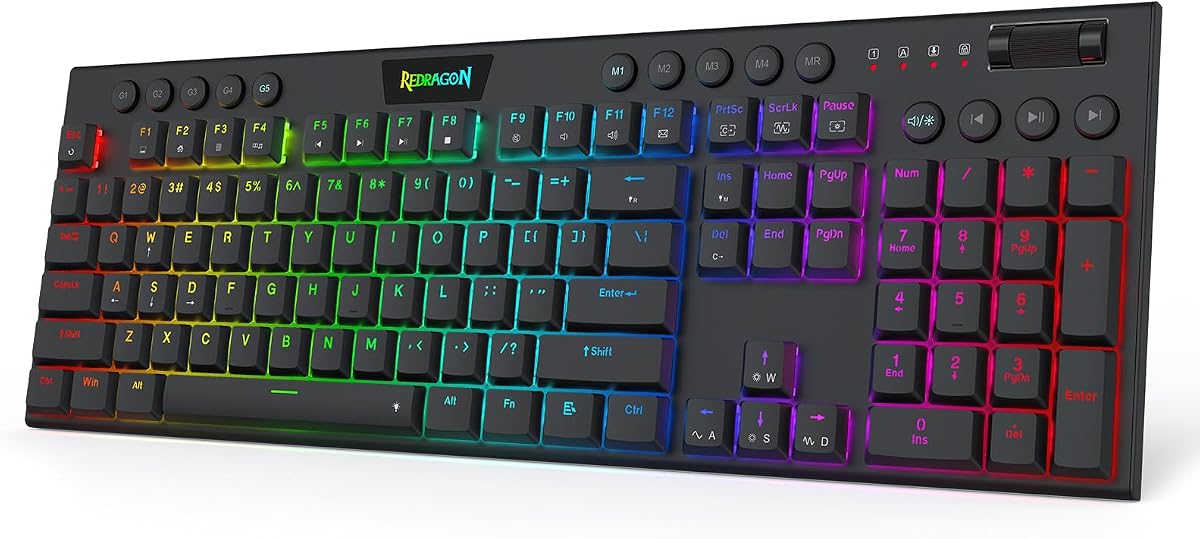
The Redragon K618 HE stands out with its perfect rating and low-profile magnetic switches. It delivers rapid triggering and smooth keystrokes tailored for high-speed Valorant gameplay.
We may earn a commission when you buy through this link, at no additional cost to you.
Its low-profile design shortens travel distance significantly, allowing for faster actuation. The dedicated macro zone lets you record complex combos without needing software installation.
While it lacks wireless capabilities, its wired connection ensures zero latency. The one-knob simplicity makes volume and lighting adjustments quick during intense matches.
This keyboard is ideal for players seeking speed and simplicity. If you prefer a slim profile and rapid actuation, this is a top recommendation.
The 30% slimmer design reduces finger movement, improving reaction times in competitive scenarios.
You can record up to 20 macros on-the-fly, saving time during complex team compositions.
We may earn a commission when you buy through this link, at no additional cost to you.
The AULA WIN68 HE offers impressive performance at a budget-friendly price. With an 8000Hz polling rate and adjustable actuation, it ensures near-instant input registration.
We may earn a commission when you buy through this link, at no additional cost to you.
Its web-based driver allows for extensive customization without software downloads. This convenience is perfect for gamers who want quick access to settings on shared machines.
While the build materials are standard, the performance remains top-tier. The lack of macOS support is a minor trade-off for the value provided.
Choose this keyboard if you need high-speed performance without breaking the bank. It delivers competitive features at an accessible entry point.
Access the driver directly via browser for easy key remapping and RGB adjustments.
Customize key press sensitivity from 0.02mm to 3.44mm for personalized feel.
We may earn a commission when you buy through this link, at no additional cost to you.
The Corsair Clipper PRO MINI combines premium build quality with advanced Hall Effect technology. Its IP57 rating ensures it survives spills and dust during long gaming sessions.
We may earn a commission when you buy through this link, at no additional cost to you.
Rapid Trigger and Multi-Action features provide consistent execution and reduced fatigue. The MGX HyperDrive switches offer linear, fast actuation for precise control.
Though the price is higher, the durability and features justify the investment. The compact 60% layout maximizes mouse space for better aiming performance.
Invest in this keyboard if you need a reliable, high-performance device. It is built to handle intense competitive play over time.
Reset keys instantly at 0.1mm for faster counter-strafing and movement.
Built to resist water and dust, ensuring longevity in messy environments.
We may earn a commission when you buy through this link, at no additional cost to you.
The Redragon K673 HE features a dual-module floating structure that dampens noise effectively. This creates a softer, Hi-Fi bounce instead of harsh clacking sounds.
We may earn a commission when you buy through this link, at no additional cost to you.
Its rapid trigger mode and 8000Hz polling ensure minimal input lag. The one-knob control allows easy management of lighting and volume without complex shortcuts.
While the software is functional, it lacks advanced customization features. The wired connection ensures stability but limits portability compared to wireless options.
This keyboard suits players who value quiet operation and speed. If you want a smooth typing experience alongside competitive performance, consider this model.
Anti-wobble switch plates reduce noise during rapid key presses.
Dynamic key activation cuts redundant strokes for precise movements.
We may earn a commission when you buy through this link, at no additional cost to you.
The Redragon K686 HE uses next-gen UltraMag POM magnetic switches for enhanced stability. This design minimizes wobble and ensures consistent keystrokes during rapid actions.
We may earn a commission when you buy through this link, at no additional cost to you.
With 8000Hz polling, inputs register instantly without delay. The one-knob interface simplifies lighting and volume adjustments without memorizing key combos.
The dual-module floating structure adds to the premium feel. However, it lacks wireless connectivity which may limit flexibility for some users.
Choose this if you prioritize stable, accurate inputs. Its magnetic switches offer precise control ideal for tactical gameplay.
Next-gen magnetic switches eliminate physical contact for long life.
Independent switch plates reduce wobble and improve typing feel.
We may earn a commission when you buy through this link, at no additional cost to you.
The Razer Huntsman Mini uses optical switches that register keystrokes at the speed of light. This technology provides faster actuation than traditional mechanical switches.
We may earn a commission when you buy through this link, at no additional cost to you.
Razer Snap Tap allows prioritizing inputs for rapid counter-strafing. Its Chroma RGB lighting integrates seamlessly with a wide ecosystem of gaming peripherals.
While it lacks magnetic switches, the optical technology remains highly responsive. The aluminum frame ensures durability and a solid typing experience.
This keyboard suits players who want optical precision. If you value speed and brand integration, this is a strong contender.
Rapid inputs are prioritized for better movement control in FPS games.
Sync lighting effects with games and other Razer hardware easily.
We may earn a commission when you buy through this link, at no additional cost to you.
The Aula WIN60 HE offers a compact layout without sacrificing magnetic performance. Its hot swappable base allows you to change switches easily without soldering.
We may earn a commission when you buy through this link, at no additional cost to you.
With 8000Hz polling, inputs register with minimal delay. The web-based driver ensures compatibility across devices without installing heavy software.
While the compact design lacks a numpad, it maximizes desk space. The rapid trigger mode ensures fast resetting for quick movements.
Ideal for gamers who want flexibility in a small package. This keyboard blends customizability with essential competitive features.
Swap switches easily to customize your typing experience further.
Save desk space while retaining essential gaming keys for movement.
We may earn a commission when you buy through this link, at no additional cost to you.
The AULA F75 Pro supports Bluetooth, 2.4GHz, and wired connections for ultimate flexibility. Its large battery ensures long usage without frequent recharging.
We may earn a commission when you buy through this link, at no additional cost to you.
With a 75% layout, it retains arrow keys while saving space. The multi-function knob provides quick control over lighting and volume.
Wireless convenience may introduce slight latency compared to wired models. However, the 2.4GHz mode remains reliable for most gaming scenarios.
Choose this if you need versatility across devices. It offers a premium typing experience with essential gaming features.
Switch between up to five devices seamlessly for work and play.
Side-printed PBT keycaps offer durability and a unique aesthetic.
We may earn a commission when you buy through this link, at no additional cost to you.
The ATTACK SHARK X68 allows binding four functions to one key based on press depth. This adjustable actuation provides unique control options for complex gameplay.
We may earn a commission when you buy through this link, at no additional cost to you.
Its rapid trigger mode offers 0.01mm accuracy, reducing latency significantly. The web driver simplifies customization without heavy software installations.
While setup requires some time, the flexibility is unmatched. The top mount structure ensures stable and quiet typing operations.
Ideal for players seeking total customization. If you want to bind specific actions to pressure levels, this is the right choice.
Use key pressure to trigger different actions for advanced control.
Aluminum alloy plate ensures stability and a satisfying typing sound.
We may earn a commission when you buy through this link, at no additional cost to you.
The ASUS ROG Strix Scope II combines a compact 96% layout with full functionality. Its wireless mode ensures reliable connectivity without compromising performance.
We may earn a commission when you buy through this link, at no additional cost to you.
With PBT keycaps and hot-swappable switches, it offers premium durability. The sound-dampening foam reduces pinging noises for a quieter environment.
Though the size is larger, the retained arrow keys and numpad enhance usability. Wireless convenience makes it ideal for clean desk setups.
Select this for a balanced workstation and gaming keyboard. It provides versatility and high-end features in a compact wireless design.
Retain numpad and arrow keys while keeping a compact footprint.
Connect via Bluetooth, wireless, or wired for maximum flexibility.
We may earn a commission when you buy through this link, at no additional cost to you.
Choosing the best keyboard for Valorant requires understanding key technical factors that impact performance.
Valoremant favors Hall Effect or Optical switches for speed. Hall Effect uses magnetic fields for consistent actuation.
Opt for Hall Effect or Optical switches to ensure fastest response times.
A 8000Hz polling rate reduces input delay. Standard keyboards often offer 1000Hz.
Look for 8000Hz polling to minimize latency during fast-paced matches.
Rapid Trigger resets keys instantly for counter-strafing. It allows rapid resetting without physical contact.
Prioritize Rapid Trigger support to improve movement precision and speed.
Adjustable actuation lets you set key sensitivity. Lower points mean faster registration.
Choose models allowing actuation customization for personalized speed.
Durable materials like PBT keycaps resist wear. Aluminum frames add stability.
Ensure build materials like PBT keycaps and aluminum frames are present.
Wired connections guarantee zero latency. Wireless offers convenience but check specs.
Select wired for zero latency or wireless with verified low specs.
60% layouts maximize mouse space. Full-size offers keys for productivity.
Choose compact layouts to maximize your mouse movement space.
Web drivers simplify customization without downloads. Ensure easy access to settings.
Prefer web-based drivers for hassle-free customization and accessibility.
Set your actuation point to 0.5mm for rapid movement. Use rapid trigger to reset keys instantly.
Clean dust regularly with compressed air to maintain sensor accuracy.
Update firmware via the web driver to ensure optimal performance features.
Yes, Hall Effect switches provide faster actuation and durability. They eliminate physical wear and allow rapid resetting.
For competitive play, wired is safer for zero latency. Modern wireless options may work but verify latency claims.
Rapid Trigger resets keys instantly without bottoming out. This improves counter-strafing precision and movement speed.
Yes, 60% layouts save mouse space for better aiming. Ensure arrow keys are accessible via Fn for movement.
Clean weekly to prevent dust buildup on magnetic sensors. Use compressed air gently to avoid damage.
Simple macros are allowed, but complex ones may be banned. Check Riot's policy to ensure fair play.
The Redragon K618 HE and Aula WIN68 HE lead in speed and value respectively. Both offer essential features for competitive gameplay.
Prioritize Hall Effect switches and high polling rates for best results. Ensure your budget aligns with performance needs.
Always check current prices and specifications before buying. Verify warranty and return policies for protection.