
Kids Tablet 7 Inch for Kids 3-9
4.0Editor score
Android 12 Operating System
32GB Internal Storage
Parental Control Features
Choosing the right tablet for young children requires balancing durability with educational value. Parents need devices that withstand drops while offering safe, age-appropriate content that sparks curiosity and learning without overwhelming little ones with complex interfaces.
We compared ten leading models based on parental controls, battery life, and screen quality. Our analysis focuses on how each device handles content filtering, ease of use for toddlers, and overall build quality to ensure long-term satisfaction for busy families.
Each pick highlights specific strengths like offline learning or robust case protection. Please note that pricing and availability fluctuate regularly, so verify current details before purchasing to ensure you get the best deal for your specific household needs today.
4.0Editor score

4.6Editor score

4.6Editor score
As an Amazon Associate we earn from qualifying purchases.
The following table provides a side-by-side comparison of all ten selected tablets, highlighting key specifications such as storage capacity, operating system version, and included accessories to help you make an informed decision quickly.


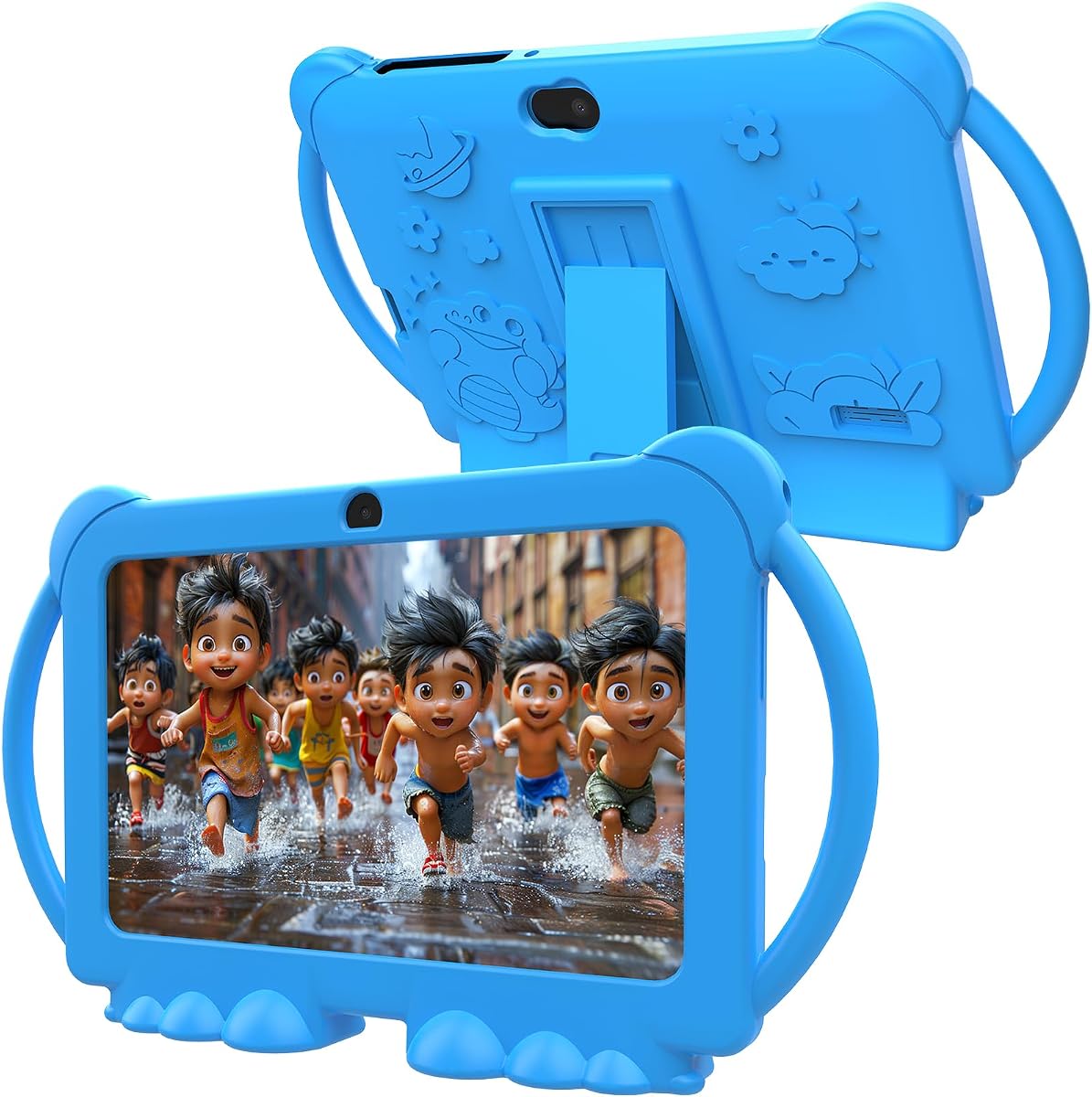


This top-selling model offers a complete package for young children starting their digital journey. With a strong rating from thousands of parents, it delivers reliable performance through a dedicated kid-safe interface that keeps content appropriate.
We may earn a commission when you buy through this link, at no additional cost to you.
The included Amazon Kids Plus subscription provides instant access to thousands of books and games, reducing setup time for busy families. The sturdy case absorbs impacts well, and the ten-hour battery ensures it lasts through long travel days.
While the sixteen gigabytes of storage fill up quickly with media, the ability to add a microSD card solves this limitation effectively. Parents appreciate the straightforward dashboard for managing screen time without needing technical expertise.
This tablet is ideal for first-time users who need durability and curated content. It balances cost and features well, making it a safe choice for parents seeking a worry-free device for children aged three to seven.
The included case is designed to withstand drops and bumps that commonly occur during play, ensuring longevity and reducing replacement costs significantly.
With thousands of ad-free titles included, children have immediate access to trusted brands like PBS Kids and Disney without parental approval for every download.
We may earn a commission when you buy through this link, at no additional cost to you.
This model stands out with a larger screen and improved battery life, making it perfect for extended learning sessions or travel. The higher rating reflects its robust build quality and responsive performance for multitasking apps.
We may earn a commission when you buy through this link, at no additional cost to you.
Parents benefit from the expanded storage capacity which allows for more downloaded books and videos without needing external memory. The strengthened glass screen adds an extra layer of protection against accidental scratches during daily use.
The added weight can be noticeable for very small hands compared to the smaller version, but the handle design mitigates this issue effectively. The screen brightness is significantly better for outdoor use or bright rooms.
Choosing this model makes sense for families who want a long-term device that can grow with the child. It offers a balance of power and protection that justifies the slightly higher initial investment for quality.
The high definition display provides crisp visuals that reduce eye strain during reading, ensuring a comfortable viewing experience for long periods of use.
With up to thirteen hours of battery life, parents can rely on the device lasting through cross-country flights or long days away from home chargers.
We may earn a commission when you buy through this link, at no additional cost to you.
This affordable tablet brings the flexibility of the full Android operating system to young children at a lower entry price. It allows access to the Google Play Store, giving parents more freedom to choose specific educational apps.
We may earn a commission when you buy through this link, at no additional cost to you.
The inclusion of GPS and FM radio features adds utility that is rare in budget tablets, making it versatile for various learning scenarios. The four gigabytes of RAM help maintain smooth performance when running multiple applications simultaneously.
Users should be aware that the hardware components are less premium than branded options, which may affect long-term durability under heavy use. However, the included shockproof case provides necessary protection to offset these limitations effectively.
It is an excellent choice for families on a strict budget who still want a capable device for learning and play. The full Android environment allows for future-proofing as the child grows and their needs evolve.
Accessing the Play Store allows parents to install any approved educational game, giving much more flexibility than restricted ecosystems found in other devices.
The inclusion of FM radio and GPS offers unique capabilities that can be used for outdoor learning activities or listening to local broadcasts without internet.
We may earn a commission when you buy through this link, at no additional cost to you.
This device excels at providing entertainment and education even when Wi-Fi is unavailable, thanks to pre-installed offline learning tools. The latest Android version ensures compatibility with modern apps and security updates for a safer experience.
We may earn a commission when you buy through this link, at no additional cost to you.
The integration of Google Kids Space provides a curated environment that is both safe and engaging for children. Parents can easily manage screen time and filter content to ensure that usage remains focused on educational goals.
While the case is sturdy, the build quality feels lighter than premium branded options which might require more careful handling over time. The performance is adequate for typical toddler usage scenarios involving games and videos.
This tablet is a great option for families who often travel or live in areas with unstable internet connections. It ensures that learning time is never interrupted by connectivity issues, providing consistent engagement.
Pre-installed educational games run perfectly without internet access, making it ideal for flights, car rides, or remote locations where connection is spotty.
Running Android 16 ensures compatibility with the latest educational apps, future-proofing the device against obsolescence for a longer usable lifespan.
We may earn a commission when you buy through this link, at no additional cost to you.
Designed for children transitioning out of toddlerhood, this model offers a more sophisticated look with a slim case that appeals to pre-teens. The higher storage capacity supports larger media libraries and more complex educational software effectively.
We may earn a commission when you buy through this link, at no additional cost to you.
The web browsing feature allows supervised access to the internet, helping older children develop digital literacy under parental guidance. Parents can filter sites and set time limits to ensure safe exploration of the wider web.
The absence of a rugged case might be a concern for younger children who are prone to dropping devices, so it suits those with more careful habits. The interface feels more mature, bridging the gap between toy and real tablet.
This option is perfect for families seeking a device that a child can use for several years without needing an upgrade. It balances learning tools with entertainment in a way that respects a child's growing independence.
Built-in guardrails filter inappropriate content, allowing older kids to explore the web safely while parents maintain control over what they can see.
With sixty-four gigabytes of storage, families can store more books, videos, and games locally without needing to constantly manage space or use memory cards.
We may earn a commission when you buy through this link, at no additional cost to you.
This model focuses on multimedia features with a dual camera setup that allows children to take photos and record videos easily. The IPS screen provides vibrant colors that enhance the viewing experience for educational videos and games.
We may earn a commission when you buy through this link, at no additional cost to you.
The parental controls are straightforward, allowing adults to set passwords and manage content access without complexity. The shockproof case ensures the device can withstand the typical rigors of daily use by a toddler.
While the camera quality is a standout feature for young photographers, the processing power is average which may lead to occasional lag with intensive apps. The battery life is standard but does not exceed expectations significantly.
For families prioritizing creative expression and photography, this tablet offers a fun platform for children to explore their artistic side. It remains a practical choice for general entertainment and learning needs.
Dual cameras encourage creativity by letting kids capture their own images and videos, fostering engagement beyond passive consumption of content.
The IPS display ensures bright and clear visuals, which helps reduce eye strain during reading and watching educational videos for extended periods.
We may earn a commission when you buy through this link, at no additional cost to you.
The large ten-inch screen provides ample space for reading and watching videos, making it excellent for shared viewing experiences. The high amount of RAM ensures smooth multitasking, which is beneficial for running multiple educational tools at once.
We may earn a commission when you buy through this link, at no additional cost to you.
Expandable storage to one terabyte means families can store vast libraries of content without worrying about running out of space. The latest Android version keeps the device secure and compatible with a wide range of applications.
However, the size and weight might be too large for very young children to hold independently, requiring a stand or adult supervision during use. The battery life is decent but does not match some smaller counterparts in duration.
This tablet is best suited for older children or shared family use where screen real estate is a priority. It offers strong performance for learning tasks that benefit from a larger display.
With eight gigabytes of RAM, the device handles multiple apps simultaneously without slowing down, ensuring a smooth experience during complex learning activities.
The ten-inch screen reduces the need to zoom in on text, making it easier for children to read books and follow educational tutorials comfortably.
We may earn a commission when you buy through this link, at no additional cost to you.
This tablet comes with a soft silicone case that provides excellent protection against drops and bumps while maintaining a lightweight profile. The Android system offers a flexible environment for downloading various educational apps and games.
We may earn a commission when you buy through this link, at no additional cost to you.
The dual camera setup allows children to engage with photography, adding a creative element to their digital play. Parents can use the control tools to monitor usage and block inappropriate content effectively.
Battery life is standard for this category, lasting a reasonable amount of time for daily use but may need charging for all-day trips. The performance is adequate for casual use though may struggle with heavy graphics.
It is a practical choice for parents looking for a reliable device that prioritizes physical protection. The included case ensures durability, which is essential for devices frequently used by young children.
The silicone case absorbs shocks from drops and adds a non-slip grip, reducing the risk of damage during enthusiastic play sessions.
Dual cameras enable children to take pictures and videos, encouraging creative engagement and documentation of their daily activities.
We may earn a commission when you buy through this link, at no additional cost to you.
Featuring a massive battery, this tablet promises long-lasting usage without frequent charging interruptions. The large screen is excellent for reading and watching educational content, providing a comfortable experience for children.
We may earn a commission when you buy through this link, at no additional cost to you.
The octa-core processor ensures smooth performance across various apps, reducing lag during gameplay or video playback. The parental control system allows adults to set limits and filter content to ensure a safe environment.
The weight might be significant for very young children to hold for long periods, so a stand is recommended for use. The charging speed is efficient, helping to minimize downtime between usage sessions effectively.
This device is ideal for families who need a durable tool for long periods of study or travel. Its battery life and screen size make it a strong contender for serious educational use.
The six thousand milliamp battery provides extended playtime, ensuring the device lasts through long days at school or on family trips without recharging.
Support for fast charging means the device can quickly regain power, reducing downtime and ensuring it is ready for use when needed.
We may earn a commission when you buy through this link, at no additional cost to you.
This tablet comes with a safe and fun software suite that offers a playground for young children to explore immediately. The Android thirteen system provides a familiar interface with modern features for easy navigation and use.
We may earn a commission when you buy through this link, at no additional cost to you.
The inclusion of the iWawa app adds a layer of curated content that is specifically designed for educational growth and entertainment. Parents can use the robust parental controls to manage screen time and spending limits easily.
While the build quality is functional, it may not withstand the same level of rough handling as premium cases without additional protection. The performance is adequate for standard use cases like watching videos and playing simple games.
It offers a practical entry point for families wanting a device with good pre-loaded software and modern charging technology. It is a solid choice for basic entertainment and learning needs.
The pre-installed iWawa app provides a safe environment for play and learning, reducing the need for manual app installation and approval.
USB Type-C charging ensures faster power delivery and compatibility with modern chargers, making it convenient to keep the device powered up.
We may earn a commission when you buy through this link, at no additional cost to you.
Selecting the right tablet requires evaluating hardware durability, software safety, and battery capacity to match your child's daily needs effectively.
Look for tablets that come with sturdy, shock-resistant cases designed specifically for children. The material should absorb impacts from drops without cracking the screen or damaging internal components.
A durable build ensures the device survives the typical handling of a toddler, extending its usable life and protecting your investment.
Ensure the tablet has a robust parental dashboard that allows you to set time limits, filter content, and review activity history. These controls are essential for maintaining a safe digital environment.
Strong parental controls give you peace of mind that your child is accessing only age-appropriate content and spending reasonable time on the device.
Choose a model with at least ten hours of battery life to support long periods of usage without constant charging. This is critical for travel or days when outlets are not readily available.
Long battery life ensures uninterrupted entertainment and learning, reducing the frustration of a device shutting down unexpectedly.
Opt for a tablet with enough internal storage to hold books, games, and videos, or one that supports expandable memory via microSD cards. This allows for a growing library of content.
Sufficient storage means you can download favorite content for offline use without constantly managing space on the device.
Consider a screen size that balances visibility and portability. A larger screen helps with reading but might be heavier for small hands to hold comfortably for long periods.
A clear, bright display protects eyes from strain during reading and viewing, making the learning experience more comfortable.
Decide between a locked-down kid-friendly OS and a full Android environment. Full Android offers more app flexibility but requires more parental oversight for safety.
The right OS choice depends on how much freedom you want to give your child and how much control you need to maintain.
Check if the tablet includes a free subscription to a content service like Amazon Kids Plus. This can save money and provide immediate access to educational material.
Included subscriptions ensure you have a rich library of content available from the moment you turn on the device.
Look for models that come with a warranty that covers accidental damage. This can significantly reduce the cost of repairs or replacements if the device is dropped.
A solid warranty provides a safety net, making the purchase less risky for parents of active children.
First, always set up parental controls immediately upon unboxing. Configure the user profiles, set time limits, and select age-appropriate content categories to ensure a safe environment from the start.
Second, install a sturdy case if one is not included and keep the screen clean with a soft microfiber cloth. Avoid using harsh chemicals that could damage the screen coating or the plastic casing.
Third, regularly update the software to keep the device secure and running smoothly. Check the parental dashboard weekly to review activity reports and adjust settings as your child's needs change.
Yes, these tablets are designed with safety as a priority. They feature robust parental controls, age-appropriate content filters, and durable cases to protect against physical damage during use.
Health experts generally recommend limiting screen time to about one hour per day for preschoolers. Most parental dashboards allow you to set these limits automatically to help manage usage effectively.
Most models in this list come with a protective case included. However, if you buy a tablet without one, you should purchase a shockproof case separately to prevent damage from drops.
Many of these tablets support popular streaming apps like Netflix. You will need to install the app and log in with your account to access content through the device's interface.
You can transfer photos using a USB cable or by connecting to Wi-Fi and using cloud storage services. Most devices also have cameras to take photos directly on the tablet itself.
Yes, many tablets allow you to download content for offline use. Once downloaded, books and videos can be viewed without an active internet connection, which is useful for travel.
Choosing the right tablet depends on your specific needs for durability, content, and budget. The top picks offer a balance of protection, educational value, and ease of use that suits most families.
Prioritize parental controls and build quality to ensure a safe environment for your child. Investing in a model with good battery life and storage will save you from frequent upgrades and frustration.
Remember to check current availability and verify warranty details before purchasing. These devices are a great tool for learning when used responsibly under parental supervision.