
WALI Computer Monitor Stand for Desk
4.7Editor score
Large metal shelf up to 44lbs
Adjustable height for ergonomics
Under-stand storage for accessories
Finding the right laptop rack for desk can transform your workspace into a more efficient and ergonomic environment. Whether you work from home or in a busy office, a good stand protects your device and reduces strain.
We compared ten top-rated models based on stability, compatibility, and design features. Each product offers unique benefits, from vertical storage to under-desk mounting, ensuring you find the perfect fit for your setup.
Each pick highlights key strengths and potential trade-offs to help you decide quickly. Keep in mind that prices and availability can change over time, so check current listings before making your final purchase decision.
4.7Editor score

4.8Editor score

4.6Editor score
As an Amazon Associate we earn from qualifying purchases.
This side-by-side comparison highlights key specifications and features across all ten selected laptop rack for desk models to help you quickly identify the best match for your specific needs and budget constraints.





The OMOTON Dual Vertical Desk Laptop Stand Holder earns our Editor's Choice for its robust build and dual-slot functionality. It holds two laptops securely side by side, making it ideal for users managing multiple devices without cluttering their desk surface.
We may earn a commission when you buy through this link, at no additional cost to you.
Its anodized aluminum construction matches the look and feel of premium laptops, while non-slip silicone mats protect devices from scratches. The adjustable width allows it to fit notebooks ranging from thin ultrabooks to thicker gaming machines with ease.
While it is limited to two slots compared to larger organizers, the stability and material quality outweigh this constraint for many professionals. The wide base ensures it never tips even when loading or unloading heavier laptops.
Anyone juggling two machines should consider this stand first. It balances aesthetics, protection, and utility better than most options in its price range, offering a polished solution for dual-monitor or dual-laptop workflows.
Efficiently store two laptops in minimal space, keeping your workspace organized while ensuring quick access to both devices.
Silicone mats on slots and base prevent scratches and sliding, protecting expensive devices during daily use.
We may earn a commission when you buy through this link, at no additional cost to you.
The NODOCA 2-Slot Laptop Storage offers a smart side-mount design that keeps laptops off the main desktop surface entirely. Made from high-strength carbon steel, it provides excellent durability while freeing up valuable workspace for monitors or paperwork.
We may earn a commission when you buy through this link, at no additional cost to you.
A built-in headphone holder at the bottom adds extra utility, allowing you to hang accessories without buying separate stands. The adjustable width accommodates a wide range of laptop models from various manufacturers securely.
Installation requires a desk with specific thickness and depth constraints, which may limit use on some furniture. However, once mounted, the stability is impressive and the footprint remains minimal.
Ideal for users with limited desktop space or those who prefer vertical storage on desk edges. It combines strong build quality with practical add-ons like the hook to enhance desk organization effectively.
Clips to the side of your desk, preserving the central work area for active tasks.
Integrated hook supports headphones or controllers, reducing clutter on your desk surface.
We may earn a commission when you buy through this link, at no additional cost to you.
The BYMECOST No Drill Under Desk Laptop Mount provides a discreet storage solution that lives beneath your workstation. Its powder-coated metal tray supports heavy items like hubs, power supplies, or even a second laptop without taking up any desktop real estate.
We may earn a commission when you buy through this link, at no additional cost to you.
Installation is straightforward since it clamps directly to the desk frame without drilling. Three openings allow cables to route through neatly, keeping cords organized while maintaining air circulation for heat dissipation.
Users must ensure their desk has a clear edge without crossbars, and the installation area width must meet specific dimensions. If compatible, it transforms unused under-desk space into a functional storage area.
Best suited for standing desks or offices where desktop space is critical. This mount offers significant organizational value for those willing to measure their desk dimensions carefully before purchase.
Utilizes hidden space beneath your desk to store devices and accessories out of sight.
Designed openings let power and data cables pass through, preventing tangles on the floor.
We may earn a commission when you buy through this link, at no additional cost to you.
This Adjustable Laptop Stand for Desk combines ergonomic benefits with portability, making it a versatile choice for remote workers. Its metal construction supports up to 17.6 pounds while offering adjustable height to align screens with eye level.
We may earn a commission when you buy through this link, at no additional cost to you.
Ventilation holes on the top surface improve airflow around the laptop during operation, reducing overheating risks. The foldable design allows it to slip into a backpack, perfect for professionals who work across multiple locations.
While it lacks the storage slots of other models, it excels as a dedicated ergonomic riser for daily use. Anti-skid silicone pads and smooth edges ensure safety and comfort during extended typing sessions.
Anyone who travels or needs adjustable viewing angles should prioritize this stand. It delivers solid performance at a budget-friendly price, focusing purely on health and comfort without extra features.
Adjustable angles reduce neck strain and improve posture during long work hours.
Foldable form factor makes it easy to carry between home, office, and travel.
We may earn a commission when you buy through this link, at no additional cost to you.
The LOXP Adjustable Laptop Stand brings unique mobility with its 360-degree rotating base, allowing you to pivot your screen easily. Made from one-piece fiber metal, it offers improved durability and stability compared to standard aluminum alternatives.
We may earn a commission when you buy through this link, at no additional cost to you.
Whether sitting or standing, you can adjust the height and angle to maintain eye level positioning. The non-slip silicone protects your device from sliding, ensuring safety even when rotating the stand on smooth surfaces.
Portability is supported via its foldable design, though the rotating mechanism makes it slightly bulkier than simple risers. It supports laptops up to 16 inches, covering most modern consumer and professional models.
This stand is perfect for collaborative workspaces where sharing screens quickly is essential. Its combination of rotation, adjustability, and sturdy build makes it stand out among typical laptop risers.
Rotate the screen to face others without moving the entire stand, streamlining teamwork.
One-piece fiber metal ensures stability during rotation and prevents wobbling.
We may earn a commission when you buy through this link, at no additional cost to you.
The BESIGN LS03 Aluminum Laptop Stand is a classic choice known for its sleek design and ergonomic benefits. Made from premium aluminum, it elevates your laptop by six inches to improve posture and reduce shoulder pain during use.
We may earn a commission when you buy through this link, at no additional cost to you.
Its detachable design allows for easy assembly and disassembly, making it simple to store when not needed. The open structure supports excellent airflow, keeping laptops cool even during intensive tasks without fans.
While the angle is fixed and lacks adjustability, the height alone provides significant ergonomic improvement for most users. Rubber holders secure the laptop firmly, preventing scratches or sliding on the surface.
Ideal for users who prefer clean aesthetics and reliable stability without complex adjustments. This stand balances cost and performance effectively, delivering a polished workspace upgrade at a reasonable price point.
Elevates screen to eye level naturally reducing strain on neck and back.
Detachable parts fold flat for compact storage when not in daily use.
We may earn a commission when you buy through this link, at no additional cost to you.
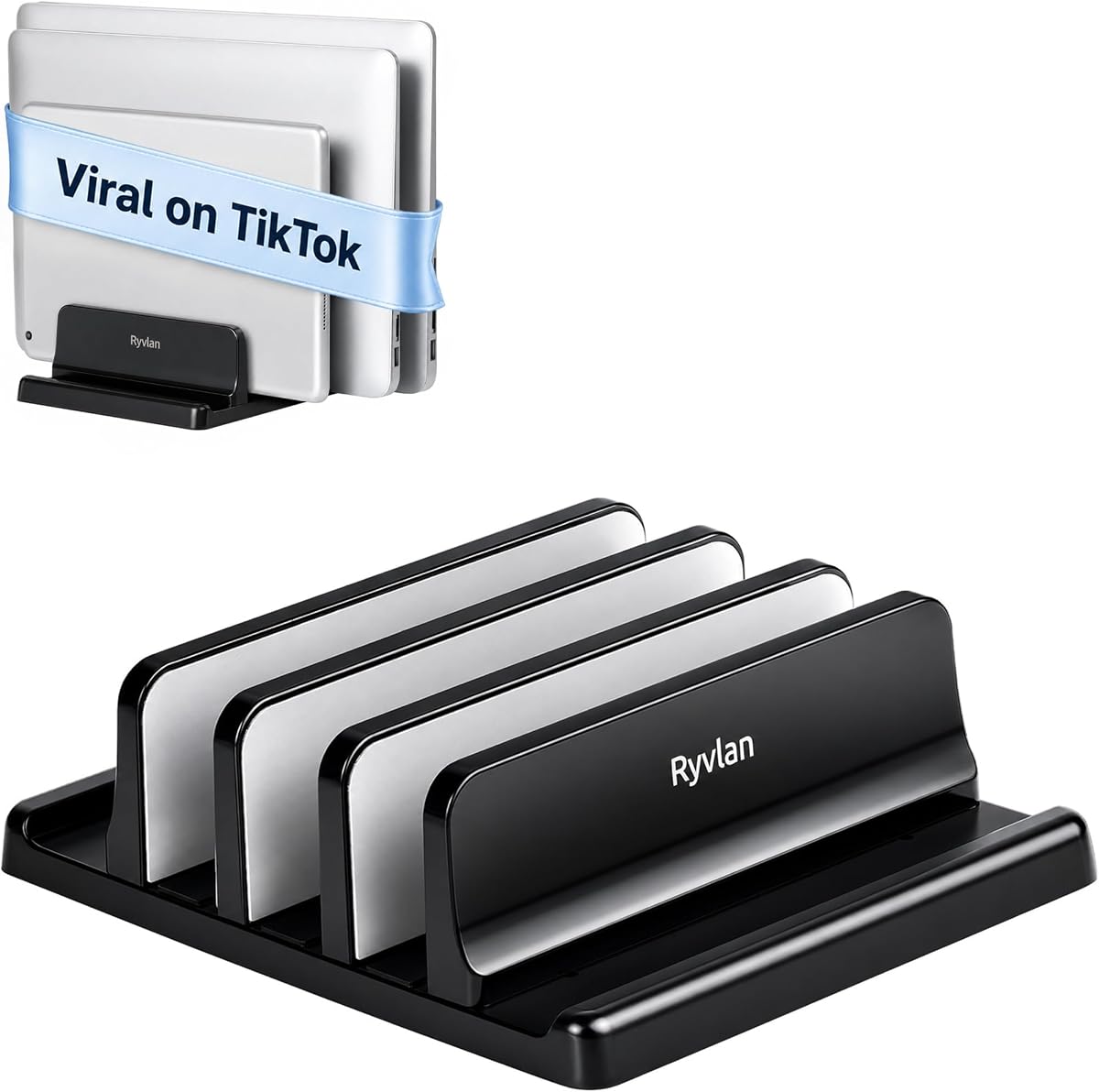
The Ryvlan Vertical Laptop Stand offers impressive capacity, holding three laptops and two tablets in a single footprint. Its design targets shared workspaces or teams needing to organize multiple devices in one central spot.
We may earn a commission when you buy through this link, at no additional cost to you.
Each slot adjusts via an included wrench to fit thicknesses from 0.47 to 1.2 inches. Silicone padding on all walls and bases prevents scratches and keeps devices secure even if bumped accidentally.
While the ABS plastic is lighter than metal alternatives, the weighted base ensures stability. The polished black finish matches modern office furniture without standing out visually or disrupting a clean aesthetic.
Best for households or offices with several devices that need daily storage. It clears the entire desk surface while keeping everything accessible, making it a practical organizer for tech-heavy users.
Centralizes storage for laptops and tablets reducing clutter and keeping work tidy.
Individual slot width adjustment ensures snug fit for different laptop sizes and thicknesses.
We may earn a commission when you buy through this link, at no additional cost to you.
Vaydeer Vertical Laptop Stand combines versatility with affordability by supporting a laptop, phone, and tablet simultaneously. Its vertical orientation saves desk space while providing a neat spot for daily tech needs.
We may earn a commission when you buy through this link, at no additional cost to you.
The adjustable width accommodates laptops from 0.55 to 1.69 inches thick using an included Allen wrench. Soft silicone mats cover grooves to protect device surfaces from scratches during insertion or removal.
Though made from ABS plastic, it remains stable thanks to a solid base design. This lightweight construction makes it easy to move around as needed without risking damage to the desk surface.
A cost-effective solution for home offices with mixed devices. It keeps essentials organized in one place without demanding much budget or desk real estate for everyday use.
Vertical orientation minimizes footprint, freeing up table space for other tasks.
Silicone padding guards against scratches ensuring devices remain in good condition.
We may earn a commission when you buy through this link, at no additional cost to you.
The Elestoria 5-Slot Vertical Laptop Stand earns the Best Premium badge for its exceptional build quality and capacity. Crafted from solid aluminum alloy, it offers a heavy stable base that keeps four laptops and a tablet secure without tipping.
We may earn a commission when you buy through this link, at no additional cost to you.
Adjustment is tool-free using screws on the bottom to fit each slot individually. This allows for a custom fit on each device ranging from thin ultrabooks to thicker gaming laptops up to 17.3 inches.
The closed back design may limit cable routing options compared to open stands, but it protects devices from spills. Silicone padding and polished edges ensure devices are handled with care during use.
Best for studios or offices managing multiple machines daily. Its premium materials justify the higher cost for users seeking a long-term, professional storage solution that looks and performs like high-end hardware.
Solid aluminum ensures long-lasting strength and a professional aesthetic for any workspace.
Individual slot adjustment secures different laptop sizes tightly for stability.
We may earn a commission when you buy through this link, at no additional cost to you.
The WALI Computer Monitor Stand offers unbeatable value as a versatile laptop and monitor riser. With a large metal shelf supporting up to 44 pounds, it handles heavier devices and printers without bending or wobbling under weight.
We may earn a commission when you buy through this link, at no additional cost to you.
Three height settings allow you to choose between 3.9, 4.7, or 5.5 inches off the desk for better viewing angles. Vented holes on the platform ensure airflow remains strong to prevent overheating during active use.
Open space below the stand stores keyboards and notebooks, reducing visual clutter on your desk surface. Rubber pads protect both the stand and the desk from scratches during placement or movement.
If you need a robust solution at the lowest cost, this riser delivers. It combines durability, storage, and ergonomics in a simple package that suits almost any office environment efficiently.
Combines high load capacity with ergonomic height options at a budget-friendly price.
Space underneath the stand keeps accessories organized and out of direct view.
We may earn a commission when you buy through this link, at no additional cost to you.
Selecting the right laptop rack for desk depends on your workspace layout, device count, and ergonomic needs. This guide breaks down key factors to ensure you make an informed decision.
Materials like aluminum and steel offer long-term stability and scratch resistance, while plastic options save money but may feel less robust. For daily heavy use, prioritize metal frames with strong welds or thick profiles.
Choose metal for longevity and aesthetics, plastic for budget-friendly light-duty needs.
Consider how many devices you need to store daily. Single-slot risers save space, while multi-slot vertical stands support multiple laptops and tablets. Match capacity to your typical workflow and number of active users.
Pick capacity based on whether you store one device or multiple for shared use.
Adjustable width and height allow the stand to fit different laptop models and ergonomic requirements. Fixed stands are simpler but less flexible if your devices change over time.
Prioritize adjustable models if you switch devices frequently or need specific viewing angles.
Lift your screen to eye level to reduce neck strain and improve posture during work. Look for stands that raise the laptop at least six inches or offer adjustable riser heights.
Ensure the stand elevates the screen enough to avoid hunching forward during use.
Laptops need airflow to prevent overheating, so open designs with holes or slats help dissipate heat. Solid trays may trap heat during long intensive tasks like gaming or rendering.
Choose open or vented designs to maintain optimal operating temperatures for your device.
Under-desk clamps require specific desk dimensions, while desktop stands are simpler to place. Consider how much desk space you have and whether drilling is acceptable for your environment.
Opt for clamp mounts if space is limited, or desktop stands for flexibility.
Non-slip pads and silicone mats protect your device from scratches and slipping during use. Ensure all contact points between stand and laptop are padded for safety.
Look for soft rubber or silicone padding on all surfaces that touch your devices.
Measure your desk space before buying to avoid overcrowding. Minimalist designs with small footprints keep workspaces tidy, while bulkier stands offer more capacity.
Balance storage capacity with available desk space to maintain a clean workspace.
Place your laptop rack on a flat stable surface and adjust slots to match your device dimensions carefully. Ensure all locking screws are tightened to prevent slipping or wobbling during daily use.
Clean the stand regularly using a soft dry cloth to remove dust and debris that might scratch your devices. Avoid harsh chemicals or abrasive tools on silicone pads or metal finishes to maintain protection.
If using a vertical stand, ensure laptops are fully closed and secured before moving the desk. For under-desk mounts, periodically check that clamps remain tight and secure over months of use.
For small desks, vertical stands or under-desk mounts like the BYMECOST offer the best footprint savings. These models keep laptops off the main surface while maintaining easy access.
Yes, many models like Elestoria and Ryvlan support devices up to 17.3 inches. Ensure width adjustment matches your laptop thickness and weight limits are not exceeded.
Lifting a laptop screen to eye level reduces neck and back strain significantly. Stands like BESIGN LS03 and WALI provide height adjustments ideal for healthy posture.
Most stands require minimal assembly, often under five minutes. Detachable models like BESIGN LS03 can be assembled without tools and stored easily when not in use.
Choose stands with open or vented designs that promote airflow around the device. Avoid enclosed solid trays if your laptop runs hot during intensive tasks.
Yes, models with silicone mats protect delicate surfaces from scratches. Always ensure the stand is stable and the device is properly seated before use.
Our top picks like the OMOTON Dual Vertical and WALI Monitor Stand offer excellent balance of features and value for different needs. Consider your device count and desk space when selecting the best model.
Prioritize ergonomic height and material durability for long-term use. A good laptop rack not only organizes your workspace but also supports better health and productivity habits.
Always verify current pricing and availability before purchasing as details may change over time. Choose the model that fits your specific workflow and budget to transform your workspace today.