
Large Key Wired Telephone
4.2Editor score
Oversized physical buttons
Adjustable ring tone volume
Wall mountable design
This guide compares the top large button phones for seniors including corded landlines with photo speed dial, volume boost, and SOS features for easier
Finding the right communication device is essential for older adults who want to stay connected with family and caregivers. Large button phones simplify the calling process by offering oversized keys, clear displays, and intuitive controls designed specifically for reduced vision or dexterity.
We have carefully reviewed ten leading models available in the current market to identify the most reliable options. Our comparison focuses on accessibility features like photo speed dial, adjustable volume levels, SOS emergency buttons, and corded reliability to ensure dependable service.
Each pick below highlights specific strengths ranging from budget-friendly designs to advanced amplified models with hearing aid compatibility. Please note that product availability and pricing can change frequently so always verify the latest details before making your final purchase decision today.
4.2Editor score

4.1Editor score
3.9Editor score
This side-by-side comparison breaks down the key specifications and features of ten highly rated large button phones to help you find the model that best fits specific needs and home setup requirements.




The Uvital Big Button Phone ranks as a top choice for seniors due to its thoughtful design focusing on ease of use and safety. It holds a solid rating from users who appreciate its clear visual cues and loud audible alerts ensuring no important calls are missed.
We may earn a commission when you buy through this link, at no additional cost to you.
Key strengths include the one-touch speed dialing system that allows users to program photos of family members onto the buttons which is ideal for those with memory loss. The adjustable loud volume reaches up to 120dB for the ringer and 90dB for the earpiece helping those with hearing difficulties stay connected clearly even in noisy environments.
Honest trade-offs involve the lack of advanced features like an answering machine or caller ID display which keeps the device simple but limits functionality for tech-savvy users. The wall mounting restriction also means it must be placed on a flat surface which could limit placement options in smaller rooms.
This phone is best suited for elderly individuals living alone or in care facilities who need a reliable and straightforward way to communicate. Its SOS button and photo dialing features provide peace of mind for family members while the corded design ensures it works during power outages.
Customizable button photos let seniors call loved ones instantly without remembering numbers which reduces frustration and enhances independence.
The bright LED call flash alert ensures incoming calls are noticed visually which is crucial for users with hearing impairments or in noisy settings.
We may earn a commission when you buy through this link, at no additional cost to you.
The SWISSVOICE Xtra TMAX10 stands out with a high user satisfaction rating and a design that prioritizes simplicity and visual accessibility for older adults. It offers a clean interface with large keys and customizable photo options to streamline the calling process significantly.
We may earn a commission when you buy through this link, at no additional cost to you.
Strengths lie in its oversized and clearly separated number keys which make dialing accurate for users with reduced eyesight or hand dexterity. The dedicated plus and minus buttons allow for four volume levels on both handset and speakerphone calls ensuring comfort during long conversations.
Users might find the six speed dial keys slightly limiting if they need to store more contacts quickly. The device also avoids complex menus which is great for seniors but might disappoint those looking for caller ID or message storage capabilities.
This model is ideal for seniors who prefer a no-frills telephone experience with strong visual aids. It works well in quiet home environments where the visual ring indicator complements the audible alerts effectively to ensure calls are never missed.
The visual alert adds a layer of safety for hearing impaired users by flashing when the phone rings so they do not miss incoming calls.
Large keys with good spacing help prevent accidental presses and build confidence for those with arthritis or tremors when dialing numbers.
We may earn a commission when you buy through this link, at no additional cost to you.
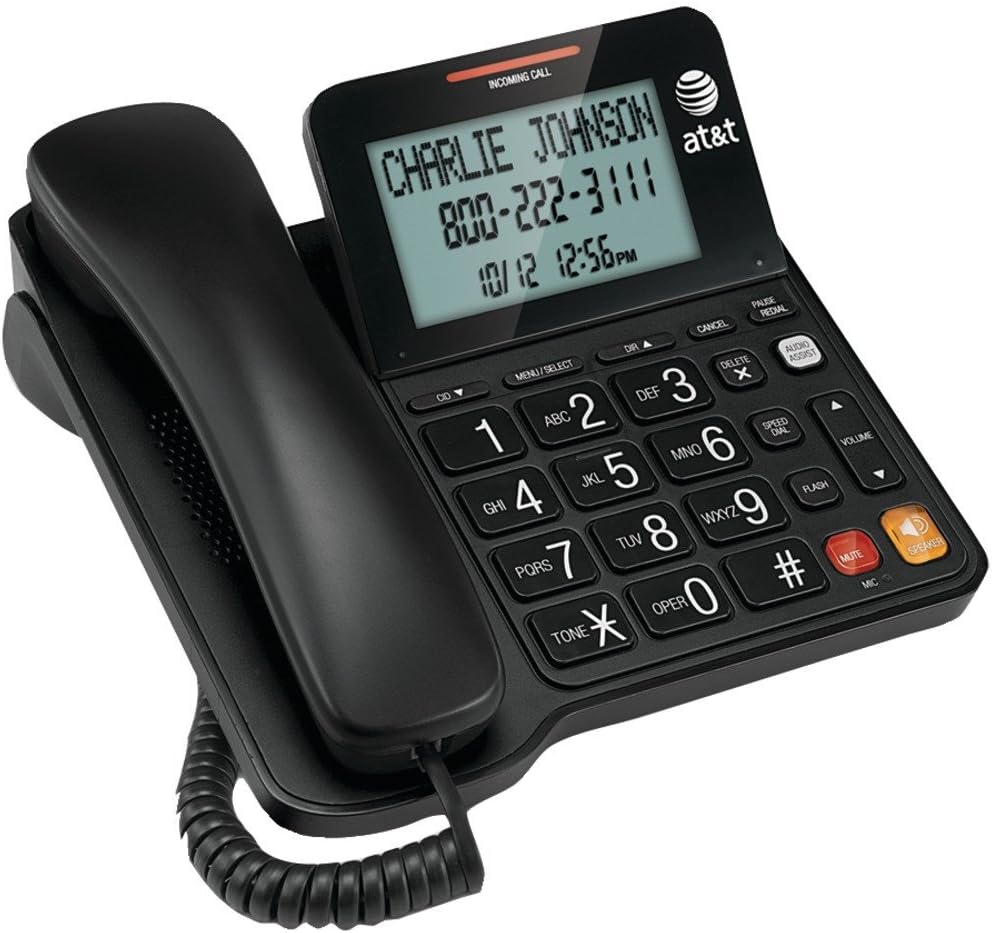
The AT&T CL2940 combines classic reliability with modern conveniences like caller ID and a tilt display to help seniors screen calls more effectively. Its robust build and volume boosting features make it a strong contender for those who want a traditional phone with extra utility.
We may earn a commission when you buy through this link, at no additional cost to you.
Key strengths include the large tilt display that makes reading caller information easy without needing to lean in too close. The audio assist volume boost amplifies incoming sound specifically helping users with hearing difficulties hear conversations clearly without external amplification devices.
A notable trade-off is the requirement for four AA batteries to power the display which adds a maintenance step compared to fully corded units. The device is also slightly bulkier which might be an issue for small bedside tables or compact desks.
This phone is perfect for seniors who want to know who is calling before answering. The combination of extra-large buttons and a clear screen makes it accessible for users with vision challenges while maintaining the essential calling functions they trust.
Knowing who is calling before picking up helps seniors avoid unwanted telemarketing and gives peace of mind to those living alone.
The built-in audio assist feature enhances voice clarity significantly which is helpful for users with mild to moderate hearing loss.
We may earn a commission when you buy through this link, at no additional cost to you.
The Large Key Wired Telephone is an excellent budget-friendly choice for those needing a basic yet effective communication tool without unnecessary complexities. It offers essential large buttons and volume controls at a very accessible price point making it ideal for secondary locations or temporary needs.
We may earn a commission when you buy through this link, at no additional cost to you.
Strengths include its durable ABS construction which provides good fall resistance and a comfortable hand feel for daily use. The oversized physical keys measure about 1 inch wide ensuring that users with limited vision or dexterity can press them accurately without error.
The main limitation is the lack of memory or speed dial features which means numbers must be entered manually each time. This can be difficult for seniors with memory issues but the simple design ensures that basic calling remains straightforward and frustration-free for anyone.
This phone is best for households on a budget or for places like kitchens or garages where a simple line is needed. The wall-mount capability and reliable power supply ensure it stays available and functional whenever a quick call is necessary.
Affordable pricing makes this an easy addition to any home without straining the budget while still providing reliable large button accessibility.
The ABS plastic body is designed to withstand drops and daily wear ensuring the phone remains functional for years of regular use.
We may earn a commission when you buy through this link, at no additional cost to you.
The Large Button Landline Phone for Seniors focuses heavily on simplicity and safety with huge buttons and a dedicated SOS key for emergencies. Its design specifically targets users with poor eyesight or memory loss by removing complex steps and focusing on direct contact.
We may earn a commission when you buy through this link, at no additional cost to you.
Key strengths include the oversized buttons that are nearly the size of a coin which makes dialing easy for those with stiff hands or arthritis. The SOS emergency key provides immediate peace of mind for seniors living alone ensuring they can reach help or family instantly.
One limitation is the absence of a speakerphone function which restricts hands-free communication options. Additionally the memory keys are limited compared to other models which may require re-entry of numbers more often for frequent callers.
This phone is highly recommended for seniors with cognitive challenges who need a very straightforward device. The loud ringer and flashing light work together to ensure no call is missed while the corded design guarantees reliability during power outages.
A dedicated red SOS button allows instant access to emergency contacts which is vital for safety and independence in the home.
Black numbers on a white background offer high contrast making it easier to distinguish keys for users with cataracts or fading vision.
We may earn a commission when you buy through this link, at no additional cost to you.
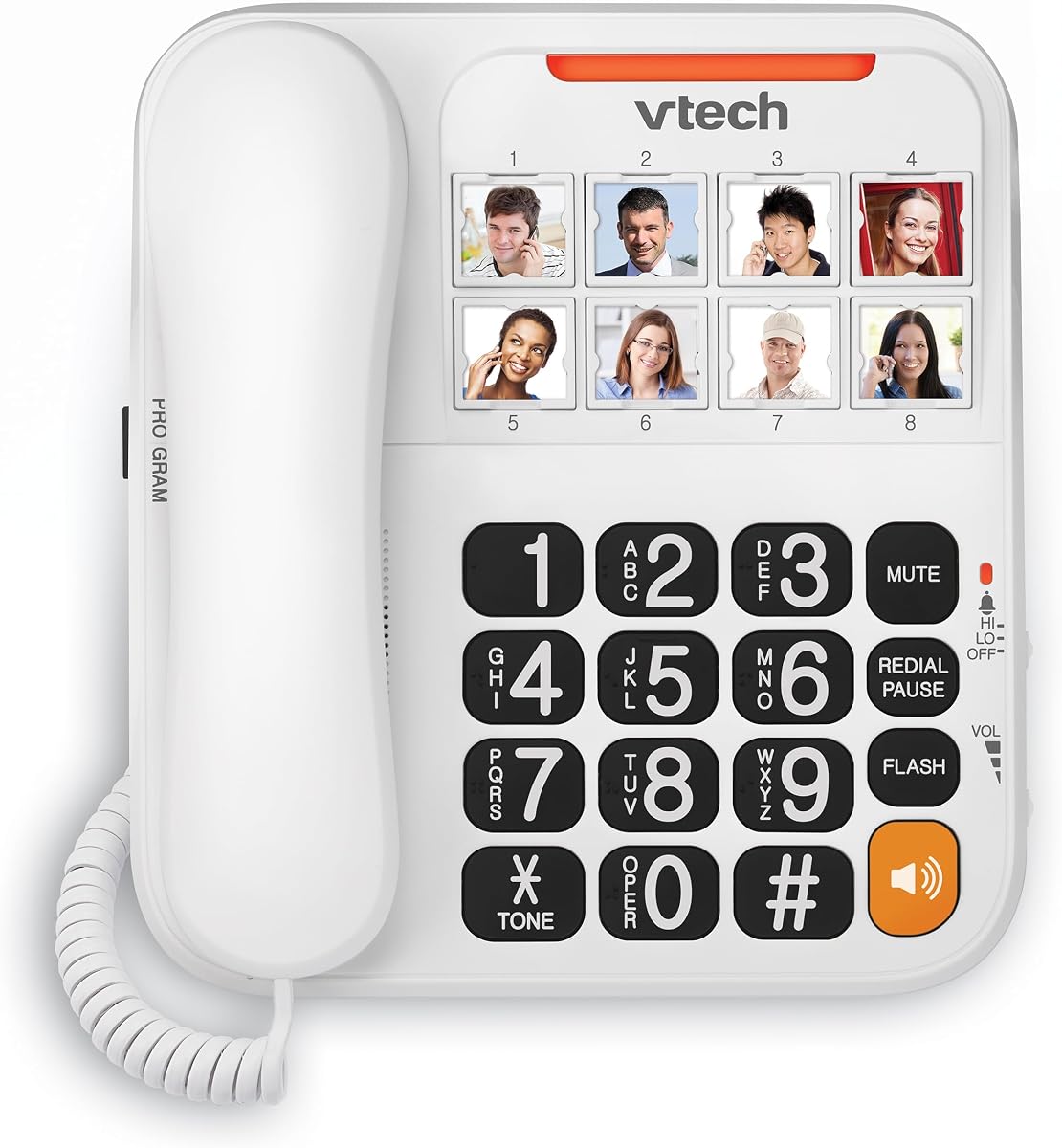
The VTech SN1117 brings unique accessibility features like talking digits and photo speed dial to help users navigate the device with more confidence. It is designed to reduce the frustration of mis-dialing by confirming numbers audibly as they are pressed.
We may earn a commission when you buy through this link, at no additional cost to you.
Key strengths include the eight photo speed dial keys which allow users to store important contacts with images for quick access. The talking digits feature announces the numbers as they are dialed providing an extra layer of confirmation that is helpful for users with severe vision loss.
The full-duplex speakerphone allows both parties to speak and listen simultaneously which feels more natural than half-duplex systems. However the setup process for these features might be slightly complex for seniors who are not comfortable with any electronic programming steps.
This phone is best for those who benefit from audio cues to confirm their actions. It offers a good balance of features for families willing to help set it up initially so their elderly relatives can enjoy hands-free calling and photo speed dialing easily.
Audible number announcements prevent dialing errors and help visually impaired users feel confident when entering contact numbers manually.
The speakerphone allows natural two-way conversation without cutting off the other person which makes group calls more comfortable and interactive.
We may earn a commission when you buy through this link, at no additional cost to you.
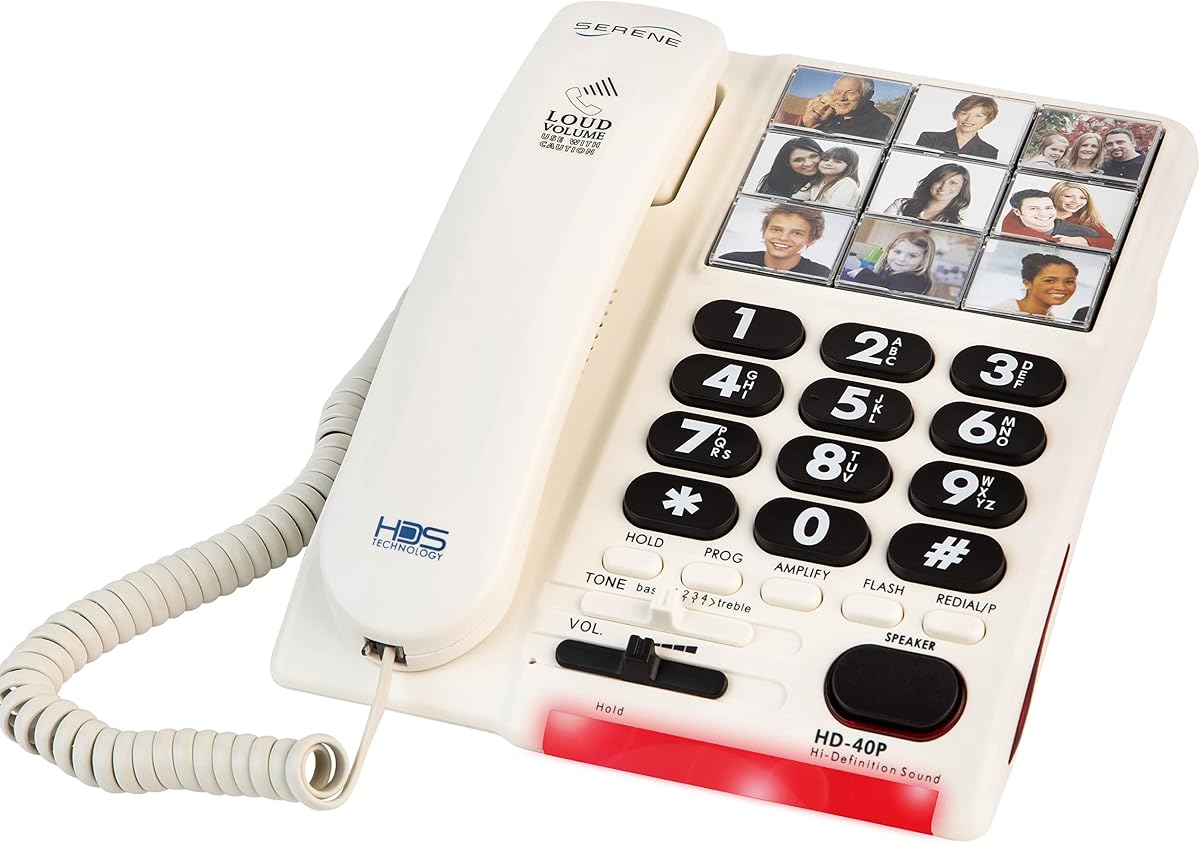
The Serene Innovations Amplified Big Button Phone is engineered specifically for those with significant hearing loss or memory impairments like dementia. It prioritizes clear audible feedback and visual simplicity to ensure communication remains effortless for even the most vulnerable users.
We may earn a commission when you buy through this link, at no additional cost to you.
Key strengths include the amplified sound which boosts hearing by up to 26dB making conversations clear for those with moderate hearing loss. The ringer is set to 85dB which is loud enough to cut through background noise like a TV or music so alerts are always heard.
The photo buttons help users identify contacts by face rather than number which is crucial for seniors with memory issues. However the higher price point and heavier build might be a consideration compared to standard models with fewer specialized features.
This phone is the ideal choice for caregivers looking for a specialized device for loved ones with hearing or memory challenges. The combination of amplification and visual cues offers a tailored solution that standard phones cannot match for specific assistive needs.
The 26dB amplification ensures conversations are heard clearly reducing the need for external amplifiers or frequent repetition.
Loading speed dial buttons with portraits helps those with dementia recall who they are contacting without needing to read numbers.
We may earn a commission when you buy through this link, at no additional cost to you.
This versatile phone allows for both wall mounting and desktop placement making it adaptable for various home environments and accessibility needs. Its ten two-touch memory options provide ample space for storing important contacts without requiring complex programming steps.
We may earn a commission when you buy through this link, at no additional cost to you.
Strengths include the hands-free speaker option which allows seniors to talk while doing other tasks in the kitchen or workshop. The loud Hi-Lo ringtone switch ensures that alerts are heard in different environments whether the room is quiet or noisy.
The lack of photo dialing means users must rely on numbers or text labels for memory keys which may be less intuitive for those with vision issues. The speaker quality is functional but basic compared to premium models with advanced audio tech.
This phone is best for households needing a secondary line that can be mounted easily out of the way. The simple memory system and hands-free capability make it a practical choice for staying connected while moving around the home.
The option to mount on a wall keeps the phone accessible yet out of the way and it works well in hallways or living rooms.
With ten touch memory options users can store enough numbers for daily needs without struggling to remember long sequences manually.
We may earn a commission when you buy through this link, at no additional cost to you.
The Excelltel Big Button Phone offers a generous nine one-touch speed dial keys combined with hands-free calling capabilities for seamless interaction. It focuses on accessibility with simple buttons and an SOS feature to ensure seniors can reach help instantly when needed.
We may earn a commission when you buy through this link, at no additional cost to you.
Key strengths include the large set of speed dial keys which allow storing more contacts than many competitors. The hands-free function enables users to make and receive calls without holding the handset which is helpful for those with limited mobility or who prefer multitasking.
Users may find the absence of caller ID a limitation for screening unwanted calls effectively. The build is simple and functional but does not offer premium materials which may affect the overall feel during extended use.
This phone is best for seniors who prioritize speed and convenience in their daily calls. The combination of SOS access and multiple memory keys makes it a reliable tool for staying connected safely and efficiently in any home setting.
Having nine one-touch keys means seniors can store numbers for all family members and doctors for instant access with one press.
The speakerphone function lets users walk away from the base while talking which adds convenience for busy household tasks or multitasking.
We may earn a commission when you buy through this link, at no additional cost to you.
The SWISSVOICE Premium 3355 is a feature-rich model that includes an answering machine and an extra cordless handset for added flexibility. It is designed to cover multiple needs in one package making it a strong contender for households that require more than just basic calling.
We may earn a commission when you buy through this link, at no additional cost to you.
Key strengths include the hearing aid compatibility which ensures clear sound for users with hearing devices. The inclusion of an answering machine allows seniors to record messages and listen to them later providing a comprehensive communication system without extra devices.
The complexity of managing both corded and cordless units plus the answering machine might be overwhelming for some seniors. The higher price point also reflects these extra features which may not be necessary for those seeking a simpler device.
This phone is best for tech-capable seniors or families who want a complete communication solution. The combination of accessibility features like photo keys and hearing aid support makes it a powerful tool for maintaining connections and capturing messages reliably.
An integrated answering machine ensures no messages are lost and can be played back anytime for those who miss calls often.
Compatibility with hearing aids prevents feedback loops and ensures users hear every word clearly without interference from their devices.
We may earn a commission when you buy through this link, at no additional cost to you.
Choosing the right phone for a senior involves assessing specific physical and cognitive needs to ensure the device enhances rather than complicates their daily life. We break down the most critical factors to consider before making a decision.
Oversized buttons are crucial for users with arthritis or reduced dexterity as they reduce the chance of pressing the wrong number. Look for keys that are spaced well apart and have high contrast numbers against the background to aid those with vision challenges.
Prioritize models with physical keys over touchscreens to ensure a tactile response that makes dialing easier and more accurate for elderly hands.
Hearing loss is common among seniors so a phone with adjustable volume or built-in amplification is essential. Look for models that offer volume boosts for both the ringer and the earpiece to ensure conversations are heard clearly.
Check for features like hearing aid compatibility if the user wears a hearing aid to prevent static and feedback during calls.
Speed dial functions allow seniors to store important numbers like family or doctors for one-touch access. This reduces cognitive load and helps those with memory loss stay connected without needing to remember complex number sequences.
Photo speed dial is particularly useful as it replaces numbers with images of faces making it intuitive and easier to remember for users with cognitive impairments.
Seniors with hearing impairments rely on visual cues to know when a call is coming in. Look for phones with flashing LED lights or bright visual indicators that activate when the phone rings.
A loud ringer is also important to ensure the phone is heard over background noise like televisions or kitchen appliances in a busy home.
An emergency button that connects directly to a family member or emergency service adds a layer of safety for seniors living alone. These features provide immediate peace of mind for caregivers and the users themselves.
Ensure the SOS function is easy to activate but not so sensitive that it is triggered accidentally during daily use.
Corded phones are generally more reliable during power outages since they draw power directly from the phone line. They also eliminate the need to charge batteries which can be a hassle for seniors.
Cordless options offer mobility within the home but require regular charging. Consider the user's mobility needs and the likelihood of power disruptions when making a choice.
Built-in answering machines allow seniors to check messages without needing additional devices. This is convenient for those who want to screen calls or leave messages for others when they are unable to answer.
Ensure the interface for the answering machine is simple and that it offers clear playback options to avoid frustration during use.
A display with caller ID helps seniors screen unwanted calls and know who is calling before answering. Look for large displays that show names and numbers clearly without requiring squinting.
Tiltable displays can be helpful for reading information from different angles which is useful for seniors who may sit or stand at various distances from the phone.
Start by setting up the phone in a stable location that is easily reachable without needing to stretch or bend. Connect the phone line securely to the base and ensure the handset cord is coiled properly to prevent tripping hazards.
Take time to program the speed dial keys or photo buttons with important family numbers before handing it over to the senior. Write down the contact list in large print and place it next to the phone as a reference guide for the first few weeks.
Regularly check the battery backup or handset charging status if the model uses cordless elements to avoid unexpected power failures. Keep the surface around the phone clean and free of dust to maintain the button responsiveness and visual clarity over time.
Yes most corded landline phones work without electricity because they draw power directly from the telephone line. This makes them reliable for emergencies when the power is out but cordless models may not work unless they have backup batteries.
Setting up photo speed dial can be tricky for seniors so it is best to have a family member do the initial programming. Most models allow you to upload images via a computer or simple menu making the process straightforward for the user.
Most senior phones offer ringer volumes ranging from 80dB to 120dB to ensure they are heard clearly in noisy environments. Higher volume options are especially helpful for users with moderate to severe hearing loss who need extra auditory cues.
Many models include a standard headset port or allow for Bluetooth headsets if supported. Using a headset can reduce strain on the neck and make long conversations more comfortable for seniors with mobility issues.
Many modern large button phones are designed with hearing aid compatibility to prevent static interference. Look for models that specify HAC ratings to ensure clear sound transmission for users wearing hearing devices.
Basic corded phones do not need batteries for calling but some models with displays or answering machines require backup batteries. Check the specific product details to see if batteries are needed for full functionality.
The Uvital Big Button Phone leads our list with its combination of photo speed dial and emergency features making it a top choice for safety and simplicity. The SWISSVOICE and AT&T models also offer strong alternatives depending on whether visual cues or caller ID are higher priorities.
When selecting a phone prioritize accessibility features like button size and volume control to match the specific needs of the user. Consider whether an answering machine or cordless options are necessary based on their daily habits and home environment.
Remember to verify current availability and pricing as features and costs can vary by region and retailer. Choosing the right model ensures your loved one stays connected safely and independently in their daily life.