
NETGEAR Nighthawk WiFi 7 Router RS90
4.3Editor score
Up to 9.3 Gbps
Covers 2500 sq ft
Tri-band WiFi 7
Compare the top 10 long range WiFi routers for 2026 to find reliable coverage and high speeds for your home network needs.
Finding the right router for your home means looking for long range WiFi routers that cover every corner without signal loss. Strong antennas and modern technology help push data through walls and floors effectively for all your connected devices.
We compared ten top models based on speed, coverage area, security features, and compatibility with the latest internet standards. This list includes options from leading brands like TP Link and Netgear to help you choose the best fit.
Each pick shows key strengths and weaknesses to help you match a router to your specific house size and internet plan. Prices change often so check current offers before you buy to ensure you get the best value today.
4.3Editor score

4.3Editor score

4.3Editor score
This table compares all ten routers side by side so you can see speed ratings, antenna counts, and special features at a glance.





This TP Link BE6500 router uses the latest WiFi 7 standard to push high speeds over long distances. It received a solid 4.3 rating from users who value future proof connectivity and strong signal penetration through walls.
We may earn a commission when you buy through this link, at no additional cost to you.
It features Multi Link Operation which lets devices send data across bands at once for lower latency. The six high performance antennas and beamforming focus signals toward your laptops and phones so video calls stay clear even far from the router.
The only trade off is you need newer devices to get full benefit from WiFi 7 speeds. But even with older gear this router delivers reliable connections and includes robust security features without extra subscription costs.
Choose this router if you plan to buy new laptops or phones soon and want one strong signal throughout a large home or small office with many devices online.
MLO allows simultaneous data transfer across 2.4GHz and 5GHz bands for much faster throughput and lower lag during gaming.
High performance antennas and beamforming concentrate signals to reach up to 2400 square feet for reliable internet in all rooms.
We may earn a commission when you buy through this link, at no additional cost to you.
The TP Link AXE5400 is a tri band router that adds a 6GHz band to reduce congestion on busy networks. With a 4.3 rating it performs well in homes with many connected devices streaming or gaming at the same time.
We may earn a commission when you buy through this link, at no additional cost to you.
WiFi 6E gives your fastest devices a dedicated lane for near zero latency gaming and video calls. OFDMA and tri band design help share bandwidth fairly so no single device slows down the whole network when many people are online.
You may not get full 6GHz range through thick walls so plan placement carefully. Still it is a solid choice for large apartments or homes where you need to connect dozens of smart devices without signal drops.
Pick this model if you want to upgrade to 6GHz support now and have a moderate budget for a reliable router that handles heavy traffic well.
The new 6GHz band provides more open channels for faster speeds and reduced interference from neighboring WiFi networks.
EasyMesh compatibility lets you add extenders later to cover larger spaces without changing your main router setup.
We may earn a commission when you buy through this link, at no additional cost to you.
This TP Link AX5400 router delivers excellent range and speed for the price and holds a strong 4.5 rating from customers. It is a great pick for homes that need reliable WiFi 6 performance without paying for the latest WiFi 7 tech.
We may earn a commission when you buy through this link, at no additional cost to you.
Four by four transmit receive streams on 5GHz give you fast speeds for 8K streaming and large file transfers. The six high gain antennas and beamforming focus the signal so you get good coverage in a 2000 square foot home.
You lose some future proofing compared to WiFi 7 models but this router handles current needs well. The USB port lets you share printers or storage across the network and HomeShield keeps devices safe.
Choose this router if you want a high performing WiFi 6 device that covers most homes without breaking the bank and you do not need 6GHz support.
High 5GHz throughput allows smooth playback of high resolution video without buffering on multiple devices at once.
The USB 3.0 port makes it easy to share external drives or printers with all devices on your home network.
We may earn a commission when you buy through this link, at no additional cost to you.
The TP Link AX6000 router uses eight high gain antennas to push signals further than typical dual band units. With a 4.4 rating it is a top choice for large homes where you need strong wireless coverage and fast wired connections.
We may earn a commission when you buy through this link, at no additional cost to you.
The 2.5G multi gigabit port means you will not be bottlenecked if your ISP offers plans over one gigabit. Eight antennas combined with beamforming provide robust range and the OneMesh system lets you add extenders later for whole home coverage.
Setup requires a modem and you may need a multi gig plan to use all wired speed but wireless still performs well for many devices. Voice control with Alexa adds convenience for managing guest WiFi on the fly.
This router is a strong pick if you have a large floor plan and want a wired port that keeps up with future internet speed upgrades.
A 2.5G WAN or LAN port prevents bottlenecks for high speed internet plans over 1Gbps wired connections.
Alexa integration lets you turn guest WiFi on or off using simple voice commands from compatible smart speakers.
We may earn a commission when you buy through this link, at no additional cost to you.
This NETGEAR Nighthawk RS90 router brings WiFi 7 speed and range to homes that want a simple setup and strong performance. It has a 4.3 rating from users who like the easy Nighthawk app and reliable connections for streaming and gaming.
We may earn a commission when you buy through this link, at no additional cost to you.
MLO and OFDMA help manage multiple devices smoothly and the 2.5G port lets you connect to multi gigabit modems. The dual-band design delivers up to 3.6Gbps total speed and covers up to 2000 square feet with consistent signal through walls.
You do not get a third band for heavy loads so tri-band might be better for very busy homes. But for most households this router offers future proof speeds and security features right out of the box.
Choose this router if you prefer NETGEAR software and need a straightforward way to upgrade to WiFi 7 without mesh complexity.
The Nighthawk app guides setup and lets you run speed tests or pause devices from your phone.
Advanced Router Protection blocks malware and hackers automatically for all connected devices at home or on the go.
We may earn a commission when you buy through this link, at no additional cost to you.
The NETGEAR Nighthawk WiFi 7 router is a top tier model built for homes that need maximum wireless and wired speed. With a 4.3 rating and tri-band architecture it delivers up to 9.3Gbps total speed for demanding gaming and streaming setups.
We may earn a commission when you buy through this link, at no additional cost to you.
Three bands separate traffic so your fastest devices use 6GHz while others stay on 5GHz or 2.4GHz. It covers up to 2500 square feet and includes two 2.5G LAN ports for connecting gaming rigs or NAS drives without slowing the network.
The price is higher and you need a matching internet plan to see the full benefit of 9Gbps speeds. But if you have a large home and many high bandwidth devices this router will keep everything running smoothly.
Pick this model if you want the fastest WiFi 7 performance available and do not mind paying extra for premium features.
Three separate bands deliver up to 9.3Gbps total speed and prevent congestion from too many devices on one frequency.
Two 2.5G Ethernet ports let you connect wired devices to fast networks without creating a bottleneck.
We may earn a commission when you buy through this link, at no additional cost to you.
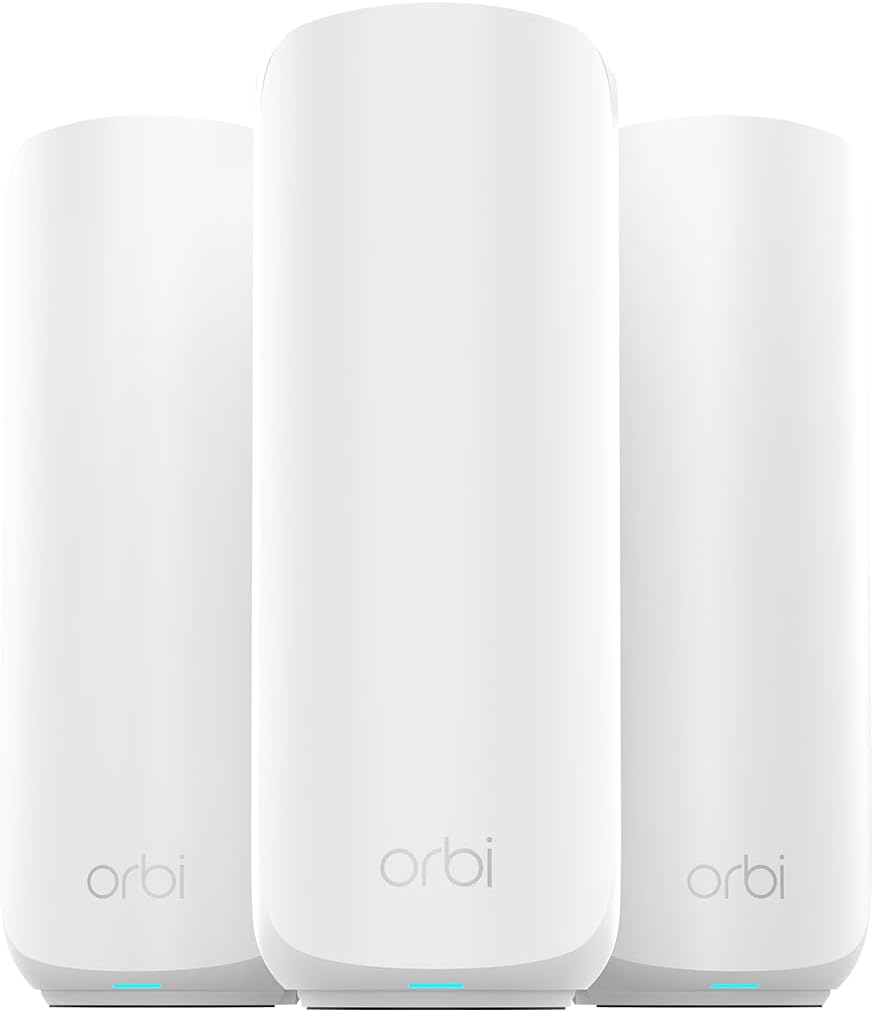
This NETGEAR Orbi 370 series mesh system covers up to 6000 square feet which is perfect for very large homes or multi story buildings. It received a 4.2 rating from users who value complete coverage without dead zones in every room.
We may earn a commission when you buy through this link, at no additional cost to you.
All three units work together to create one seamless network name so devices switch between them automatically. WiFi 7 gives up to 5Gbps speed and enhanced backhaul keeps speeds fast even when you are using the satellites far from the main router.
The cost is higher than a single router but you avoid the need for separate extenders that slow down speeds. If you have a big house this mesh system is the most reliable way to keep every room connected.
Choose this mesh if you need to cover a large area and want a system that is easy to manage from one app.
Three nodes create seamless WiFi across 6000 square feet so you never lose connection moving from room to room.
Add more satellites later if you build an addition or need extra coverage in specific rooms.
We may earn a commission when you buy through this link, at no additional cost to you.
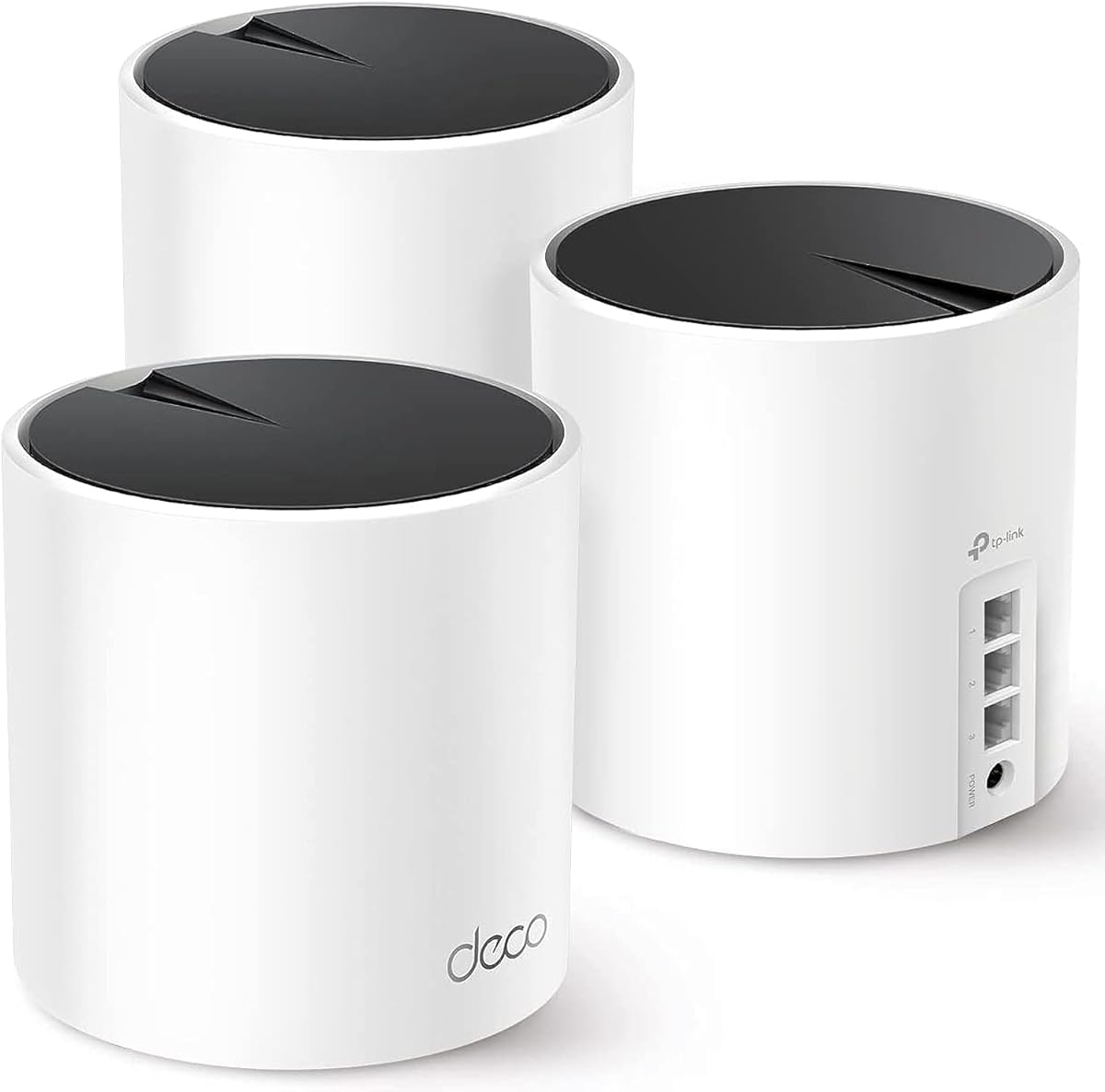
The TP Link Deco X55 mesh system is a solid choice for large homes that want affordable whole house WiFi coverage. It holds a strong 4.4 rating from users who appreciate simple setup and reliable signal throughout a 6500 square foot area.
We may earn a commission when you buy through this link, at no additional cost to you.
Three units form a mesh network so you get a single WiFi name and strong signal in every room. You can use wired backhaul through the gigabit ports for faster speeds between units if your home has existing ethernet cables.
It lacks WiFi 7 support and has slightly lower peak speeds than newer mesh systems but it is very stable. The Deco app makes management simple and security features come included without extra monthly fees.
Pick this mesh if you have a large home and want a budget friendly way to eliminate dead zones with reliable WiFi 6 speeds.
Each unit has three gigabit ports so you can connect them with cables for faster and more stable mesh backhaul.
The Deco app provides visual guidance for setup and lets you manage network settings from anywhere.
We may earn a commission when you buy through this link, at no additional cost to you.
This TP Link BE9300 router is a high performance tri-band WiFi 7 model designed for power users and large homes. It has a 4.0 rating from users who value its ability to handle many wired devices and high throughput for streaming and gaming.
We may earn a commission when you buy through this link, at no additional cost to you.
Four 2.5G LAN ports mean you can connect multiple devices like PCs and drives at full speed. WiFi 7 features like 320 MHz channels give you up to 9.3Gbps total speed and help maintain strong performance even with many devices online.
The setup is more involved than basic routers and you will need a modem for internet access. But if you need many fast wired ports and strong wireless speed this router offers excellent future proof capabilities.
Choose this router if you have many wired devices to connect and want one of the fastest available WiFi 7 routers.
Four 2.5G LAN ports let you connect several wired devices at full speed without extra switches.
A separate network for smart devices improves security and keeps them off your main network.
We may earn a commission when you buy through this link, at no additional cost to you.
The TP Link AC1200 router is a budget friendly option that delivers reliable coverage for small homes and apartments. It has a strong 4.5 rating from users who need basic but dependable WiFi without spending much money on new tech.
We may earn a commission when you buy through this link, at no additional cost to you.
Four external antennas with beamforming focus signal toward your devices for better range than typical low cost routers. All four LAN ports are gigabit so you can connect wired devices at full speed and OneMesh lets you add extenders later.
It uses older WiFi 5 technology so speeds are lower than newer models but it still works well for streaming and browsing. If you have a smaller space and a tight budget this router covers your needs well.
Choose this router if you want a simple affordable solution for a small home and do not need the latest WiFi 6 or 7 features.
At a low price point this router gives you reliable gigabit wired and wireless connectivity for basic home needs.
Add a OneMesh extender later to cover larger spaces without replacing your main router or paying extra setup fees.
We may earn a commission when you buy through this link, at no additional cost to you.
Choosing the right long range WiFi router requires understanding key factors that affect signal strength and speed in your home.
Newer standards like WiFi 7 and 6E offer faster speeds and less congestion. Tri-band routers add a 6GHz band that helps separate traffic for better performance when many devices are online. Single or dual band routers work for smaller homes but may struggle with heavy loads.
Look for tri-band if you stream 4K video or game online while others work from home.
Coverage depends on antenna count and power. High gain antennas and beamforming focus signal toward devices to push data through walls. Manufacturers list square footage but real world results vary based on home layout and building materials.
Choose a model with coverage at least 20 percent higher than your home size to ensure strong signal in all rooms.
Modern ISPs offer multi-gigabit plans so check for 2.5G or 10G wired ports to avoid bottlenecks. Even if you rely mostly on wireless you may connect a TV or gaming console via cable for stable performance.
Select routers with multi-gig ports if you plan to upgrade your internet plan to speeds over one gigabit.
Mesh systems use multiple units to cover larger homes without dead zones. A standalone router works well for smaller or single story spaces. Consider if you can add nodes later as your needs grow.
Buy a mesh set if you have a multi story home or thick walls that weaken single router signals.
Built-in security tools help protect smart devices from threats and parental controls let you limit screen time. Some brands include these features for free while others require a subscription for advanced protection.
Choose a router with free security features if you want to safeguard family devices without extra monthly costs.
Ensure the router works with your ISP modem and has the necessary ethernet ports. Most models need a separate modem for cable or fiber connections. Setup apps make installation easier but check if you need to install additional software.
Verify ISP compatibility before buying to avoid returns or extra equipment costs for bridging or modem setup.
Price often matches performance and new standards. WiFi 7 routers cost more now but may last longer as devices adopt the new tech. If you buy every few years choose newer standards even at higher cost.
Balance upfront cost with how long you plan to keep the router before replacing it.
Most routers include mobile apps that let you run speed tests pause devices and update firmware remotely. Good apps save time and help you troubleshoot issues from anywhere in the house.
Pick a router with a highly rated app if you want to manage your network without opening a browser.
Start by placing your router in a central high location away from walls or metal objects. Keep it out of direct sunlight and ensure vents are clear so it stays cool and performs well over time.
Update firmware regularly through the mobile app or web interface to fix bugs and improve security. Restart the router every few weeks to clear memory and help it maintain strong connections for all devices.
Use the guest network feature for visitors so they do not access your main files or printers. Periodically run a speed test to check performance and move the router if you notice dead zones.
Most routers work with any ISP as long as they use a separate modem for cable or fiber connections. Some providers bundle a gateway so you may need to set it to bridge mode for your router to function fully.
WiFi 7 adds faster speeds with 320MHz channels and supports Multi Link Operation so devices send data across bands at once. This reduces latency and congestion when many devices stream or game simultaneously.
A mesh system uses two or more units that form one seamless network name so devices switch automatically as you move. It covers larger homes better than a single router and reduces dead zones.
Most routers need a modem to connect to the internet. However you can use a router in access point mode with existing wired internet to add wireless capability in your home.
Check for updates every few months or enable auto update in the app if available. Firmware updates fix security vulnerabilities and improve performance for connected devices.
Thick walls or distance from the router weaken signals. Moving the router to a central spot or adding a mesh node can improve coverage in weak areas.
The top picks like the TP Link BE6500 and NETGEAR Nighthawk WiFi 7 offer excellent range and speed for most homes in 2026. For large multi-story homes consider a mesh system to ensure consistent coverage throughout the entire house.
Prioritize the number of devices you connect and how much internet speed you pay for. Tri-band and WiFi 7 models handle more traffic but may cost extra compared to dual-band or WiFi 6 alternatives.
Prices change so check current deals before buying to get the best value. Review all factors one more time to make sure your router choice meets your coverage and budget needs.