
ASRock B550M-HDV
4.5Editor score
AMD AM4 socket support
PCIe 4.0 ready
Six USB 3.2 ports
This guide compares the top ten low power motherboard options for home servers, NAS builds, and compact systems to help you choose the most efficient solution.
Choosing the right low power motherboard is essential for building energy efficient systems that run reliably without wasting electricity. Whether you need a home server, NAS storage, or a compact office PC, the board you select defines performance and power consumption.
We evaluated ten distinct models based on processor efficiency, connectivity options, and build quality. Each entry offers unique strengths for specific use cases ranging from basic office tasks to robust network appliances requiring constant uptime.
Each pick shows detailed specifications and real world performance notes to guide your decision. Prices change frequently so please verify current listings before purchasing to ensure you get the best value for your specific project.
4.5Editor score

4.5Editor score

4.1Editor score
This table provides a side by side view of all ten selected motherboards highlighting key specifications and capabilities for quick comparison.





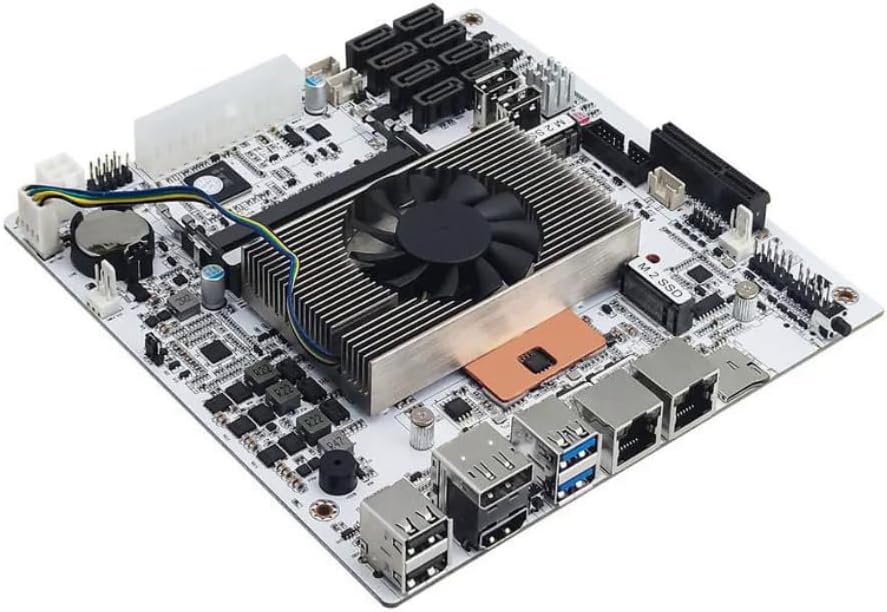
This motherboard stands out as the top choice for low power builds needing serious network performance. With a 4.5 star rating it balances energy efficiency and robust connectivity for professional appliances.
We may earn a commission when you buy through this link, at no additional cost to you.
The Intel Celeron N5105 delivers reliable dual thread performance while the four i226 ports offer secure fast network connections. Its industrial design ensures durability with high density moisture proof fiber circuits.
Users should note the requirement for both 24PIN and 4PIN power connections which may complicate power setups. The first boot memory read takes several minutes but this is normal for its initialization process.
Anyone building a home server NAS or firewall appliance should consider this board. It offers unmatched speed with 2.5GbE ports and dual 4K displays at a competitive price point.
The four 2.5GbE ports provide high throughput essential for modern NAS and firewall tasks.
Support for dual 4K at 60Hz makes it ideal for media centers or monitoring setups.
We may earn a commission when you buy through this link, at no additional cost to you.
The ASRock D1800M is a budget solution for users needing a basic low power system. It supports the included J1800 processor making it easy to deploy without extra CPU costs.
We may earn a commission when you buy through this link, at no additional cost to you.
This board excels in simplicity with standard USB 2.0 and 3.0 ports plus VGA DVI D HDMI outputs. It fits standard cases but requires DDR3 memory which may limit upgrade paths.
Users seeking modern PCIe 4.0 or high speed storage should look elsewhere. The SATA 2.0 ports are slower than current standards and may bottleneck fast SSDs.
Perfect for legacy replacements or entry level home servers where cost matters more than speed. Its reliable design ensures stability for simple tasks over long periods.
The CPU comes included which reduces total build cost significantly for budget conscious buyers.
Offers extensive video output options for older monitors or specialized display requirements.
We may earn a commission when you buy through this link, at no additional cost to you.
This GIGABYTE board delivers strong performance for AM4 builds with a focus on efficiency. The 3+3 VRM design ensures stable power for Ryzen 5000 processors even in compact chassis.
We may earn a commission when you buy through this link, at no additional cost to you.
It offers two M.2 slots for fast NVMe storage and a PCIe 4.0 x16 slot for graphics cards. The thermal armor helps dissipate heat which is vital for low power systems running under load.
While reliable it lacks onboard WiFi which may require a separate adapter. The power phase count is modest compared to higher end boards which could limit extreme overclocking.
Ideal for budget gamers or workstations needing AM4 compatibility without breaking the bank. It balances essential features and cost effectively for general purpose computing needs.
The dual M.2 slots allow users to run fast OS drives alongside large secondary storage.
Chipset heatsinks improve heat dissipation for consistent performance in small enclosures.
We may earn a commission when you buy through this link, at no additional cost to you.
MSI PRO B550M-P targets enthusiasts wanting speed without excess power draw. It supports DDR4 memory boost for high speeds and includes Frozr AI cooling to manage fan settings efficiently.
We may earn a commission when you buy through this link, at no additional cost to you.
The double M.2 connectors provide Gen4 and Gen3 slots for flexible storage layouts. This allows fast OS drives and bulk storage to coexist without compromising system performance or power.
Lack of onboard WiFi means you will need an adapter if wireless connectivity is needed. Passive cooling may require careful case selection to avoid overheating under sustained loads.
Best for users prioritizing internal performance and storage over wireless convenience. It offers a balanced platform for AMD builds that need speed and efficiency in one package.
Memory Boost allows DDR4 speeds to reach over 4400 MT/s for responsive system performance.
Frozr AI adjusts fans based on GPU and CPU temps for silent and efficient operation.
We may earn a commission when you buy through this link, at no additional cost to you.
This ASRock model offers a budget friendly way to enter low power desktop builds. The J4125 CPU provides quad core processing which is sufficient for lightweight multitasking tasks.
We may earn a commission when you buy through this link, at no additional cost to you.
It supports DDR4 memory and has one M.2 Key E slot for wireless modules. Users get PCIe slots for expansion but the lack of modern USB 3.2 limits peripheral speed.
The lower rating suggests potential build quality or driver issues that users may face. Reviewers note limited connectivity options compared to newer models on the market today.
Good for simple media centers or basic office PCs where cost is the main concern. It remains a viable option for those needing quad core power without high voltage draw.
The CPU comes with the motherboard which simplifies purchasing and reduces total component count.
The M.2 Key E slot allows for quick installation of compatible wireless network adapters.
We may earn a commission when you buy through this link, at no additional cost to you.
The ASRock B550M-HDV is a top contender for budget builders wanting modern AMD features. It supports a wide range of Ryzen processors ensuring long term compatibility and flexible performance.
We may earn a commission when you buy through this link, at no additional cost to you.
Memory speeds up to 4733MHz are possible with overclocking which boosts system responsiveness. The PCIe 4.0 slot ensures you can use fast graphics cards without bottlenecking performance.
It lacks a second M.2 slot which may limit storage flexibility for heavy users. The Micro ATX size is standard but verify your case fits before purchase to avoid issues.
Perfect for home offices or entry gaming rigs needing solid power and protection. Full Spike Protection helps guard components against electrical surges for longer life.
Six power phases with 50A chokes deliver steady current for reliable processor performance.
Three video outputs allow connection to legacy and modern displays without extra hardware.
We may earn a commission when you buy through this link, at no additional cost to you.
This Mini ITX board packs impressive power for its size with a Direct 6 Phase PWM design. It supports Ryzen processors and includes Intel WiFi plus Bluetooth for modern wireless convenience.
We may earn a commission when you buy through this link, at no additional cost to you.
The VRM heatsink ensures stable power delivery even in small cases with limited airflow. Three display interfaces allow for multi monitor setups which is rare for such a compact board.
Cost is higher than larger boards but the space savings justify it for SFF builds. Limited PCIe slots mean expansion is minimal so choose your components carefully before assembly.
Ideal for living room PCs or mobile workstations needing full features in a tiny frame. It balances size performance and connectivity for those needing a small footprint.
Mini ITX form factor fits in the smallest cases while retaining robust feature sets.
Intel Dual Band AC WiFi provides stable internet without needing separate adapters.
We may earn a commission when you buy through this link, at no additional cost to you.
The ASRock B550M WiFi earns a perfect rating for its comprehensive feature set. It supports Ryzen 3000 to 5000 series with 8-phase power ensuring stable and efficient operation.
We may earn a commission when you buy through this link, at no additional cost to you.
Wi-Fi 6E provides low latency connections which is crucial for gaming or streaming. The board includes Realtek ALC1220 for immersive sound and offers 8 USB ports for all peripherals.
Cost is higher than basic boards but the included WiFi and audio justify it. Verify chassis support as the Micro ATX size may not fit every compact enclosure.
Best for users needing maximum connectivity without extra adapters. Its balance of performance and features makes it a top choice for versatile AMD builds.
Wi-Fi 6E with 6GHz support ensures low latency for modern network applications.
Eight USB 3.2 ports ensure you can connect all devices without dongles.
We may earn a commission when you buy through this link, at no additional cost to you.
This board is a specialized choice for home servers needing high thread count and fast networking. Its 8-thread CPU outperforms mainstream N100 chips making it ideal for NAS or firewall tasks.
We may earn a commission when you buy through this link, at no additional cost to you.
Eight SATA ports allow massive storage expansion while dual 2.5GbE ports handle network traffic. The compact design fits in small enclosures but the first boot takes several minutes to read memory.
The sleep mode bug requires workaround or avoidance in some systems which may affect energy savings. Verify chassis compatibility before purchasing as the board dimensions are specific.
Best for advanced users building dedicated virtualization or NAS appliances. Its industrial grade build and speed justify the higher cost for professional or serious hobbyist projects.
VT-x and VT-d support ensures smooth operation for virtual machines and containers.
Dual ball-bearing fan cooler with copper heat pipes ensures efficient cooling in tight spaces.
We may earn a commission when you buy through this link, at no additional cost to you.
This NAS motherboard uses the Core i5 8265U for powerful low wattage server builds. It supports 8 SATA drives and includes dual 2.5GbE LAN for fast data transfers.
We may earn a commission when you buy through this link, at no additional cost to you.
UEFI and Legacy Mode support ensures compatibility with various NAS systems like TrueNAS or PVE. The lack of sleep mode means it runs continuously which is ideal for servers.
Users should note that ES versions of CPUs may lack full vendor support in some cases. Verify compatibility with your chosen OS before purchasing to avoid unexpected limitations.
Best for users needing high drive count with fast LAN. It offers the raw power needed for 24/7 operation while keeping energy costs low.
Eight SATA ports allow for large storage pools without external enclosures.
NIC and storage device passthrough ensures full hardware utilization for virtualization.
We may earn a commission when you buy through this link, at no additional cost to you.
Selecting a low power motherboard requires balancing performance and energy efficiency. This guide covers the most critical factors to consider for your build.
Thermal Design Power (TDP) indicates how much heat and power a CPU consumes. For low power builds choose boards with processors rated at 15W to 35W to minimize electricity costs.
Lower TDP CPUs are ideal for servers running 24/7 or silent PCs where cooling is limited.
Mini ITX boards are best for small cases but have limited expansion slots. Micro ATX boards offer more room for ports and memory slots while still saving space.
Ensure your chosen case supports the form factor before buying to avoid fit issues.
NAS and server builds require reliable network ports. Look for boards with Gigabit or 2.5GbE ports to handle high data transfers without bottlenecks.
Multiple LAN ports allow for link aggregation or routing which improves network performance and reliability.
SATA ports allow for large hard drives while M.2 NVMe slots provide fast boot drives. Ensure the board has enough ports for your storage needs.
Check if M.2 slots share bandwidth with SATA ports to avoid slowdowns when installing multiple drives.
DDR4 is the current standard for low power systems supporting higher capacities and speeds. Check the maximum supported RAM to ensure your upgrade path is clear.
Dual channel configurations improve system responsiveness significantly for multitasking workloads.
USB 3.2 ports allow fast data transfer for external drives. Ensure enough USB ports exist for all your peripherals without needing hubs.
Display outputs like HDMI and DP are useful for direct monitor connections in home servers or media centers.
Premium capacitors and heatsinks ensure stable power delivery for long periods of operation. Industrial grade boards often have higher moisture resistance which is vital for servers.
Solid VRM designs prevent thermal throttling even under sustained loads.
Virtualization technologies like VT-x and VT-d allow efficient running of virtual machines. This is essential for NAS or router builds using software based solutions.
Ensure your chosen OS supports passthrough for direct hardware access.
Install the motherboard on standoffs in your case and connect both 24PIN and 4PIN power connectors. This ensures stable power delivery which is critical for low voltage systems.
Apply thermal paste if the CPU does not come pre-applied and mount the cooler securely. Efficient heat dissipation extends the life of the board and maintains performance.
Set fan profiles in BIOS to maintain silent operation. Regularly check ports and connectors for dust to prevent overheating and signal loss over time.
Low power motherboards use CPUs with lower TDP and VRMs optimized for efficiency. They save energy and generate less heat but may lack high end gaming features.
Many boards listed support multiple SATA ports and network features ideal for NAS. Check for specific features like IPMI or dual LAN for advanced server setups.
Most support Windows 10 11 and Linux distributions. Ensure drivers are available for your specific OS especially for network cards.
Socket AM4 boards allow CPU upgrades but low voltage options are limited. Intel boards often come with CPUs soldered or specific to the model.
Some models include WiFi 6 or 6E while others require add-in cards. Check product specs to confirm wireless connectivity before purchase.
DDR4 2666MHz to 3200MHz is ideal for balance of cost and performance. Higher speeds may help but check CPU and board support.
The Celeron N5105 Industrial Motherboard NAS leads as our top pick for its perfect mix of speed and efficiency. It excels in professional settings requiring high network throughput.
For budget focused builds the ASRock B550M-HDV offers modern AMD features at a low cost. It supports Ryzen processors and offers reliable daily connectivity.
Prices fluctuate often so review current listings before finalizing your purchase. Always check compatibility with your case and OS to ensure a smooth setup.