
HP Chromebook 14 x360 Plus
4.2Editor score
360-degree hinge design
4GB LPDDR5 memory
Wi-Fi 6 connectivity
Finding the right laptop can be challenging when you need performance without breaking the bank. Whether you are a student, professional, or casual user, there are many powerful options available that rival the capabilities of traditional MacBooks while offering unique features and flexibility for your daily tasks.
We have rigorously compared a diverse selection of laptops ranging from budget-friendly Chromebooks to high-end Windows machines and even recent Apple models. Our evaluation focuses on build quality, battery life, display performance, and overall value to ensure you get a reliable device that meets your specific workflow requirements.
Each pick in this guide highlights specific strengths such as portability, screen quality, or operating system flexibility. Keep in mind that prices and availability can change frequently so checking the latest deals before making a purchase decision is always a smart move for getting the best value.
4.2Editor score

4.4Editor score

4.6Editor score
As an Amazon Associate we earn from qualifying purchases.
The following table provides a side-by-side overview of key specifications for each laptop reviewed in this guide to help you quickly compare processing power, memory, storage, and display features across the different models.


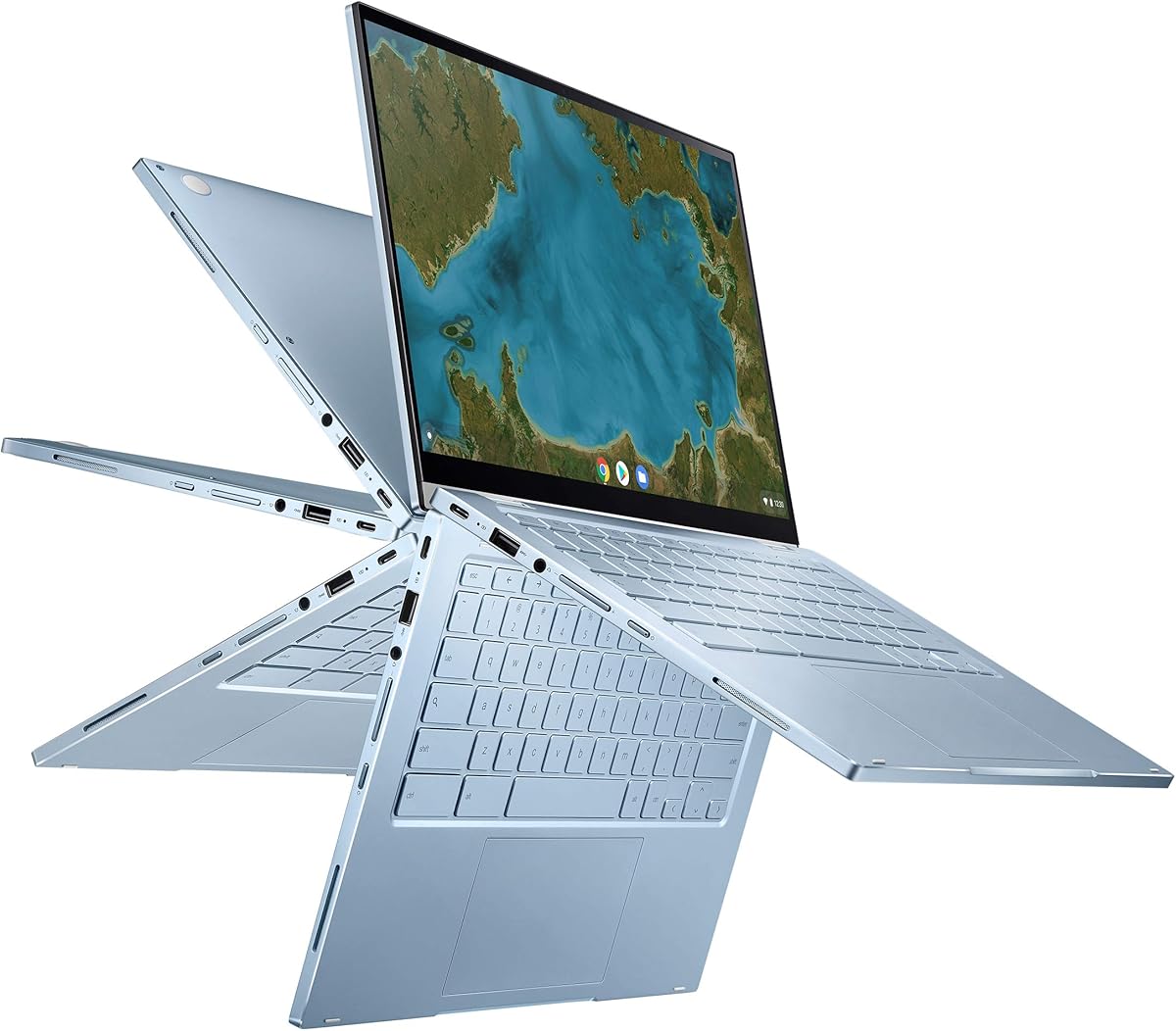


The HP Chromebook 14 x360 Plus stands out as an excellent budget-friendly option for those seeking a MacBook alternative without the high price tag. With a solid rating from users, this device offers a versatile form factor that adapts to various usage scenarios effectively.
We may earn a commission when you buy through this link, at no additional cost to you.
Its 360-degree hinge allows for multiple usage modes including tent, stand, and tablet modes which enhances productivity and entertainment value. The inclusion of Wi-Fi 6 ensures fast and reliable connectivity for modern web applications and streaming services.
While the storage and memory are modest, they are sufficient for typical Chrome OS tasks like web browsing and document editing. The trade-off is acceptable for users who rely heavily on cloud storage and do not require local processing power for heavy applications.
This laptop is ideal for students and families needing a reliable secondary device for schoolwork and media consumption. Its durable build and extended support window make it a practical choice for everyday computing needs on a budget.
The flexible hinge design enables seamless transitions between laptop and tablet modes for enhanced usability.
Wi-Fi 6 and Bluetooth 5.4 ensure stable connections for wireless peripherals and high-speed internet access.
We may earn a commission when you buy through this link, at no additional cost to you.
The ASUS Chromebook Flip CX1 is tailored for students who need a durable and capable machine for online learning and note-taking. Its rating reflects satisfaction with its build quality and performance for daily tasks like browsing and video calls.
We may earn a commission when you buy through this link, at no additional cost to you.
With 8GB of RAM, this device handles multitasking better than many entry-level Chromebooks allowing smooth switching between multiple browser tabs and applications. The inclusion of a free Google One AI Premium plan adds value for users needing extra cloud storage.
The Intel Celeron processor is adequate for light workloads but may struggle with more demanding tasks like video editing or heavy multitasking. This limitation is balanced by the long battery life which supports full days of use without needing a charger.
Ideal for K-12 students or homeschooling environments this laptop offers robust protection against physical wear and tear. The combination of hardware resilience and cloud-centric features makes it a strong contender for educational purposes.
The 8GB RAM configuration provides a smoother experience when managing multiple applications simultaneously.
Built-in Google apps and cloud backup streamline workflow for users who work primarily online.
We may earn a commission when you buy through this link, at no additional cost to you.
The Samsung Galaxy Book4 2024 delivers premium performance that competes well with higher-end MacBook models. It receives high marks for its robust hardware configuration which supports demanding business applications and creative tasks effectively.
We may earn a commission when you buy through this link, at no additional cost to you.
The Intel Core 7 processor combined with 16GB of RAM ensures fast responsiveness even during intensive workloads. Users appreciate the large 512GB SSD which provides quick boot times and sufficient space for local files without relying heavily on cloud storage.
While the display is crisp and color-accurate, the device is slightly heavier than some portable alternatives which may impact travel comfort. However the trade-off is justified by the comprehensive connectivity options including HDMI and Ethernet for versatile setup configurations.
This laptop is best suited for professionals who need a powerful Windows machine for daily business operations. Its blend of performance features and ergonomic design makes it a reliable choice for extended work sessions.
The 10-Core processor provides ample power for multitasking and complex application workloads.
The IPS panel offers wide viewing angles and vibrant colors for an immersive visual experience.
We may earn a commission when you buy through this link, at no additional cost to you.
The Google Pixelbook Go is renowned for its ultra-portable design and reliable performance making it a favorite for travelers. Its rating highlights user satisfaction with the device's ability to stay cool and quiet even under sustained use.
We may earn a commission when you buy through this link, at no additional cost to you.
Weighing barely 1kg this Chromebook is easy to carry in any bag while maintaining a sturdy build quality. The battery life supports full days of use and the fast charging feature ensures quick top-ups when time is short.
Performance is adequate for web-based tasks though the limited number of ports may require dongles for external peripherals. The keyboard and trackpad are well-designed providing comfort during long typing sessions without causing strain.
This device is perfect for mobile professionals who prioritize weight and battery life over heavy processing power. Its simplicity and reliability make it an excellent companion for work on the go.
The absence of a fan ensures silent operation which is ideal for quiet environments.
Ultra-lightweight construction makes this laptop the easiest to carry during daily commutes.
We may earn a commission when you buy through this link, at no additional cost to you.
The Lenovo Flex 14 2-in-1 offers a versatile experience that allows users to switch between traditional laptop and tablet modes easily. It is highly rated for its inclusion of an active pen which enhances creativity and note-taking capabilities.
We may earn a commission when you buy through this link, at no additional cost to you.
Powered by an AMD Ryzen processor with 12GB of RAM this device handles Windows applications efficiently. The NVMe SSD ensures quick data access which improves overall system responsiveness compared to older storage technologies.
While the design is functional it lacks the sleek aesthetic of newer models and runs an older version of Windows which might require updates. However these trade-offs are acceptable given the strong performance and utility features offered.
This laptop is ideal for users who want a Windows convertible with tangible input options for drawing or handwriting. Its balanced performance and practical features make it a solid value proposition.
The included active pen enables natural handwriting and drawing directly on the screen.
A built-in webcam shutter provides physical privacy protection when not in use.
We may earn a commission when you buy through this link, at no additional cost to you.
The ASUS Chromebook Flip C433 combines a sleek design with reliable performance making it stand out among budget devices. Users appreciate its premium aluminum build and the spacious keyboard that enhances typing comfort.
We may earn a commission when you buy through this link, at no additional cost to you.
Its NanoEdge display maximizes screen real estate within a compact footprint allowing for immersive viewing without excessive bezels. The inclusion of a backlit keyboard is a rare feature at this price point that aids productivity in low light.
Although the storage is limited the device runs smoothly for typical web tasks thanks to its efficient processor and RAM configuration. Users must manage files carefully or rely on cloud storage to accommodate the limited local space.
This model is best for style-conscious buyers who want a reliable Chromebook for everyday tasks. The blend of aesthetics and function provides a high-quality experience without the premium price of larger brands.
The narrow bezel design delivers a modern look that feels more premium than the price suggests.
A backlit keyboard ensures comfortable typing in dimly lit environments or offices.
We may earn a commission when you buy through this link, at no additional cost to you.
The Lenovo Flagship Chromebook is designed to deliver essential computing power in a package that is easy to transport. It serves well as a primary device for basic web tasks and media consumption at an accessible price.
We may earn a commission when you buy through this link, at no additional cost to you.
Powered by a MediaTek processor it offers adequate performance for browsing and streaming while maintaining low power consumption. The Wi-Fi 6 capability ensures that wireless connections remain fast and stable during online meetings or downloads.
Users should be aware that the limited RAM and storage mean this device is best suited for light use cases. However the responsive touchscreen and full HD resolution make it a pleasant experience for reading and watching videos.
This laptop is an excellent entry-level option for families or students who need a reliable machine for homework. Its simplicity and low cost make it a practical choice for specific daily needs.
The slim design allows for effortless carrying in backpacks or briefcases.
Interactive screen navigation provides a modern user experience for media consumption.
We may earn a commission when you buy through this link, at no additional cost to you.
The Apple 2026 MacBook Neo introduces new AI features and a modern design that elevates the MacBook experience. Its high rating reflects user approval of its sleek aesthetics and powerful performance for everyday tasks.
We may earn a commission when you buy through this link, at no additional cost to you.
Powered by the A18 Pro chip this device offers significant speed advantages over previous models enabling seamless multitasking and fast application launches. The battery life supports all-day productivity without needing a charger which is ideal for students.
While the RAM and storage are fixed and somewhat limited they are compensated by the speed of the unified memory architecture. The display delivers rich colors and sharp text which enhances media consumption and creative work.
This model is perfect for users who want a premium portable device with modern AI tools integrated into the OS. The balance of performance and portability makes it a top choice for professional use.
Built-in AI tools assist with writing and summarization tasks to boost productivity.
The Liquid Retina display ensures text and images look crisp and vibrant.
We may earn a commission when you buy through this link, at no additional cost to you.
The Apple 2021 MacBook Pro with M1 Max offers professional-grade performance that remains highly relevant for demanding tasks. It is rated well for its ability to handle heavy workflows like video editing and coding with ease.
We may earn a commission when you buy through this link, at no additional cost to you.
The M1 Max chip paired with 64GB of RAM provides immense power for multitasking and complex computations. Users benefit from a large 2TB SSD which ensures fast data access and ample space for large project files.
Buying a renewed model means checking the condition carefully but the performance remains top-tier for professionals. The battery and warranty details provide assurance that the device is reliable despite being pre-owned.
This laptop is ideal for creatives and engineers who need a desktop replacement for intensive workloads. The combination of raw power and value makes it a compelling option for serious professionals.
The high performance chip supports demanding creative software without lag or slowdown.
Renewed units provide access to premium hardware at a more affordable price point.
We may earn a commission when you buy through this link, at no additional cost to you.
The Apple MacBook Pro 15-inch Intel model provides access to macOS at a much lower entry cost than newer versions. While it has a lower rating due to age it still serves well for basic Mac needs.
We may earn a commission when you buy through this link, at no additional cost to you.
Its Intel Core i7 processor and 16GB of RAM offer sufficient power for general productivity and media tasks. The large 15-inch Retina display is excellent for multitasking and viewing content with high fidelity.
Users should note that battery life and performance are not comparable to Apple Silicon models which may impact mobility. However for those locked into the Mac ecosystem it offers a cost-effective entry point into professional computing.
This device is best for users who need macOS compatibility on a strict budget for standard workflows. It remains a reliable option for general computing despite its older internal components.
An accessible way to experience macOS hardware without the high premium price.
The Retina screen delivers sharp visuals ideal for creative and media work.
We may earn a commission when you buy through this link, at no additional cost to you.
Selecting the right laptop involves balancing performance, portability, and price. This section outlines key factors to consider before making a purchase decision.
Decide whether you prefer macOS, Windows, or ChromeOS as this choice affects software compatibility and workflow. ChromeOS is ideal for web tasks, while Windows offers broader app support and macOS provides seamless integration with Apple devices.
Choose an OS that matches your daily software needs and ecosystem preferences.
Look for modern processors like Intel Core i5/i7 or Apple Silicon chips to ensure smooth multitasking and longevity. Avoid older or entry-level processors if you plan to run demanding applications or keep the device for several years.
Prioritize processors that align with your performance requirements for long-term satisfaction.
Ensure the device has at least 8GB of RAM for comfortable multitasking and sufficient SSD storage for your files. Upgradable options or higher baseline capacity prevent bottlenecks as your usage grows over time.
Opt for higher memory and storage configurations if you work with large files or apps.
A high-resolution screen with good color accuracy is essential for viewing content and reducing eye strain. Look for IPS panels with at least 1080p resolution and consider touch capabilities if you want interactive input.
Select a display that offers sharpness and brightness for your typical working environments.
If you work on the go, prioritize laptops with at least 8 hours of battery life to avoid carrying chargers constantly. Check reviews for real-world battery performance rather than relying solely on manufacturer claims.
Battery longevity is critical for mobile users who need reliability without constant power access.
Consider the weight and size of the laptop to ensure it fits comfortably in your bag and is easy to carry. Durable materials and a solid hinge design contribute to long-term usability and resistance to daily wear.
Choose a build quality that matches your lifestyle and physical transport needs.
Check for enough USB ports, HDMI, or SD card slots to connect your peripherals without needing too many dongles. Modern laptops may rely on USB-C so ensure you have adapters for legacy devices if necessary.
Verify that the available ports meet your external device requirements for seamless connectivity.
Determine a realistic budget and weigh it against the features offered to find the best value. Sometimes spending slightly more upfront on better specs can save money on replacements or upgrades later.
Balance cost with necessary features to maximize the return on your investment.
To extend the lifespan of your laptop, avoid exposing it to extreme temperatures or direct sunlight which can damage the battery and screen. Keep the device in a protective case when traveling to prevent scratches and minor impacts.
Regularly clean the screen and keyboard with a soft microfiber cloth to remove dust and oils that can accumulate over time. Use compressed air to gently clear debris from ports and vents to maintain optimal airflow and cooling.
Update your operating system and software regularly to ensure security patches and performance improvements are applied. Back up important data frequently using cloud services or external drives to protect against accidental loss or hardware failure.
Chromebooks are excellent alternatives for users who primarily work within a browser environment. They offer fast boot times and robust security but lack support for native desktop applications like full versions of Microsoft Office or Adobe Creative Suite.
No, macOS is proprietary software designed exclusively for Apple hardware. However, you can achieve a similar workflow by using cloud-based apps and tools that are compatible with both Windows and macOS systems.
MacBooks and modern Chromebooks typically offer the longest battery life. The Google Pixelbook Go and Apple 2026 MacBook Neo both support all-day use without needing frequent recharges.
Most modern laptops support external monitors via HDMI or USB-C with display output. Check the specific ports on your chosen model to ensure compatibility with your external setup.
Buying a renewed MacBook can be a smart way to save money while getting premium hardware. Ensure you check the battery health and warranty terms to confirm it meets your expectations for longevity.
Apple Silicon chips are designed by Apple for better efficiency and performance in their devices. They typically offer longer battery life and faster speeds compared to traditional Intel processors in similar form factors.
The top picks in this guide offer a range of options from budget Chromebooks to high-performance Windows laptops. Whether you prioritize portability, display quality, or raw power there is a device here that fits your needs.
Consider your specific workflows and how much you value ecosystem integration when making a decision. Sometimes the best choice is not the most expensive one but the one that best supports your daily tasks.
Prices and availability change often so check current listings before finalizing your purchase to ensure you get the best deal available in the market today.