
QNAP TL-D1600S 16 Bay SATA
4.5Editor score
16 x 3.5-inch SATA 6Gb/s
Storage expansion for QNAP NAS
High-Performance Desktop SATA JBOD
Selecting the right storage solution is critical for businesses and enthusiasts needing massive capacity. A 16 Bay NAS Enclosure offers the scalability required for growing data demands while maintaining robust performance and reliability for mission-critical applications.
We evaluated ten leading options based on processor power, network capabilities, drive compatibility, and expansion potential. Our analysis focuses on real-world usability, thermal management, and the ability to handle intensive workloads without compromising data integrity or system stability.
Each pick highlights unique strengths tailored to specific use cases like virtualization, media rendering, or bulk archival. While features vary widely, all selections prioritize secure data handling and efficient airflow. Please note that availability and configurations may change over time.
4.5Editor score

4.5Editor score

4.1Editor score
As an Amazon Associate we earn from qualifying purchases.
The following table provides a side-by-side comparison of the top ten 16 Bay NAS Enclosures available this month. We highlight key specifications to help you quickly identify the model that best fits your storage capacity and performance requirements.



The Synology 16 bay RackStation RS4021xs+ stands out as a top-tier enterprise network-attached storage device designed for heavy workloads. It delivers exceptional throughput and random read performance making it suitable for virtualization and database hosting tasks.
We may earn a commission when you buy through this link, at no additional cost to you.
Its 8-core Intel processor allows multiple compute-intensive services to run smoothly. Two PCIe expansion slots provide flexibility for adding M.2 NVMe cache or high-bandwidth network cards ensuring the system can scale with your business needs.
Reliability is ensured through two redundant power supplies that keep the system running even if one fails. While the storage capacity can expand up to 40 drive bays using RX1217 units the initial cost and need for separate hardware are trade-offs.
Businesses needing high performance and robust failover capabilities should consider this unit. It represents a solid investment for organizations prioritizing data integrity and continuous uptime over budget constraints.
The powerful processor supports virtualization and database tasks without bottlenecks.
Expandable drive bays and PCIe slots allow future-proofing for growing data.
We may earn a commission when you buy through this link, at no additional cost to you.
The Asustor Lockerstor 10 Gen3 AS6810T is engineered for enthusiasts and professionals demanding enterprise-grade performance in a compact package. It features an AMD Ryzen Embedded V3C14 quad-core processor optimized for virtualization and AI workloads.
We may earn a commission when you buy through this link, at no additional cost to you.
Networking capabilities are impressive with dual 10GbE and dual 5GbE ports allowing ultra-high bandwidth and link aggregation for multi-user environments. The inclusion of USB4 40Gbps ensures external storage integration is nearly as fast as internal drives.
While it offers only 10 drive bays the system is built for performance rather than raw bulk capacity. ECC DDR5 memory ensures data integrity which is critical for mission-critical tasks like databases and virtualization platforms.
Creative studios and IT environments requiring fast access to high-resolution files will find this NAS ideal. It balances raw power with advanced connectivity options that few competitors offer at this tier.
USB4 and 10GbE networking support future high-speed data transfer needs.
ECC memory protects against data corruption during intensive continuous operations.
We may earn a commission when you buy through this link, at no additional cost to you.
The QNAP TL-D1600S is a high-performance desktop JBOD storage enclosure designed to expand capacity for existing QNAP NAS devices Windows or Linux computers. It supports up to 16 3.5-inch SATA 6Gb/s drives for massive storage potential.
We may earn a commission when you buy through this link, at no additional cost to you.
A key advantage is the inclusion of the QXP-1600eS PCIe SATA interface card which eliminates extra costs and ensures seamless integration with host systems. This makes it an economical choice for adding bulk storage without overhauling your infrastructure.
Since it is a JBOD enclosure it relies on the host system for processing and management. While this limits standalone capabilities it maximizes value by turning any compatible server into a powerful storage node.
Users looking to scale storage capacity affordably should prioritize this model. It provides a straightforward plug-and-play solution for archiving media or backing up critical data efficiently.
The included card and low price make expanding capacity financially feasible.
Works with various platforms allowing flexible integration into existing setups.
We may earn a commission when you buy through this link, at no additional cost to you.
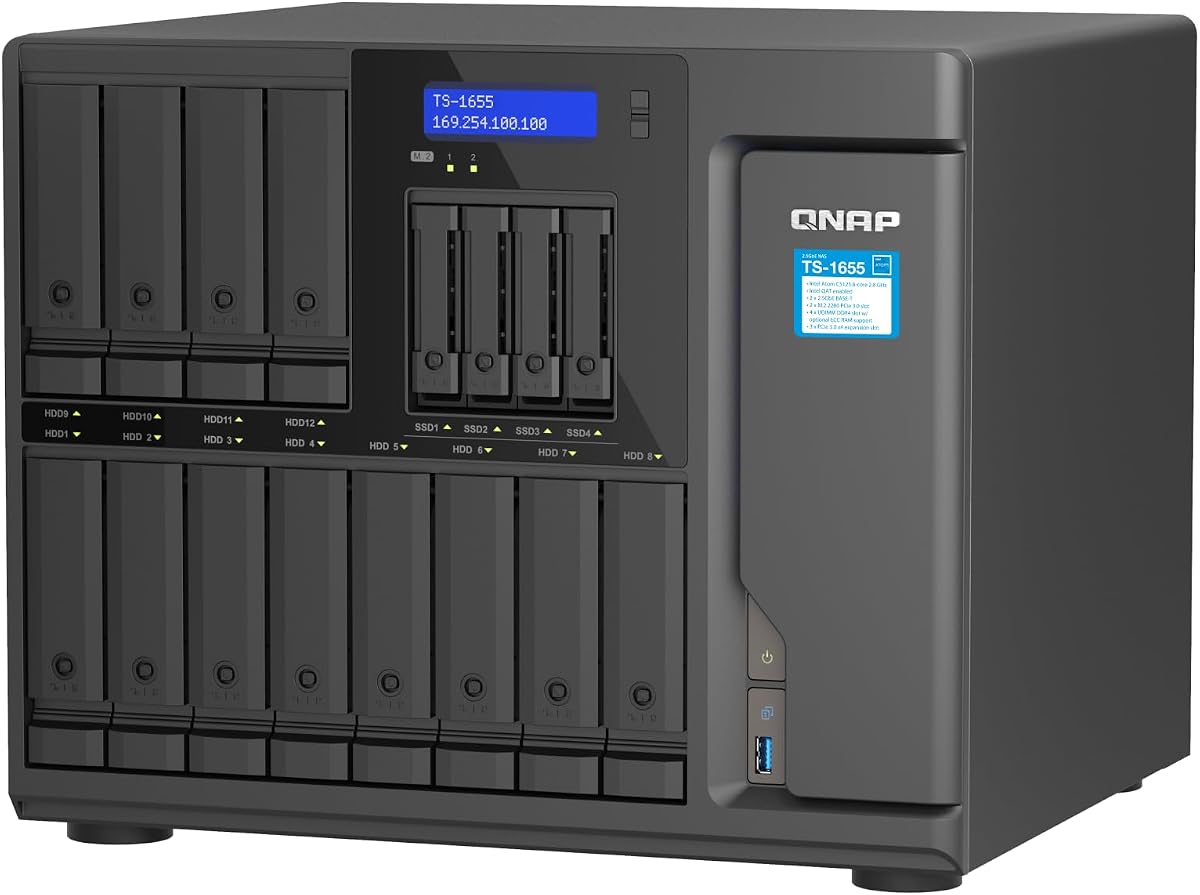
The QNAP TS-1655-8G-US is a 16 Bay Hybrid NAS built to handle diverse workloads including virtualization and multimedia transfer. It features an Intel Atom C-5125 8C processor that offers solid performance for its class.
We may earn a commission when you buy through this link, at no additional cost to you.
Storage flexibility is high with twelve 3.5-inch bays and four 2.5-inch bays allowing mixed drive types. Dual 2.5GbE ports accelerate file access while dual M.2 NVMe PCIe Gen 3 slots enable SSD cache acceleration for faster application response.
The system supports ECC RAM up to 128GB which improves stability for critical tasks. However the Atom processor may not match higher-end Xeon speeds for heavily threaded workloads making it better suited for average usage.
Organizations needing balanced capacity and performance without premium costs will appreciate this hybrid design. It effectively bridges the gap between simple file storage and complex server virtualization.
Mixed bays allow using both large HDDs and fast SSDs efficiently.
NVMe slots provide caching options to boost overall system responsiveness.
We may earn a commission when you buy through this link, at no additional cost to you.
The Synology 12 Bay DiskStation DS3622xs+ is designed to consolidate backup and video management systems with robust hardware. Its 6-core Intel Xeon processor delivers over 260,000 4K random read IOPS ensuring quick data access.
We may earn a commission when you buy through this link, at no additional cost to you.
While it ships with 12 bays it can scale up to 36 drive bays using DX1222 expansion units. This makes it a modular choice for businesses anticipating rapid data growth without replacing the core system immediately.
Networking versatility is a strong point with support for 10/25GbE and Fibre Channel which are essential for high-throughput environments. NVMe SSD Cache further optimizes read and write speeds for active databases.
Enterprises needing reliable backup infrastructure and scalability should consider this unit. It offers a sturdy foundation for large storage arrays though initial bay count requires planning for full capacity needs.
Add more drives later to accommodate growing data demands seamlessly.
Multiple network speeds ensure compatibility with enterprise switching environments.
We may earn a commission when you buy through this link, at no additional cost to you.
The QNAP TL-R1600PES-RP-US is a 16 Bay 3U Short Depth Rackmount JBOD designed for flexible storage expansion. It supports 16 x 3.5-inch SATA 6Gb/s drives and uses Mini-SAS HD interfaces for high-speed data transfer.
We may earn a commission when you buy through this link, at no additional cost to you.
Redundant power supplies ensure service continuity in case of a single supply failure which is critical for servers requiring constant uptime. The short depth design makes it easier to install in small media cabinets with dense cabling.
As a JBOD unit it expands existing QNAP NAS storage without adding computing load. While the rail kit must be purchased separately the included warranty and reliable power features offer significant value for data centers.
Users needing a compact and robust rackmount expansion unit will find this device useful. It efficiently bridges storage gaps in server racks while maintaining power redundancy and space efficiency.
Short depth and redundant power suit constrained server rooms effectively.
Mini-SAS HD provides reliable throughput for large-scale storage arrays.
We may earn a commission when you buy through this link, at no additional cost to you.
The Generic ZhenLoong Full Tower NAS Computer case is a versatile chassis designed for building custom server or workstation systems. It supports up to 15 x 3.5-inch/2.5-inch hot-swappable hard drives and includes a 15-port SATA backplane.
We may earn a commission when you buy through this link, at no additional cost to you.
Compatibility is broad supporting EEB EATX ATX and MATX motherboards along with redundancy 1+1 PSUs. Eight PCI full-height slots allow for GPU or expansion card integration making it ideal for rendering or AI tasks.
Because it is a barebone case assembly is required and shipping can take up to 40 days. This makes it a project-oriented choice for enthusiasts willing to build their own server for tailored needs.
DIY server builders needing extensive drive capacity and GPU support will appreciate this chassis. It offers a sturdy foundation for a custom NAS though patience is required for delivery and setup.
Wide range of supported sizes allows flexible hardware configuration.
Multiple expansion slots accommodate powerful graphics cards for compute tasks.
We may earn a commission when you buy through this link, at no additional cost to you.
The Synology 12 Bay Disk Expansion DX1222 is designed to expand storage capacity for selected Synology diskstation units seamlessly. It allows you to configure new storage in minutes using Synology DSM's unified tools.
We may earn a commission when you buy through this link, at no additional cost to you.
As a dedicated expansion unit it integrates directly into the existing system without complex setup. This modularity means you can start with a smaller base and grow as needed ensuring cost efficiency over time.
The unit comes with a five-year warranty which reflects Synology's confidence in its reliability. However its utility is limited to Synology diskstations so compatibility must be verified before purchase.
Existing Synology users needing more space should choose this expansion unit. It provides a hassle-free way to scale storage while maintaining the simplicity of the DSM ecosystem.
Integrates directly into your existing DS setup without extra software.
Strong warranty ensures peace of mind for expanded storage investments.
We may earn a commission when you buy through this link, at no additional cost to you.
The CENMATE Aluminum 12 Bay Hard Drive Enclosure serves as a robust external storage system for individuals needing high capacity without RAID complexity. It supports 2.5 and 3.5-inch HDDs and SSDs up to 240TB total.
We may earn a commission when you buy through this link, at no additional cost to you.
Built-in Aluminum-Alloy materials and three 2.7 inch Fans ensure data security through effective thermal management. USB A/C 3.0 ports deliver fast transfer speeds allowing a 1G movie to transfer in 3-5 seconds.
Users should note that fan noise can reach 50 decibels making it less ideal for quiet spaces. Additionally drives must be loaded one by one to ensure stability and avoid confusion if one fails.
This enclosure is perfect for users needing a portable or desktop DAS for large backups. Its tool-free design and wide compatibility make it a practical choice for diverse operating systems.
Multiple fans and aluminum build keep drives cool during heavy loads.
USB A/C ports and daisy chain options suit various expansion needs.
We may earn a commission when you buy through this link, at no additional cost to you.
The QNAP TS-1655-8G-US is a 16 Bay Hybrid NAS delivering high performance and capacity with a focus on long-term availability. It features an Intel Atom C-5125 8C processor that balances efficiency and capability.
We may earn a commission when you buy through this link, at no additional cost to you.
Dual 2.5GbE RJ45 ports accelerate file access and virtualization tasks while M.2 NVMe PCIe Gen 3 slots allow SSD cache acceleration. This combination ensures the system remains relevant for years of service.
The commitment to long-term availability means critical security patches and support continue longer than typical devices. While the Atom CPU may not suit the heaviest compute tasks it is excellent for steady multi-user workloads.
Businesses prioritizing stability and continuity should consider this model for their infrastructure. It offers a reliable platform for file sharing and backups without requiring frequent hardware refreshes.
Vendor commitment ensures the device remains supported for extended periods.
Atom processor handles daily tasks efficiently without excessive power draw.
We may earn a commission when you buy through this link, at no additional cost to you.
Selecting the right 16 Bay NAS Enclosure requires balancing performance, scalability, and budget. This section outlines key factors to consider before making a final decision for your data needs.
The processor determines how well the NAS handles multitasking virtualization and transcoding. Look for 8-core CPUs like Intel Atom or AMD Ryzen for smoother performance under load. Equally important is RAM capacity as 16GB or more is recommended for running containers or databases alongside storage tasks.
Ensure the system supports RAM upgrades so you can scale memory as your needs grow over time.
Verify that the enclosure supports both 3.5-inch and 2.5-inch drives to maximize flexibility for HDDs and SSDs. Check the maximum supported capacity per drive to ensure it fits your long-term storage goals. Hot-swap bays are also beneficial for maintaining uptime during drive maintenance or replacement.
Prioritize models with clear drive size limits and robust backplanes for reliable data transfer.
Network speed is critical for fast access to large files especially in multi-user environments. Dual 2.5GbE or 10GbE ports provide higher bandwidth and link aggregation options for better throughput. If you need external connectivity check for USB 3.2 or Thunderbolt ports to expand storage externally.
Choose network interfaces that match your current router and switch infrastructure to avoid bottlenecks.
If you anticipate rapid data growth look for units that support additional expansion units or PCIe slots. Some systems allow adding more drive bays or M.2 NVMe cache adapters to boost performance later. This modularity prevents the need to replace the entire system as storage needs increase.
Check for daisy-chaining options or expansion slots that align with your future scaling plans.
High-density drive enclosures generate significant heat which can impact drive lifespan if not managed well. Look for models with multiple fans or aluminum chassis materials that aid in passive cooling. Proper airflow design is essential to prevent thermal throttling during intensive read or write operations.
Select a unit with adjustable fan profiles or quiet modes if noise is a concern in your workspace.
The operating system and software tools define how easily you manage backups permissions and shares. Some platforms offer intuitive interfaces with robust apps for media streaming and virtualization. Compatibility with existing backup software and cloud services ensures a smoother workflow across different devices.
Evaluate the software features and community support available for the specific NAS brand you choose.
For business-critical data redundant power supplies are essential to keep the system running during power fluctuations or failures. Ensure the power unit is certified for 24/7 operation and matches your local voltage requirements. Efficient power consumption also reduces long-term electricity costs especially for always-on systems.
Prioritize models with certified PSU redundancy and efficient energy ratings for reliability.
A strong warranty reflects the manufacturer's confidence in their hardware reliability and durability. Look for at least a three-to-five-year warranty period that covers critical components like motherboards and power supplies. Access to responsive technical support can minimize downtime if hardware issues arise unexpectedly.
Verify warranty terms and support channels before purchase to ensure peace of mind.
To begin installing drives in your 16 Bay NAS Enclosure power off the unit completely. Insert each drive into its bay ensuring it clicks securely into place before powering on to prevent data corruption. This step ensures all connections are stable before the system initializes.
Regularly monitor drive health using the built-in software tools to detect early signs of failure. Keep firmware updated to access security patches and new features that improve system stability and performance. Consistent monitoring helps you proactively replace drives before they impact your data.
Ensure the enclosure has proper airflow by placing it in a well-ventilated area away from heat sources. Clean dust filters and fans periodically to maintain optimal cooling performance and prevent overheating. Proper ventilation extends the life of internal components and keeps operation noise levels lower.
A 16 Bay NAS Enclosure is a hardware device designed to hold and manage up to 16 hard drives or SSDs simultaneously. It connects to a network to allow multiple users to access stored data centrally. Some models include processing power while others act as storage expanders.
Most 16 Bay NAS Enclosures are sold as diskless units meaning you must purchase and install compatible hard drives separately. This allows you to choose drive capacity and speed based on your budget. Always check drive compatibility before purchasing to ensure proper fit.
Many 16 Bay NAS Enclosures support RAM upgrades but this depends on the specific model and manufacturer. Check the product specifications to confirm the maximum supported memory and whether you can add it yourself. Upgrading RAM improves multitasking and virtualization performance.
A 16 Bay NAS Enclosure typically supports exactly 16 physical drive bays. Some models may allow mixed drive sizes like 3.5-inch and 2.5-inch within those slots. Ensure your drives fit the physical dimensions and interface types supported by the unit.
RAID is not strictly required but it is highly recommended for data protection against drive failure. Most NAS systems support RAID configurations like RAID 5 or RAID 10 to ensure redundancy. You can also use basic volumes without RAID for maximum capacity if you have external backups.
Yes most 16 Bay NAS Enclosures are compatible with Mac and PC operating systems via standard network protocols. Some models even offer specific software tools for Mac or Windows environments. Always check OS compatibility before purchase to ensure smooth integration.
You can expand storage beyond 16 bays by adding external expansion units or using daisy-chain features if supported. Some high-end models allow you to link multiple expansion enclosures to the main NAS. Verify compatibility between the main unit and expansion boxes before buying.
With proper maintenance a 16 Bay NAS Enclosure can last five to seven years or longer. Regular firmware updates and drive health checks are essential for longevity. Keeping the unit in a cool and dust-free environment helps extend its operational life.
The top picks in this guide represent a wide spectrum of performance and value for users needing substantial storage. Whether you prioritize raw speed with the Synology RackStation or affordability with the QNAP JBOD there is a model to fit every requirement.
When selecting your NAS consider your specific workloads like virtualization media streaming or basic file backup. Ensuring your choice has adequate network speed and expansion options now will save costs and headaches in the future.
Always check the current availability and compatibility requirements before finalizing your order. Prices and configurations may shift so verifying the latest details ensures you get the exact specifications you need.