
TI-84 Evo Graphing Calculator
4.7Editor score
Icon-based home screen
3x faster performance
Simplified keypad design
Choosing the right graphing calculator is essential for students navigating complex math and science courses. A good model should offer clear visualization, robust functionality, and durability for daily classroom use. Whether you are in high school or college, the right tool can make a significant difference in your academic performance and understanding of key concepts.
We have carefully evaluated the leading options available on the market today to bring you this curated list. Our comparison focuses on critical aspects such as screen clarity, processing speed, battery life, and compatibility with standardized exams. Each product was assessed based on its ability to handle everything from basic algebra to advanced calculus and statistical analysis effectively.
Each pick in this guide highlights specific strengths to help you find the device that best suits your unique needs. Please note that product availability and pricing can change frequently, so we recommend verifying the latest details before making a final purchase decision. Our goal is to provide you with reliable information to support your educational journey.
4.7Editor score

4.6Editor score

4.4Editor score
As an Amazon Associate we earn from qualifying purchases.
The following table provides a side-by-side comparison of the top ten graphing calculators, highlighting key specifications and features to help you make an informed decision quickly.




The Texas Instruments TI-84 Plus CE stands out as a top contender for students seeking a reliable and visually engaging graphing calculator. With its high rating and widespread adoption in classrooms, it offers a blend of ease of use and powerful functionality that supports learning from middle school through college. The color display makes it significantly easier to differentiate between multiple graphs and functions simultaneously.
We may earn a commission when you buy through this link, at no additional cost to you.
One of the key strengths of this model is the built-in MathPrint feature, which allows users to input and view math symbols and formulas exactly as they appear in textbooks. This reduces cognitive load and helps students focus on solving problems rather than deciphering notation. Additionally, the rechargeable battery ensures that you are not constantly replacing batteries, making it more eco-friendly and convenient for long study sessions.
While the price may be higher than some basic scientific calculators, the durability and feature set justify the investment for serious students. The only notable trade-off is that it may not offer the most advanced programming capabilities compared to some higher-end models, but for most standardized tests and coursework, it is more than sufficient. The included four-year online subscription adds extra value for remote learning needs.
This calculator is ideal for high school and college students who need a device that is approved for major exams like the SAT and AP tests. Its lightweight yet durable design ensures it can withstand the demands of daily classroom use without adding too much weight to your bag. Overall, it is a highly recommended choice for anyone looking for a balanced and powerful graphing tool.
The vibrant color screen allows for clearer distinction between different functions and data sets, making complex graphing tasks easier to interpret.
Powered by a TI Rechargeable Battery, this model can last up to one month on a single charge, reducing the hassle of frequent battery replacements.
We may earn a commission when you buy through this link, at no additional cost to you.
The TI-84 Evo represents the newest evolution in the popular TI-84 series, designed specifically for everyday classroom use with a focus on speed and usability. It maintains the trusted core functionality of its predecessors while introducing modern improvements that streamline the learning process. With a high user rating, it quickly becoming a favorite among students who need a reliable tool without breaking the bank.
We may earn a commission when you buy through this link, at no additional cost to you.
This model features an icon-based home screen that places popular math tools front and center, allowing for faster and more intuitive navigation. The processor is three times faster than previous models, which means calculations and graphing happen almost instantly, keeping you in the flow of your work. The simplified keypad design with larger buttons reduces clutter and helps you work faster with fewer steps, minimizing input errors.
While it is priced affordably, it does not compromise on the essential features needed for high school and introductory college math courses. The bigger, clearer graphs provide 50% more graphing space, making it easier to see patterns and relationships in data. The only potential drawback is that it is a newer model, so availability might vary, and it lacks some of the advanced customization of older premium versions.
This calculator is perfect for students who want a straightforward, efficient device for daily homework and exam preparation. Its design prioritizes ease of use, making it a great choice for those who might find traditional calculator interfaces confusing. If you are looking for a cost-effective solution that still delivers strong performance, the TI-84 Evo is an excellent option to consider.
The icon-based home screen simplifies tool selection, reducing the time spent searching for functions and allowing more focus on problem solving.
With a powerful processor delivering 3x faster performance, this calculator handles complex tasks with speed, ensuring smooth operation during timed exams.
We may earn a commission when you buy through this link, at no additional cost to you.
The HP Prime G2 is a sophisticated graphing calculator designed for students who need advanced capabilities such as a computer algebra system (CAS) and touch screen interaction. It stands out with its 3.5-inch multi-touch color display, which allows for intuitive navigation and manipulation of graphs and functions. This model is ideal for higher education or advanced high school courses where symbolic manipulation and dynamic geometry are required.
We may earn a commission when you buy through this link, at no additional cost to you.
One of its most powerful features is the advanced graphing and CAS capabilities, which let you explore complex math in symbolic, graphical, and numerical views seamlessly. The large high-resolution screen supports pinch-to-zoom and interactive graph manipulation, making it feel more like using a tablet than a traditional calculator. It is also exam-approved for major tests, ensuring it can be used in critical academic settings like AP, SAT, and IB exams.
While it offers premium features, the price point is higher than standard graphing calculators, and mastering the CAS system may take some time for beginners. However, the 256MB memory and wireless connectivity options provide significant flexibility for storing programs and collaborating with other devices. The brushed metal design and included case add to its professional look and durability, making it a robust tool for long-term use.
This calculator is best suited for college students, engineering majors, or advanced high schoolers who need more than just numerical computation. The integration with HP's STEM ecosystem and mobile apps enhances its utility for interactive learning and data sharing. If you require a device that combines cutting-edge technology with rigorous academic approval, the HP Prime G2 is a top-tier choice.
The multi-touch display allows for pinch-to-zoom and direct manipulation of graphs, providing a more intuitive and engaging way to visualize mathematical concepts.
The included CAS enables symbolic math operations, allowing users to solve equations algebraically and explore complex functions with greater depth.
We may earn a commission when you buy through this link, at no additional cost to you.
The Casio Prizm FX-CG50 is renowned for its impressive color display and ability to handle 3D graphing, making it a strong choice for visual learners and advanced math courses. With over 65,000 colors, the screen clarity is exceptional, helping students distinguish between different elements in a graph easily. This model is designed to support a wide range of math applications, from basic calculations to complex geometry and statistics.
We may earn a commission when you buy through this link, at no additional cost to you.
One of its standout features is the support for three simultaneous 3D functions, allowing users to visualize spheres, cylinders, and planes effectively. Additionally, it offers Python integration, enabling users to program directly on the calculator or transfer programs from a PC. The Natural Textbook Display ensures that expressions and results appear exactly as they do in textbooks, which simplifies the interpretation of complex math.
While it offers robust features, some users may find the menu system slightly complex compared to other brands, requiring a learning curve to navigate efficiently. Battery life can also be shorter than some competitors, but the high-quality display and 3D capabilities often outweigh this drawback for those needing advanced visualization. It is approved for major exams, ensuring it is a reliable tool for standardized testing scenarios.
This calculator is ideal for students in geometry, calculus, or engineering courses who need to visualize three-dimensional shapes and functions. The combination of color clarity, programming options, and textbook-style output makes it a versatile tool for both classroom learning and independent study. If you prioritize visual fidelity and advanced graphing capabilities, the Casio Prizm FX-CG50 is a highly recommended option.
Supporting up to three 3D functions, this calculator helps students better understand spatial relationships and complex geometric shapes.
The ability to program with MicroPython directly on the device opens up possibilities for custom applications and interactive learning experiences.
We may earn a commission when you buy through this link, at no additional cost to you.
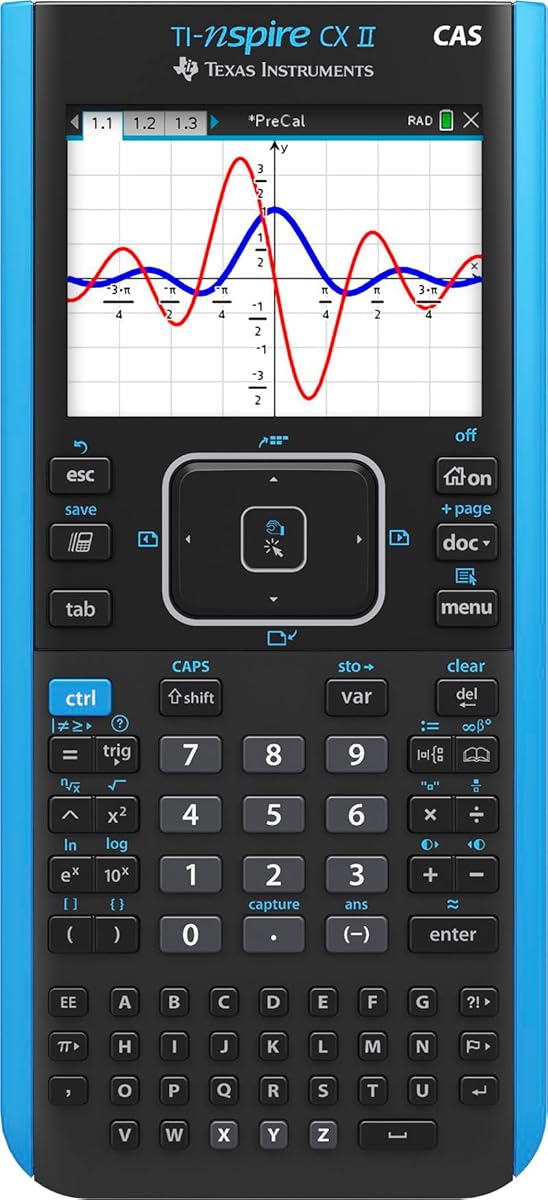
The TI-Nspire CX II CAS is a powerful graphing calculator that combines a color screen with advanced Computer Algebra System capabilities. It is designed to offer a comprehensive solution for students who need to perform symbolic math and handle complex equations. The inclusion of student software enhances its utility, allowing for deeper exploration of concepts on a computer alongside the handheld device.
We may earn a commission when you buy through this link, at no additional cost to you.
Its thin design and easy touchpad navigation make it comfortable to use for extended periods, while the rechargeable battery ensures you can work for up to two weeks on a single charge. The color screen offers high resolution and supports different graph styles to differentiate between multiple functions. The CAS functionality allows for symbolic manipulation, which is crucial for advanced math courses and engineering studies.
While it is a premium device, it comes with a higher price point and may not be approved for all standardized exams due to its CAS features. However, for students who need these capabilities, the performance and versatility are unmatched. The bundled software adds significant value, providing a seamless bridge between handheld and desktop learning environments for homework and research.
This calculator is best suited for college students or advanced high schoolers in calculus or engineering courses who require symbolic math tools. The combination of a durable build, long battery life, and powerful software makes it a reliable partner for complex academic projects. If you need a device that can handle high-level math tasks with ease, the TI-Nspire CX II CAS is an excellent investment.
The bundled student software extends the calculator's functionality to your computer, allowing for more flexible study and visualization options.
With a rechargeable battery that lasts up to two weeks, you can focus on your work without worrying about frequent power interruptions.
We may earn a commission when you buy through this link, at no additional cost to you.
The ROATEE Graphing Scientific Calculator offers a unique blend of calculation and note-taking in one device, making it a practical choice for students who want to streamline their study process. It includes a detachable LCD writing tablet that allows you to work out problems and take notes while using the calculator. This integration saves space and reduces the need for extra paper, supporting a more eco-friendly approach to studying.
We may earn a commission when you buy through this link, at no additional cost to you.
Both the calculator and the notepad feature independent Type-C rechargeable power, which reduces battery waste and ensures you are not constantly replacing batteries. The calculator itself supports essential calculations and advanced tools like complex numbers and statistics, suitable for high school and college use. The writing tablet can be installed on either side and is detachable for flexible use during exams where note-taking tools might be restricted.
While it is an innovative tool, it may not be approved for all standardized exams due to its note-taking capabilities and specific functionality. Additionally, the graphing features are basic compared to dedicated graphing calculators, so it might not suffice for advanced math courses. However, for general science, algebra, or daily calculations, it provides excellent value and convenience for students who like to sketch out problems.
This device is ideal for students who need a versatile tool for everyday calculations and homework sessions. Its eco-conscious design and portability make it a great choice for those looking to reduce waste and stay organized. If you are looking for an affordable option that combines calculation with easy note-taking, the ROATEE Graphing Calculator is a practical and functional choice.
Independent Type-C rechargeable power for both modules reduces disposable battery waste and supports a more sustainable daily study routine.
The writing tablet can be removed and used separately, offering flexibility for note-taking and problem-solving in various settings.
We may earn a commission when you buy through this link, at no additional cost to you.
The IPepul Scientific Calculator is designed as a simple and efficient tool for students who need a reliable calculator for daily math and science tasks. It features a 10-digit large screen and an integrated notepad that allows you to write while calculating, improving learning efficiency. The blue matte LCD screen is designed to protect your eyes and can be used as a standalone notepad when the calculator is not in use.
We may earn a commission when you buy through this link, at no additional cost to you.
Its lightweight design makes it easy to carry in a bag, pocket, or wallet, making it a convenient option for students and office workers alike. The battery replacement is straightforward, requiring no screws, which ensures you are not left without a working device due to a drained battery. It is suitable for various occasions including office, construction, and financial calculations, offering versatility beyond just academic use.
While it does not offer graphing capabilities, it excels as a basic scientific calculator for those who need straightforward computation without complex features. The price is very affordable, making it a practical choice for middle school students or those on a tight budget. However, for advanced math courses requiring graphing, you will need to look for a dedicated graphing calculator model.
This calculator is perfect for students who need a simple, portable tool for general math and science assignments. Its integration of a notepad helps keep your work organized and reduces paper waste. If you are looking for an inexpensive and easy-to-use calculator that fits well in any school supply kit, the IPepul Scientific Calculator is a strong candidate.
The blue matte LCD screen helps reduce eye strain during long study sessions, providing a comfortable viewing experience.
Weighing only 120g, this calculator is easy to carry anywhere, ensuring you always have a calculation tool at hand.
We may earn a commission when you buy through this link, at no additional cost to you.
The TI-84 Plus Graphics Calculator is a classic model that has long been a standard in schools for its reliability and comprehensive feature set. It features a vibrant backlit color screen that allows for clear viewing in various lighting conditions. The device comes preloaded with interactive geometry software, providing added value for students who need visual tools for geometry classes without extra purchases.
We may earn a commission when you buy through this link, at no additional cost to you.
One of its strengths is the ability to save and graph up to ten functions at one time, allowing for complex analysis in a single view. The horizontal and vertical split screen options help in comparing data or viewing different aspects of a problem simultaneously. It also includes fourteen interactive zoom features to help users explore graphs in detail, making it a versatile tool for advanced algebra and calculus.
While it is an older model compared to the CE version, it remains a robust choice for those who prefer a tried-and-true device. The price is often lower than newer models, making it a cost-effective option for students on a budget. However, the screen resolution is lower than modern standards, which might make reading small text slightly more challenging for some users.
This calculator is ideal for students who need a reliable graphing tool for standard coursework and exams. Its communication port allows for easy data transfer between devices, which can be useful for group projects. If you are looking for a durable and functional graphing calculator that has stood the test of time, the TI-84 Plus is a solid recommendation.
Included interactive geometry software provides immediate value for students studying geometry and algebra without additional costs.
With seven different graph styles and multiple zoom options, you can customize your visualizations to better understand mathematical relationships.
We may earn a commission when you buy through this link, at no additional cost to you.
The TI-Nspire CX II Color Graphing Calculator is designed to inspire students with its high-resolution full-color display and computer-like features. It allows you to connect multiple visualizations of the same concept, enhancing your understanding of mathematical relationships. This model is approved for key exams, ensuring it can be used in critical testing environments like SAT and AP without issues.
We may earn a commission when you buy through this link, at no additional cost to you.
One of its practical features is the long-lasting rechargeable battery, which means you do not need to worry about finding power outlets during long study sessions. The included 4-year license for computer software extends its utility, allowing you to work seamlessly between your handheld device and your computer. Its lightweight and portable design ensures it is easy to carry to class or the library.
While it lacks the Computer Algebra System found in the CAS version, it remains a powerful tool for graphing and analysis. The interface may have a slight learning curve for those new to the TI-Nspire ecosystem, but the intuitive design helps speed up the process. It is a reliable choice for students who need a colorful, modern calculator that supports both classroom and home learning.
This calculator is best for students in high school or college who need a versatile tool for visualizing math and science concepts. The combination of exam approval, software integration, and durable build makes it a great investment for long-term academic use. If you want a calculator that enhances visual learning and connects well with your computer, the TI-Nspire CX II is a strong option.
The high-resolution display and intuitive interface make navigation easy, allowing for quick access to tools and features.
The rechargeable battery ensures that you can work for extended periods without interruption, supporting focused study sessions.
We may earn a commission when you buy through this link, at no additional cost to you.
The Casio FX-9860GII is a robust graphing calculator known for its durability and performance in classroom environments. It features a high-contrast screen that ensures text and graphs are visible even in challenging lighting conditions. With a wide range of advanced functions, it is capable of handling complex calculations for statistics, calculus, and algebra without requiring additional accessories.
We may earn a commission when you buy through this link, at no additional cost to you.
One of its main strengths is its solid build quality, which helps it withstand the rigors of daily use by students. The design is focused on functionality, offering a variety of graphing styles and tools to visualize data effectively. It is also approved for use in major standardized exams, making it a reliable choice for test preparation and taking assessments in class.
While it does not have a color display, the high contrast ensures readability is not compromised. Some users may find the buttons slightly stiff at first, but this often contributes to the device's longevity. The price is generally competitive, making it an accessible option for schools and students who need a reliable graphing tool without the high cost of premium models.
This calculator is ideal for students who need a sturdy and functional graphing device for math and science courses. Its combination of durability, advanced features, and exam approval makes it a practical tool for academic success. If you are looking for a graphing calculator that can handle heavy use and provide consistent performance, the FX-9860GII is a worthy consideration.
With a wide range of functions and durable build, this calculator ensures you can tackle complex problems without technical interruptions.
The high-contrast screen ensures that graphs and text are clear and easy to read in various lighting environments.
We may earn a commission when you buy through this link, at no additional cost to you.
Selecting the right graphing calculator requires considering several key factors that impact your learning and exam performance. This guide breaks down the essential elements to help you make an informed decision.
Ensure the calculator is approved for the standardized tests you plan to take, such as the SAT, ACT, AP, or IB exams. Most major brands like Texas Instruments and Casio have specific models that meet these requirements. Check with your school or test center for a list of approved devices to avoid any issues during testing. Choosing a non-approved model could prevent you from using it during critical assessments.
Always verify current exam policies before purchasing, as rules can change occasionally.
A clear and high-resolution display is essential for viewing complex graphs and equations. Color screens can help differentiate between multiple functions and data sets, while backlit screens ensure visibility in dim classrooms. Look for models that offer adjustable contrast settings to suit your viewing preferences and reduce eye strain during long study sessions. Higher resolution means less squinting and better understanding of visual data.
Prioritize display quality to ensure long-term comfort and accuracy in your work.
Consider whether the calculator uses standard batteries or has a rechargeable battery. Rechargeable models are more eco-friendly and cost-effective in the long run, but standard batteries are often easier to replace quickly during exams. Look for models with long battery life to avoid interruptions during study sessions or exams. A reliable power source ensures you are never left without a functioning tool when you need it most.
Choose a power solution that balances convenience with your typical usage patterns and exam requirements.
Determine the level of math you need to perform, from basic algebra to advanced calculus or statistics. Some models offer Computer Algebra System (CAS) capabilities, which allow for symbolic manipulation, while others focus on numerical analysis. Check for additional features like 3D graphing, statistical analysis, or programming support depending on your course requirements. Advanced features can significantly enhance your ability to understand and solve complex problems.
Match the calculator's features to your current and future academic needs to avoid overspending or under-equipping.
An intuitive interface and logical layout can make learning to use the calculator much faster and less frustrating. Look for calculators with clear menus, icon-based navigation, and helpful online features that guide you through functions. Models with larger keys and good tactile feedback can also improve typing speed and accuracy. A user-friendly design ensures you spend more time solving problems rather than navigating the device.
Test the interface if possible to ensure it feels natural for your hands and study style.
Since calculators are often carried daily, a durable build is essential to withstand drops and regular use. Look for models with reinforced casings and quality buttons that will not wear out quickly. A protective case or cover can add extra protection and extend the life of the device. Investing in a well-built calculator saves money in the long run by reducing the need for replacements.
Choose a model known for robust construction to ensure it lasts throughout your academic career.
Modern calculators often come with software that allows you to connect to computers for data transfer and advanced visualization. Connectivity options like USB or wireless can facilitate easy sharing of data and programs between devices. This is particularly useful for group projects or when you need to work on larger screens at home. Some manufacturers also offer free or paid software licenses that enhance the calculator's functionality.
Evaluate connectivity options to ensure seamless integration with your existing tech ecosystem.
Set a budget that aligns with the features you need, balancing cost with long-term value. While premium models offer advanced capabilities, basic models may suffice for introductory courses. Consider the resale value and warranty support when making your decision. Ultimately, the best value is a calculator that meets your needs without unnecessary features that drive up the price.
Look for educational discounts or bundled software deals to maximize your investment.
To get the most out of your graphing calculator, start by reading the manual or exploring the built-in tutorials to understand basic operations. Practice entering functions and navigating menus regularly to build familiarity and speed. Use the scratchpad or notepad features if available to plan out your work before entering it into the calculator for accuracy.
Proper care can significantly extend the lifespan of your device. Always store your calculator in a protective case when not in use to prevent scratches and damage from impacts. Keep it away from extreme temperatures and humidity, which can affect the battery and screen performance. Clean the screen with a soft, dry cloth to remove dust and smudges without using harsh chemicals.
Regularly update the software if your model supports updates to ensure you have access to the latest features and bug fixes. Back up any important programs or data to a computer or cloud storage to prevent loss in case of device failure. By following these simple care and usage tips, you can ensure your calculator remains reliable and functional for years of academic success.
No, not all graphing calculators are approved for standardized exams like the SAT, ACT, or AP tests. Each exam board maintains a specific list of approved devices, and some models with advanced features like wireless communication or CAS are restricted. Always check the official exam guidelines and your school's policy before purchasing to ensure compliance. Using an unapproved device during a test can lead to disqualification.
A scientific calculator is designed for numerical calculations and basic functions, while a graphing calculator can plot functions and analyze data visually. Graphing calculators are more powerful and suitable for advanced math courses like calculus and statistics. They typically cost more and have larger screens to display graphs and complex equations. Choose a graphing calculator if you need visualization tools for higher-level math.
Battery life varies depending on the model and usage frequency, but standard calculators often last several months to a year on AAA batteries. Rechargeable models typically last from two weeks to a month on a single charge under normal use. Some calculators have auto-off features to preserve battery life when not in use. Always keep spare batteries handy if your device uses replaceable ones to avoid interruptions.
Yes, most graphing calculators support programming using languages like TI-Basic or Python, depending on the model. This allows users to write custom programs for specific calculations or automate repetitive tasks. Programming capabilities are especially useful for engineering and advanced math students who need tailored solutions. Check the device specifications to see what programming languages and memory capacity it supports.
If your calculator freezes, try resetting it by removing the batteries or pressing the reset button if available. Consult the user manual for specific reset instructions to avoid data loss. If the issue persists, contact the manufacturer's customer support for further troubleshooting or warranty service. Keeping your software up to date can also prevent many common technical issues.
A color screen can significantly improve readability by allowing you to distinguish between different graphs and data sets more easily. It is particularly useful for visual learners and courses that require complex 3D modeling or multiple function plots. However, color models may be more expensive and have shorter battery life compared to monochrome versions. Consider your budget and specific visualization needs when deciding.
Most modern graphing calculators come with USB ports or wireless connectivity options for data transfer. Install the corresponding software on your computer to connect and sync data such as programs, notes, or settings. Some models also support cloud storage or mobile apps for seamless sharing between devices. Always follow the manufacturer's instructions to ensure a safe and successful transfer process.
A Computer Algebra System allows the calculator to perform symbolic math, such as solving equations algebraically and manipulating variables. It is highly useful for advanced math and engineering courses where step-by-step algebraic solutions are needed. However, some exams restrict the use of CAS-enabled calculators due to their advanced capabilities. Check your course requirements before purchasing a CAS model.
Choosing the best graphing calculator depends largely on your specific academic needs and budget. Whether you prioritize advanced features like CAS or simple ease of use, the top picks in this guide offer a range of options to suit every student. Models like the TI-84 Plus CE and HP Prime G2 provide powerful tools for visualization and analysis, while budget-friendly options ensure accessibility.
When making your final decision, prioritize features that will support your learning goals, such as exam approval and display clarity. Investing in a reliable device can make a significant difference in your academic performance and stress levels during exams. Consider your future courses and whether a higher-end model with advanced capabilities is necessary for your path.
Remember that prices and availability can change frequently, so always check current listings before purchasing. We hope this guide has provided you with the information needed to make a confident choice. With the right calculator in hand, you can tackle even the most complex math problems with ease and confidence.