
Logitech G203 Wired Gaming Mouse – Black
4.6Editor score
8000 DPI Optical Sensor
6 Programmable Buttons
LIGHTSYNC RGB Lighting
This guide compares the top 10 analog gaming mice based on sensor performance ergonomics customization and durability to help you choose the right one for your
Selecting the right analog gaming mouse is crucial for precision and comfort during extended play sessions. A good mouse offers responsive tracking customizable buttons and ergonomic design to enhance your gaming experience significantly.
We evaluated leading models based on sensor accuracy build quality software support and user feedback. This list covers wired options from top brands ensuring reliable performance across various genres and play styles.
Each pick highlights key features pros and cons to help you decide quickly. Prices and availability may change so verify current details before purchasing to ensure you get the best value today.
4.6Editor score

4.6Editor score
4.5Editor score
This side-by-side comparison highlights the core specifications and unique features of each top-rated analog gaming mouse to help you make an informed decision.



The Logitech G502 Hero stands out as a top choice for gamers seeking precision and customization. With its HERO sensor offering up to 25600 DPI and 11 programmable buttons it delivers versatile performance for various gaming styles.
We may earn a commission when you buy through this link, at no additional cost to you.
Its adjustable weight system allows you to tailor the mouse to your preference ensuring comfort during long sessions. The LIGHTSYNC RGB lighting adds a personalized touch that syncs with your setup enhancing immersion.
While slightly heavier than ultra-light mice this model balances sturdiness with comfort. The mechanical switches provide crisp feedback which is essential for accurate clicks in competitive scenarios.
Ideal for FPS and MMO players this mouse offers robust features without compromising on reliability. It is a solid investment for those prioritizing performance and customizable controls.
The HERO sensor ensures accurate tracking with zero smoothing or acceleration for flawless movement.
11 buttons and adjustable weights let you fine-tune the mouse to your exact play style.
We may earn a commission when you buy through this link, at no additional cost to you.
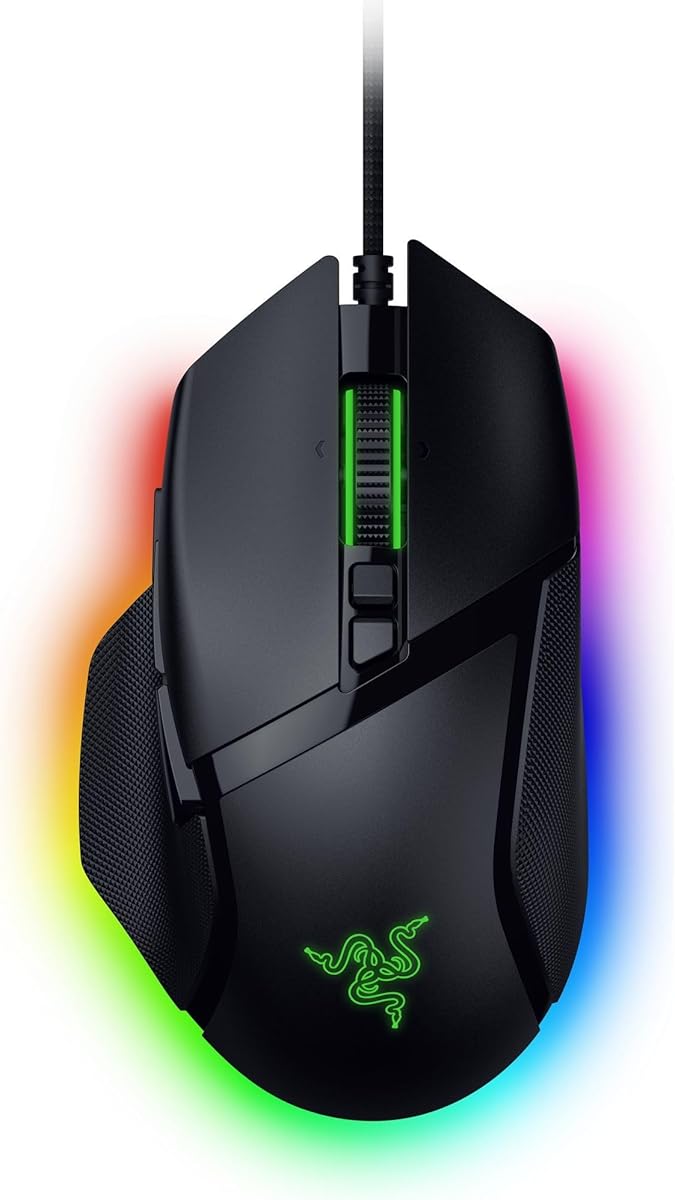
The Razer Basilisk V3 is praised for its ergonomic design that supports the hand comfortably. It features a versatile HyperScroll wheel and optical switches for rapid response making it suitable for diverse gaming needs.
We may earn a commission when you buy through this link, at no additional cost to you.
With 11 programmable buttons and Chroma RGB zones you can tailor controls and aesthetics to your liking. The fast actuation speed ensures your commands are executed instantly which is critical in fast-paced games.
Some users may find the software necessary for full customization adds complexity. However the build quality and feature set justify the investment for those seeking a high-end experience.
This mouse is perfect for gamers who value comfort and speed. Its design reduces strain during long sessions while providing the responsiveness needed for competitive play.
The HyperScroll wheel switches between free-spin and tactile modes for versatile navigation.
Optical switches offer 0.2ms actuation speed for reliable and quick input.
We may earn a commission when you buy through this link, at no additional cost to you.
The Logitech G403 Hero offers a lightweight design ideal for quick and precise movements. Its Hero 16K sensor ensures smooth tracking while the adjustable weight allows for personalized balance.
We may earn a commission when you buy through this link, at no additional cost to you.
With six programmable buttons and LIGHTSYNC RGB you can customize controls and lighting to match your setup. The rubber grips provide a secure hold which is essential for steady aiming.
While it has fewer buttons than some models the simplicity is a plus for gamers who prefer minimal clutter. The build quality is robust ensuring longevity even with heavy use.
This mouse is well-suited for FPS enthusiasts who prioritize speed and comfort. Its design reduces hand fatigue and delivers reliable performance in high-intensity scenarios.
The Hero 16K sensor tracks movement with precision and zero smoothing.
Rubber grips and ergonomic shape enhance comfort during extended gaming.
We may earn a commission when you buy through this link, at no additional cost to you.
The Logitech G203 is a budget-friendly option that does not compromise on core gaming performance. With its 8000 DPI sensor and six programmable buttons it provides essential features for most gamers.
We may earn a commission when you buy through this link, at no additional cost to you.
Its compact size and RGB lighting make it attractive for smaller desks and personalized setups. The mechanical tensioning ensures consistent clicks which is vital for accurate gameplay.
While it lacks advanced features like adjustable weights it excels in reliability and value. Beginners or casual gamers will find it more than capable for various titles.
This mouse is an excellent entry point for those new to gaming peripherals. It offers a solid balance of performance and cost without unnecessary complexity.
Delivers reliable tracking and customizable buttons at an accessible price.
LIGHTSYNC RGB allows you to match lighting with your system.
We may earn a commission when you buy through this link, at no additional cost to you.
The Logitech G MX518 revives a classic design with modern improvements like the HERO 25K sensor. It features eight programmable buttons and on-board memory for easy profile switching.
We may earn a commission when you buy through this link, at no additional cost to you.
Its ergonomic shape has been favored by many gamers for years ensuring comfort. The high DPI range supports precise tracking which is essential for competitive play.
Although it lacks some contemporary RGB aesthetics the focus remains on performance. The reliability and build quality make it a trusted choice for those who value function over flash.
This mouse is ideal for gamers who appreciate a timeless design with updated tech. It delivers consistent performance without unnecessary extra features.
The familiar shape supports your hand for comfortable extended use.
On-board memory saves settings so they work on any PC.
We may earn a commission when you buy through this link, at no additional cost to you.
The Corsair Scimitar RGB Elite is tailored for MMO and MOBA players with its 17 programmable buttons. The key slider system lets you adjust side button positions for optimal reach and comfort.
We may earn a commission when you buy through this link, at no additional cost to you.
Its contoured shape supports your hand reducing strain during long gaming sessions. The 18000 DPI sensor ensures accurate tracking which is vital for executing complex macros.
While the bulky design may not suit all preferences it is essential for the button count. The build quality is robust ensuring it can withstand frequent use.
This mouse is a top choice for those who play titles requiring many commands. Its customization options provide a significant advantage in strategic gameplay.
Adjust side buttons to fit your hand size and grip preference.
17 buttons allow for extensive macro configurations and control.
We may earn a commission when you buy through this link, at no additional cost to you.
The Razer Basilisk V3 35K features the Focus Pro 35K sensor for exceptional tracking performance on various surfaces. It includes 13 customizable controls and a versatile HyperScroll wheel for enhanced usability.
We may earn a commission when you buy through this link, at no additional cost to you.
Its ergonomic design and optical switches offer comfort and speed. The Smart-Reel mode automatically adjusts scrolling based on speed which is convenient for navigating content.
While expensive the precision and build quality are unmatched. It is an investment for serious gamers who demand the best in sensor accuracy and response.
This mouse is ideal for competitive players seeking top-tier performance. Its features ensure you have precise control in any gaming scenario.
The 35K sensor provides best-in-class accuracy on glass and other surfaces.
Auto-switching between scroll modes adds convenience and versatility.
We may earn a commission when you buy through this link, at no additional cost to you.
The Corsair NIGHTSWORD introduces a smart tunable weight system that detects the center of gravity in real time. This allows for precise balance adjustments to fit your grip perfectly.
We may earn a commission when you buy through this link, at no additional cost to you.
With 10 programmable buttons and a contoured shape it offers comfort and control. The 18000 DPI sensor ensures accurate tracking which is essential for precise aiming.
Setting up the weights may take time but the payoff is a highly personalized experience. The build quality is solid ensuring durability for regular use.
This mouse is perfect for gamers who value balance and ergonomics. It provides a tailored fit that can significantly enhance performance.
Adjust weight and balance to match your hand and play style.
Contoured shape and rubber grips reduce fatigue over time.
We may earn a commission when you buy through this link, at no additional cost to you.
The Corsair M65 RGB Ultra features an iconic aluminum frame that ensures lasting durability. With its 26000 DPI sensor and Axon Hyper-Processing Technology it offers ultra-fast response times.
We may earn a commission when you buy through this link, at no additional cost to you.
Optical switches provide reliable clicks and the adjustable weight system allows for balance customization. The sensor fusion control enables accurate tracking even during rapid movements.
While heavier than some models its sturdiness is a key advantage. It is built to withstand intense use without compromising on performance.
This mouse is suited for FPS players who need precision and durability. Its robust design and advanced tech make it a reliable choice.
8000Hz polling rate ensures movements are registered instantly.
Aluminum frame adds strength and long-term reliability.
We may earn a commission when you buy through this link, at no additional cost to you.
The Razer Basilisk V3 Custom offers extensive customization with 11 programmable buttons and Chroma RGB lighting. Its ergonomic design supports the hand comfortably for long sessions.
We may earn a commission when you buy through this link, at no additional cost to you.
With a Focus Plus 26K sensor and optical switches you get precise tracking and fast response. The HyperScroll wheel adds versatility for navigating content and games.
It is slightly bulky but provides a secure grip. The software allows for deep customization which is appealing to those who want to tailor every aspect of the mouse.
This model is ideal for gamers who want control over their peripherals. It combines comfort with advanced features for a personalized experience.
Thumb rest and shape reduce strain during extended play.
Chroma lighting reacts dynamically with supported games.
We may earn a commission when you buy through this link, at no additional cost to you.
Choosing the right analog gaming mouse involves considering sensor performance ergonomics and additional features. This guide breaks down the key factors to help you find the perfect match for your needs.
The sensor is the heart of any gaming mouse. Look for high DPI ranges and accurate tracking with zero smoothing or acceleration. Modern sensors like HERO or Focus Pro ensure your movements are translated precisely without lag or jitter.
Prioritize sensors that support your play style. FPS gamers may need high precision while MMO players might benefit from consistent performance across varied surfaces.
Comfort is essential for long gaming sessions. Consider the mouse shape size and grip type. An ergonomic design reduces strain and improves control which can enhance overall performance.
Test different shapes if possible or read reviews to ensure the mouse fits your hand well. A comfortable mouse prevents fatigue during extended play.
Programmable buttons allow you to assign macros and key binds for easier access to commands. The number of buttons depends on the game genre with MMOs needing more than FPS.
Ensure the software supports easy customization. Having quick access to commands can give you a competitive edge in complex scenarios.
Adjustable weights let you personalize the mouse feel. Some prefer lighter mice for speed while others like heavier ones for stability. Look for models with removable or tunable weights.
Choose a weight that balances your comfort and control. A well-balanced mouse enhances precision and reduces accidental slips.
Durability ensures your mouse lasts through regular use. Check for high-quality materials reliable switches and sturdy cables. Durable construction prevents wear and tear over time.
Invest in a mouse with proven reliability to avoid frequent replacements. Quality materials often translate to better performance and longevity.
RGB lighting adds a visual flair that can sync with games or music. While not essential for performance it enhances immersion. Consider if customizable lighting is important to your setup.
Decide if you want aesthetic features or prefer a minimalist design. Lighting can be a fun addition but should not compromise core functionality.
Software allows you to customize settings macros and lighting. Ensure the software is user-friendly and supports your operating system. Good software enhances the mouse capabilities.
Look for on-board memory if you prefer not to rely on software for settings. This ensures your profiles work across different PCs.
Determine your budget and balance features with cost. High-end models offer advanced tech while budget options provide essential features. Choose based on what you need.
Read reviews to assess value for money. A mid-range mouse may offer the best balance of features and price.
To get the most from your analog gaming mouse install the official software to customize buttons and sensitivity. Configure settings to match your preferred play style for optimal performance.
Keep the mouse and surface clean to maintain tracking accuracy. Use a high-quality mousepad to reduce friction and protect the sensor lens from dust.
Avoid excessive force when clicking or moving the mouse. Gentle handling extends the life of mechanical components and ensures consistent performance over time.
An analog gaming mouse uses optical or laser sensors to track movement with high precision. It translates physical motion into digital input for accurate control during gaming.
Wired mice offer consistent connection without latency making them ideal for competitive play. Wireless models are convenient but may introduce slight lag depending on the technology used.
DPI settings can be adjusted via dedicated buttons or software. Higher DPI allows faster cursor movement while lower DPI offers more precision for detailed tasks.
Most modern sensors work on various surfaces including glass. Check the product specs for compatibility to ensure optimal tracking performance on your preferred surface.
Use a soft dry cloth to wipe the exterior. Avoid liquids directly on sensors or switches to prevent damage and maintain functionality.
Programmable buttons let you assign macros and key binds for quicker access to commands. This simplifies gameplay and gives you an edge in complex situations.
Many models support both PC and macOS but check specific software compatibility. Most Logitech mice work seamlessly with macOS for basic functions.
Yes gaming mice offer superior precision comfort and customization compared to standard mice. For regular gamers the enhanced performance is a valuable upgrade for better control.
We reviewed ten top analog gaming mice highlighting features like sensor accuracy ergonomics and customization. Each model offers unique benefits to suit different gaming preferences and budgets.
Prioritize comfort and performance when making your choice. Consider how the mouse feels in your hand and whether the features match your game requirements.
Check current prices and availability before purchasing. Prices may change so verifying the latest details ensures you get the best value for your investment.