
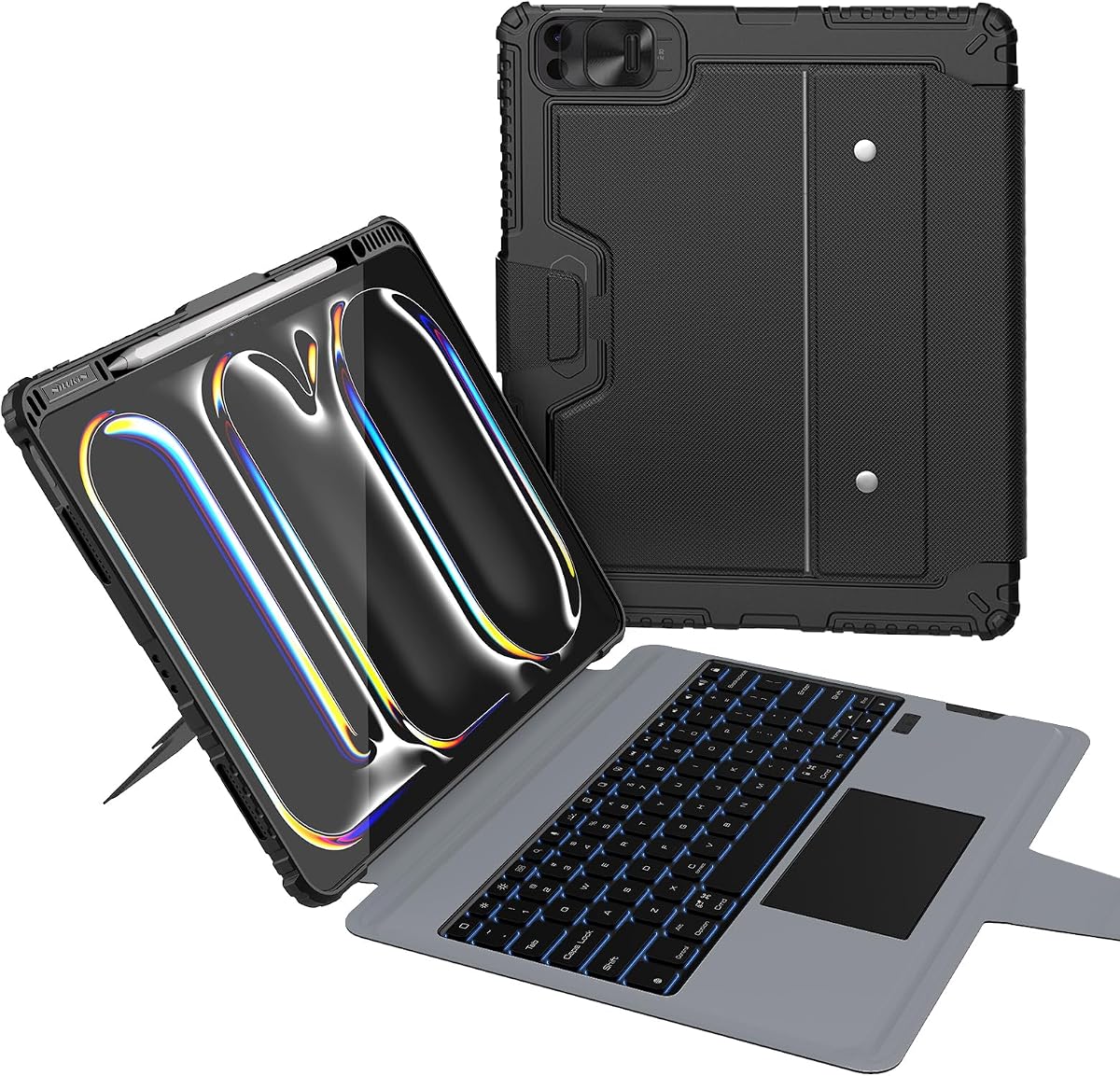
Harvopu for iPad Pro 13 Inch Case with Keyboard (M5/M4) 2025/2024, Black
4.4Editor score
Seven color backlight options available
Magnetic detachable keyboard design
Three stable viewing angles included
Transform your iPad Pro into a powerful workstation with the right keyboard case. These accessories blend protection with productivity, offering trackpads and comfortable typing experiences for work or creativity.
We evaluated ten top models based on compatibility, build quality, trackpad responsiveness, and typing comfort. Our analysis covers magnetic designs, detachable options, and rugged protections for the latest M4 devices.
Each pick highlights specific strengths and trade-offs to match your workflow. Prices and availability change frequently, so verify details before purchasing to ensure the best value for your specific needs.
4.4Editor score

4.3Editor score

3.7Editor score
As an Amazon Associate we earn from qualifying purchases.
The following comparison table outlines key specifications for each reviewed model. Use this side-by-side overview to quickly identify compatibility, trackpad features, and protective capabilities.



The Apple Magic Keyboard delivers a premium typing experience tailored for the iPad Pro 13-inch. With a 4.3 rating, it stands out for its glass trackpad and robust build quality.
We may earn a commission when you buy through this link, at no additional cost to you.
Its two-cantilever hinge provides smooth adjustment while the built-in function row offers quick access to media controls. Haptic feedback on the trackpad enhances navigation accuracy.
While the price is higher than alternatives, the seamless integration and USB-C pass-through charging justify the cost. The lack of a Pencil holder may inconvenience artists needing quick access.
Ideal for professionals seeking a laptop-like setup, this case is our top recommendation. It transforms your iPad into a reliable workstation without compromising portability.
The glass trackpad supports Multi-Touch gestures and haptic feedback for precise cursor movement. This feature elevates productivity by reducing reliance on touch interactions.
No pairing or charging is required as the case draws power directly from the iPad. Magnetic attachment ensures a secure and instant connection every time.
We may earn a commission when you buy through this link, at no additional cost to you.
The ESR keyboard case combines versatility with solid protection. Rated 4.2, it appeals to users who need a balance between typing and creative tablet modes.
We may earn a commission when you buy through this link, at no additional cost to you.
Its quick-set magnetic stand allows easy angle adjustments while the detachable keyboard enables hands-on access. The extended trackpad offers generous space for gestures.
Some users may find the stand less rigid than rigid hinged models. The focus on flexibility makes it ideal for hybrid work and entertainment workflows.
For those needing a convertible setup, this case delivers strong value. It transforms your iPad into a portable machine ready for various environments.
The magnetic stand lets you open the cantilever stand to your preferred angle effortlessly. This design simplifies transitioning from browsing to typing quickly.
Removing the keyboard provides instant hands-on access for drawing or reading. This flexibility ensures your device adapts to your current task.
We may earn a commission when you buy through this link, at no additional cost to you.
Rated 4.4, this ESR model improves on the previous design with a larger trackpad and dedicated Pencil holder. It is a strong contender for note-takers.
We may earn a commission when you buy through this link, at no additional cost to you.
The click-anywhere trackpad is 65% larger than standard options, offering smoother navigation. The low-angle magnetic support is ideal for writing or sketching tasks.
While it adds weight, the enhanced features justify the extra bulk for power users. The Pencil holder ensures your stylus is always within reach.
This case is recommended for students and creatives who need robust tools. It delivers precision and convenience without sacrificing protection.
The fully responsive trackpad features a larger surface for smoother control. This enhancement improves editing and app switching significantly.
A dedicated stylus holder prevents scratching and dropping your Pencil. This small addition adds daily convenience for artists.
We may earn a commission when you buy through this link, at no additional cost to you.
The typecase Edge stands out for its 11-color backlight options and sleek design. With a 4.2 rating, it offers a stylish alternative for personalization enthusiasts.
We may earn a commission when you buy through this link, at no additional cost to you.
The lightweight profile makes it easy to carry while the magnetic clasp ensures security. It morphs your iPad into a laptop quickly and efficiently.
While it lacks some premium features like Pencil holders, the aesthetic flexibility is a key selling point. It suits users who prioritize style alongside functionality.
Choose this case if you want customization without heavy bulk. It balances form and function well for everyday mobile use.
Adjusting eleven backlight options ensures clear visuals in every setting. This feature enhances the typing experience day or night.
The slim design makes it an ideal companion for on-the-go users. It provides functionality without adding excessive weight to your bag.
We may earn a commission when you buy through this link, at no additional cost to you.
The Logitech Combo Touch offers the biggest trackpad yet for intuitive navigation. Rated 3.7, it provides a distinct premium option for touch-heavy workflows.
We may earn a commission when you buy through this link, at no additional cost to you.
Its detachable keyboard allows for unrestricted use in drawing modes. The flexible kickstand helps you find the perfect angle for any task.
Users may find it heavier and pricier than competitors. However, the Smart Connector ensures seamless connectivity without charging requirements.
Ideal for power users needing precise cursor control, this case delivers. It transforms your iPad into a robust workstation.
The biggest trackpad offers an intuitive tracking experience with familiar gestures. This allows for swift navigation and app switching easily.
Removing the keyboard gives total freedom for sketching or reading. This flexibility supports diverse creative workflows.
We may earn a commission when you buy through this link, at no additional cost to you.
The Harvopu keyboard case delivers strong value with a 4.4 rating. It is an excellent choice for users seeking essential features without premium pricing.
We may earn a commission when you buy through this link, at no additional cost to you.
Its 500mAh battery ensures long usage while the 7-color backlight adds customization. The three viewing angles provide stability for daily tasks.
While materials are more basic, the stain-resistant PU design is easy to clean. It is perfect for students or casual professionals.
This case is the top budget pick for its balance of cost and function. It keeps your iPad protected and functional.
A built-in 500mAh battery supports up to 100 hours of typing. Charging is simple with a standard Type-C cable.
Choose from seven colors to match your mood or environment. This feature enhances visibility in low light.
We may earn a commission when you buy through this link, at no additional cost to you.
Rated 4.2, the Edge+ features a 33% larger touchpad and strong magnets for stability. It is ideal for users needing reliable connectivity.
We may earn a commission when you buy through this link, at no additional cost to you.
The detachable Wingshell back case enables seamless mode switching. N54H magnets ensure a secure connection even during movement.
While slightly pricier, the shortcut row streamlines workflow efficiently. It is a solid choice for those valuing precision.
Choose this case for a stable and responsive experience. It offers a robust setup for daily productivity.
Powerful N54H magnets securely attach the keyboard and back case. This provides a stable connection wherever you are.
The 33% larger touchpad enhances smooth navigation for tasks. This improvement helps in detailed design work.
We may earn a commission when you buy through this link, at no additional cost to you.
The wireless keyboard case leads with a 4.6 rating for its 360 rotating stand. This feature offers unmatched flexibility for any viewing angle.
We may earn a commission when you buy through this link, at no additional cost to you.
The transparent design highlights your device while the backlight enhances usability. It combines style with practical functionality.
While not as rugged as military-grade cases, the hardshell provides reliable drop protection. It suits users prioritizing aesthetics.
For those seeking style and versatility, this is an excellent choice. It adapts to your needs effortlessly.
The built-in 360 rotating stand allows smooth angle adjustments. This adapts instantly to your needs.
The sleek transparent back highlights your device's original design. It combines minimalist style with durability.
We may earn a commission when you buy through this link, at no additional cost to you.
Rated 4.3, the Nillkin Rugged Case offers 1.2m drop protection and a privacy shutter. It is built for durability in demanding environments.
We may earn a commission when you buy through this link, at no additional cost to you.
The 0-180 degree kickstand provides unmatched angle range. The camera cover adds a crucial privacy layer for sensitive work.
Its weight is the main trade-off for this level of protection. It suits field workers or travelers needing robust gear.
Choose this case if durability is your priority. It keeps your device safe during active use.
Air-cushion bumpers absorb shocks to protect your device. This tested durability ensures safety in tough conditions.
The sliding cover keeps your lens protected and privacy intact. This prevents accidental recording or spying.
We may earn a commission when you buy through this link, at no additional cost to you.
Rated 4.3, the TSQQST Clear Case blends clear aesthetics with protection. It is a great choice for users who want their iPad to remain visible.
We may earn a commission when you buy through this link, at no additional cost to you.
The 360 rotating stand supports ergonomic comfort. The acrylic design adds a futuristic touch to your setup.
While it offers solid drop protection, it is not as rugged as others. It suits casual and creative use well.
For those who value style and function, this case works well. It keeps your device safe and stylish.
The clear hard case showcases your iPad's design. Reinforced corners guard against drops and scratches.
The base switches between typing and streaming easily. This offers optimal screen positioning.
We may earn a commission when you buy through this link, at no additional cost to you.
Choosing the right case depends on your workflow and protection needs. Consider compatibility, trackpad size, and build quality.
Ensure the case supports iPad Pro 13-inch M4 or M5 models. Check specific model numbers like A2925 or A3360 to confirm fit.
Mismatched cases may not align ports or magnets correctly.
A larger trackpad offers smoother navigation and gestures. Look for models offering full iOS gesture support.
Prioritize responsiveness if you plan to replace a mouse entirely.
Scissor-switch keys and adequate travel provide comfort. Backlight options help in low-light environments.
Choose adjustable brightness levels for flexible visibility.
Slim cases reduce bulk for travel. Weight matters for extended mobile use.
Lightweight models balance protection with convenience.
Rugged cases absorb shocks better than standard ones. Reinforced corners and camera covers add safety.
Match protection to your environment.
A dedicated slot prevents losing your stylus. This is vital for artists taking notes.
Check if the case includes a magnetic slot.
Bluetooth pairing varies by model. Magnetic connections ensure instant pairing without setup.
Prioritize secure connections for reliability.
Battery-powered keyboards require charging. Some draw power directly from the iPad.
USB-C charging or pass-through options simplify power.
Pair your keyboard via Bluetooth or magnetic connection before use. Ensure it is fully charged for optimal performance.
Clean the surface regularly with a soft cloth to remove dust and smudges. Avoid harsh chemicals that could damage the material.
Store your iPad in a secure bag to prevent accidental drops. Regular updates ensure compatibility and feature access.
Most cases are designed specifically for the 13-inch M4 and M5 models. Older models may have different port placements and dimensions.
Some models require separate charging via USB-C while others draw power directly from the iPad. Check product specifications before buying.
Many cases include dedicated pencil holders for stylus access. Others may allow use without a holder but lack built-in storage.
Most modern cases support full iOS gestures on their trackpads. Look for models highlighting gesture support for best results.
Verify your iPad model number before purchasing. If it does not fit, contact the seller for a return or exchange.
Use a dry soft cloth to wipe away dust. Avoid spraying liquids directly onto the keyboard.
Our top picks include Apple for quality, Harvopu for budget, and Logitech for premium trackpad features. Each offers unique strengths for different workflows.
Prioritize compatibility and trackpad size based on your needs. A good case should enhance productivity without adding unnecessary bulk.
Prices and availability change frequently so check current deals before buying. This ensures you get the best value for your specific device.