
USB C Docking Station Dual Monitor for HP
4.3Editor score
Offers four video output ports
Delivers up to 100W power
Compatible with many laptop brands
This guide compares the top 10 docking stations for 3 monitors to help you find the perfect multi-display solution for your workspace setup.
Creating a productive workspace often requires multiple screens to handle complex tasks efficiently. A high-quality docking station for 3 monitors allows you to connect all your displays through a single cable to your laptop.
We evaluated ten leading models based on port variety, video output capabilities, charging power, and overall build quality. Our analysis ensures you can compare features side by side to find the right match for your specific workflow needs.
Each pick highlights key strengths and potential limitations to help you make an informed decision. Please note that product availability and pricing can change frequently, so verify details before purchasing your new hardware.
4.3Editor score

4.4Editor score

4.4Editor score
The following table provides a concise overview of the key specifications for each docking station. Use this reference to quickly identify which model offers the port count and video capabilities you require for your specific setup.


The Selore Laptop Docking Station stands out as a versatile hub for users needing extensive connectivity. With a 4.3 star rating, it offers a robust combination of video outputs and data ports in a sleek vertical design.
We may earn a commission when you buy through this link, at no additional cost to you.
Its most unique feature is the built-in LCD screen that displays weather and time without needing your phone. The docking station supports triple 4K displays on Windows using MST and includes fast 10Gbps USB ports for quick file transfers.
Users should note that Mac support is restricted to mirror mode due to system limitations. Additionally, the power adapter is not included, so you must ensure you have a compatible 87W or higher charger.
This docking station is ideal for Windows users seeking a feature-rich hub that goes beyond basic video expansion. The privacy button and smart display make it a standout choice for modern home offices.
The integrated LCD screen syncs via Wi-Fi to show local weather and time instantly.
Transfer large files quickly with 10Gbps USB-C and USB-A ports included on the dock.
We may earn a commission when you buy through this link, at no additional cost to you.
The TobenONE 18 in 1 Laptop Docking Station offers an impressive array of connections for complex workstations. With a 4.3 star rating, it is designed to eliminate cable clutter while maximizing your laptop potential.
We may earn a commission when you buy through this link, at no additional cost to you.
This hub supports triple 4K@60Hz displays which is crucial for smooth multitasking without lag. It features nine USB ports to handle all your peripherals including keyboards, mice, and external drives effortlessly.
Mac users should avoid this model as it is optimized specifically for Windows and Chrome OS systems. The power adapter is not included and requires a supply over 65W for stable operation.
Choose this docking station if you need maximum connectivity for a home office environment. The sheer number of ports ensures you can connect every device without needing additional adapters.
Experience smooth multitasking with triple 4K@60Hz support for editing and browsing.
Nine USB ports allow you to connect multiple devices simultaneously without dongles.
We may earn a commission when you buy through this link, at no additional cost to you.
The Plugable USB-C Triple Monitor Docking Station is a robust choice for business environments. Rated 4.4 stars, it standardizes your desktop setup with essential ports and reliable connectivity.
We may earn a commission when you buy through this link, at no additional cost to you.
It supports three extended HDMI displays and includes a full power adapter for stable operation. The device works well with M-series Macs thanks to DisplayLink support which bypasses native limitations.
Be aware that it does not support protected content playback like Netflix and requires driver installation on Macs. However, the lifetime support from North American experts makes it a safe long-term investment.
This docking station is perfect for offices needing reliable performance and standardized deployment. The included adapter and support guarantee provide peace of mind for critical work tasks.
Designed for IT deployment with unified charging to reduce adapter complexity.
Works with M-series Macs via DisplayLink to enable multiple external screens.
We may earn a commission when you buy through this link, at no additional cost to you.
The Plugable USB C Triple Display Docking Station is engineered for hybrid workspaces. With a 4.2 star rating, it streamlines connectivity for teams using mixed laptop fleets.
We may earn a commission when you buy through this link, at no additional cost to you.
It supports up to three extended HDMI displays which helps maximize productivity during conferences. The dock ensures reliable networking via Gigabit Ethernet and charges laptops with 100W power.
Mac users can bypass single display limits using DisplayLink graphics but must install drivers. Linux systems are not supported so check your operating system compatibility before buying.
Choose this dock if you need a reliable solution for a mixed fleet of devices. The enterprise-grade design ensures stability for critical work tasks and presentations.
Delivers triple extended displays to boost productivity for data analysis.
Continuous 100W charging ensures your host stays powered during heavy loads.
We may earn a commission when you buy through this link, at no additional cost to you.
The USB C Docking Station Dual Monitor for HP offers excellent value for budget-conscious users. Rated 4.3 stars, it provides essential connectivity without breaking the bank.
We may earn a commission when you buy through this link, at no additional cost to you.
It supports up to 4K dual display using HDMI DP and VGA ports which allows flexible setups. The 100W PD charging keeps your laptop powered during intensive use effectively.
Mac users will only get mirror mode functionality and must ensure their laptop supports DP1.4 signals. USB speeds are standard but sufficient for basic peripherals like mice and drives.
This is a solid choice for students or users needing a simple multi-screen setup. It handles essential tasks well while remaining accessible for those with limited budgets.
Four video ports allow you to connect various monitor types simultaneously.
Up to 100W input ensures your laptop stays charged during heavy usage.
We may earn a commission when you buy through this link, at no additional cost to you.
The Acer 13-in-1 Laptop Docking Station stands out for its build quality and included accessories. With a 4.5 star rating, it offers a premium experience for your workspace.
We may earn a commission when you buy through this link, at no additional cost to you.
It supports three independent screens via 2 HDMI and 1 DP and includes a 110W power adapter. The aluminum body dissipates heat efficiently which helps maintain peak performance during long sessions.
Users should note that triple 4K requires your laptop to support DSC and Macs are limited to mirror mode. The security slot adds an extra layer of physical security for public spaces.
This docking station is perfect for those seeking a reliable all-in-one solution. The included power adapter and solid build make it a top contender for professional environments.
Sleek aluminum body dissipates heat efficiently to maintain performance.
Integrated security slot allows you to lock the dock to your desk.
We may earn a commission when you buy through this link, at no additional cost to you.
The Selore USB C Docking Station 3 Monitors transforms your laptop into a triple monitor workstation easily. Rated 4.3 stars, it combines versatile ports with seamless switching controls.
We may earn a commission when you buy through this link, at no additional cost to you.
It features three HDMI ports that support triple 4K extend mode on Windows. The 10Gbps data transfer ensures your large files move quickly between devices without delays.
Mac users can use up to 2 displays including one extended and one mirrored. Video output requires DisplayPort Alt Mode or Thunderbolt 3/4 so check your laptop specifications carefully.
Choose this dock if you need a reliable way to extend your screens on Windows. The one-touch button simplifies switching between mirror and extend modes efficiently.
Three HDMI ports support triple 4K extend mode for Windows users.
Ultra-fast 10Gbps speeds allow for rapid file transfers across devices.
We may earn a commission when you buy through this link, at no additional cost to you.
The TobenONE DisplayLink Docking Station offers a powerful solution for high-end workstations. With a 4.4 star rating, it enables you to run multiple 4K displays from a single cable.
We may earn a commission when you buy through this link, at no additional cost to you.
It includes a massive 120W power adapter and supports up to four displays on Windows. The DisplayLink technology ensures smooth multitasking for tasks like financial analysis and streaming.
You will need to download drivers for use on some systems and Linux is not supported. The high wattage adapter allows for rapid charging while powering multiple peripherals simultaneously.
This dock is ideal for professionals needing maximum screen real estate and performance. The included adapter and support make it a premium choice for serious work.
Includes a 120W adapter to handle high power demands efficiently.
Features support for up to four monitors for ultimate productivity.
We may earn a commission when you buy through this link, at no additional cost to you.
The Plugable USB-C Triple Display Laptop Docking Station offers a driverless experience for Windows users. With a 4.4 star rating, it simplifies setup without requiring additional software downloads.
We may earn a commission when you buy through this link, at no additional cost to you.
It supports triple HDMI displays with flexible resolutions like dual 4K or triple mixed setups. The 100W charging ensures your laptop stays powered throughout the workday reliably.
Mac users are not recommended for this model so focus on Windows or ChromeOS systems. The 2.5Gbps Ethernet provides faster network speeds than standard connections.
This docking station is great for those who want immediate plug-and-play functionality. It handles complex workflows without technical hurdles making it efficient for daily use.
Driverless connectivity means you can start working immediately without setup.
Supports combinations like dual 4K or triple mixed resolution displays.
We may earn a commission when you buy through this link, at no additional cost to you.
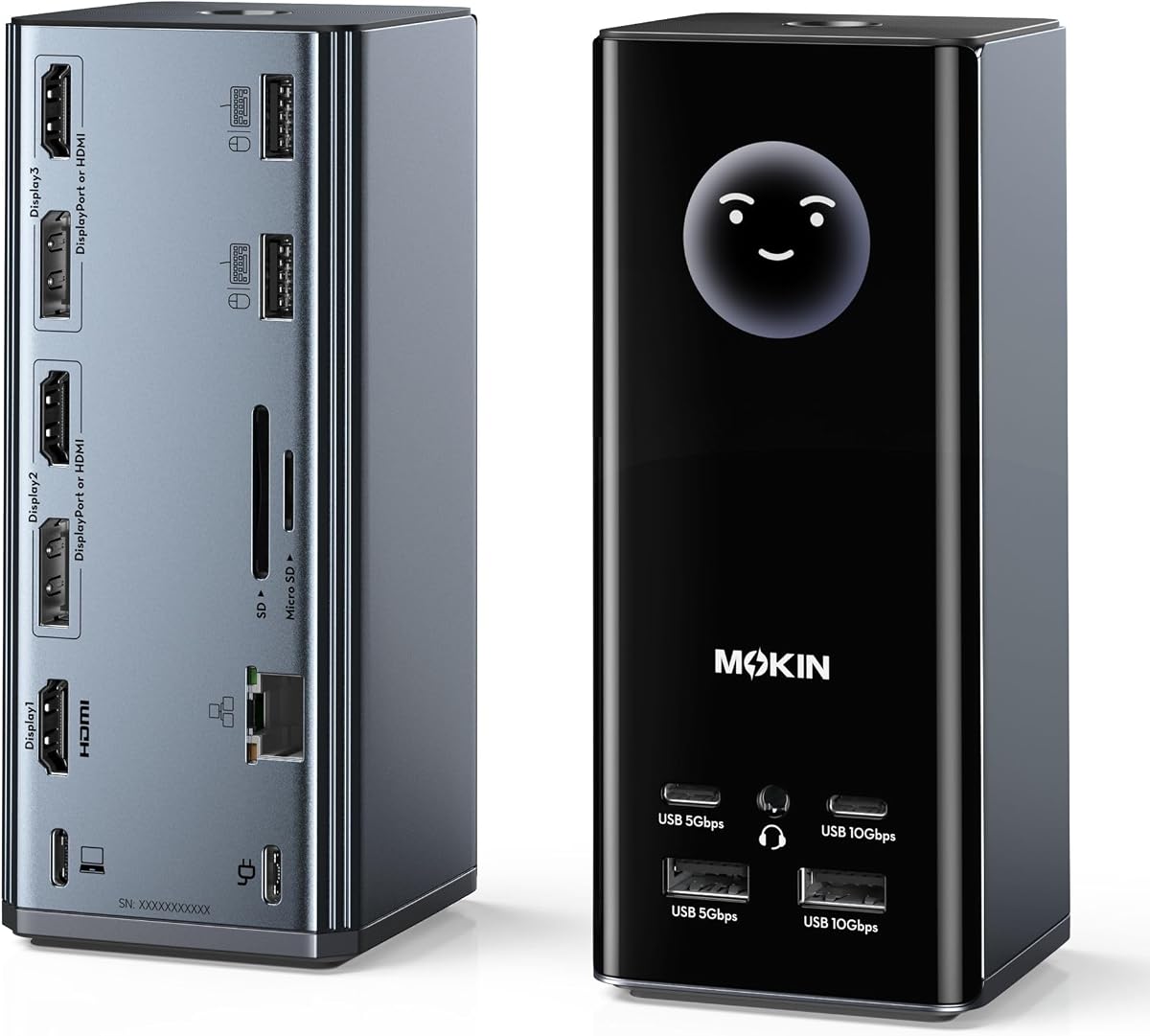
The MOKiN USB C Docking Station 3 Monitors features a unique weather display function. With a 4.2 star rating, it combines standard video expansion with visual intelligence.
We may earn a commission when you buy through this link, at no additional cost to you.
The LCD screen shows real-time weather and status without needing your phone. It supports triple 4K monitors and includes a privacy lock button to secure your info instantly.
The power adapter is not included and you must ensure a stable network for the weather display. The silicone suction base ensures the dock stays stable during frequent use.
This dock is ideal for users who appreciate smart features in their workspace setup. The combination of display and privacy tools offers a modern solution for home offices.
Integrated LCD display provides real-time monitoring of workstation status.
Tap the privacy button to instantly turn off screens and protect data.
We may earn a commission when you buy through this link, at no additional cost to you.
Selecting the right docking station requires considering several technical factors to ensure compatibility and performance for your specific needs.
The method your dock uses to drive multiple displays is critical. Some use MST which splits one video signal across multiple screens but often limits resolution on Mac. Others use DisplayLink which compresses video allowing true independent displays but requires driver software. Check if your laptop supports DisplayPort Alt Mode if you want native video without drivers.
Look for displays that explicitly support triple 4K if that is your target resolution.
A docking station must provide enough power to keep your laptop running under load. Look for a 100W Power Delivery output to ensure your battery does not drain while using multiple monitors. If the dock does not include an adapter ensure you buy a compatible one that matches the power requirements.
Always verify that your laptop can accept Power Delivery input to avoid compatibility issues.
Beyond video outputs you need to consider data ports for peripherals. A good docking station should offer at least three USB ports along with card readers and network connections. This ensures you can connect all your devices without needing extra hubs.
Prioritize models with USB 3.1 or higher for fast data transfer if you work with large files.
Windows and macOS handle multi-monitor setups differently. Windows usually supports extended displays easily while macOS limits the number of external screens on many chips. Ensure the dock supports your OS natively or via DisplayLink to avoid limitations.
If you use a Mac prioritize docks that mention M-series chip compatibility or DisplayLink support.
Docks with aluminum casings dissipate heat better than plastic ones which prevents thermal throttling during long work sessions. Look for units with ventilation holes or sturdy designs to maintain performance.
A durable build ensures your investment lasts longer and handles the heat of multiple displays.
Some docking stations include smart screens for weather or privacy buttons for quick security. While these are not essential they can improve workflow convenience. Decide if you value these extras over raw connectivity options.
Consider if features like Ethernet ports or audio jacks are necessary for your workflow.
Long-term support is vital for business tools. Brands that offer lifetime technical support or robust warranties provide security against hardware failures. Check reviews to see if the company resolves issues quickly.
Select a brand known for reliable customer service to minimize downtime if problems occur.
If you rely on stable internet a dock with Gigabit or 2.5Gbps Ethernet is useful. Wired connections are often faster and more reliable than Wi-Fi for video calls or large downloads.
Ensure the Ethernet port is included if you need stable network access during work.
Start by connecting your monitors to the video ports on the dock before plugging it into your laptop. Ensure all cables are firmly seated to prevent signal drops during use.
Install any required drivers if you use DisplayLink technology before powering on the dock. This ensures that your operating system recognizes all connected displays immediately.
Keep the dock in a well-ventilated area to prevent overheating during extended use. Avoid blocking vents and clean dust regularly to maintain optimal performance over time.
Mac systems often limit external displays to one or two screens due to hardware constraints. To connect three monitors you usually need a docking station with DisplayLink technology which bypasses these limitations. Ensure your Mac model supports external displays before purchasing.
Most modern docks use USB-C or Thunderbolt for the main connection so you will need a compatible USB-C cable. Video ports like HDMI and DP use standard cables which are often included in the box.
Windows relies on Multi-Stream Transport to run multiple screens from one port. If your laptop does not support this you may need a DisplayLink dock. Also check your laptop power settings to ensure video is enabled.
Running three monitors and other peripherals requires significant power so a 100W Power Delivery dock is recommended. This ensures your laptop charges while driving the displays without draining the battery.
A quality dock will not significantly reduce speeds but cheap models might bottleneck USB transfers. Look for docks with USB 3.1 or Thunderbolt 3 to ensure data moves as fast as your laptop allows.
Yes most modern docks manage power safely and prevent overcharging. However ensure your dock has proper ventilation to avoid overheating which can affect battery life over time.
Many docks support Chrome OS but video output depends on the laptop USB-C port capabilities. Check if your Chromebook supports DisplayPort Alt Mode to ensure it works with external monitors.
Both send video signals but DisplayPort often supports higher refresh rates. You can use either depending on your monitor inputs but ensure the dock supports the resolution you need.
We reviewed ten distinct options ranging from budget hubs to premium enterprise solutions to help you find the perfect match. The Selore Plugable and TobenONE models stand out for their balance of features and performance.
Prioritize power delivery and video technology based on your specific needs. If you need reliable native displays choose a dock with MST support but look for DisplayLink if you need Mac compatibility.
Remember to check current availability and pricing before making your final decision. Prices fluctuate frequently so verify the best deal for your chosen model to save money.