
LGA 1155 Motherboard H61 for Intel 2th/3th Core i7/i5/i3 DDR3
5.0Editor score
Supports Intel 2nd 3rd gen CPUs
Dual channel DDR3 memory slots
M.2 SSD interface included
This guide compares ten top Lga 1155 Motherboard options for Intel 2nd and 3rd gen CPUs, covering features, performance, and compatibility.
Finding the right Lga 1155 Motherboard is essential for building a reliable PC with older Intel processors. These boards support Core i3, i5, i7, and Xeon E3 v2 CPUs. A good board offers stable power delivery and essential connectivity for daily tasks.
We compared ten models based on chipset, expansion slots, memory support, and user feedback. Our analysis covers budget-friendly options alongside premium boards with advanced features. This helps you choose the best fit for your specific build requirements and budget constraints.
Each pick shows key specs and real-world performance notes to guide your decision. Prices and availability change frequently so verify details before purchasing. Use this list to find a board that matches your needs for gaming, office work, or home server setups.
5.0Editor score

4.3Editor score

4.0Editor score
The following table provides a side-by-side comparison of all ten Lga 1155 Motherboard options. Review the specifications and features to identify the best match for your system.



This H61 motherboard stands out as a top budget option for builders using older Intel processors. With a perfect 5.0 rating, it offers excellent value for those needing a reliable platform for office or light gaming tasks.
We may earn a commission when you buy through this link, at no additional cost to you.
It supports a wide range of CPUs including Core i3, i5, i7, and Xeon E3 v2 series. The inclusion of an M.2 interface is a major plus for modern storage speeds. The dual channel DDR3 slots allow up to 16GB of memory for smooth multitasking.
While it lacks a physical user manual, most drivers are handled automatically by Windows 10. The package excludes the CMOS battery so plan to buy one separately. These trade-offs are minor given the low cost and solid performance.
Buy this if you need a cost effective solution for a budget PC build. It is ideal for users who want basic functionality without spending much on hardware components.
This board works with many 2nd and 3rd generation Intel Core processors as well as Xeon E3 v2 server CPUs.
The M.2 slot supports NVMe SSDs allowing faster boot times and application loading compared to older SATA drives.
We may earn a commission when you buy through this link, at no additional cost to you.
The MACHINIST H61 board offers a smaller Flex-ATX form factor ideal for compact cases. It supports similar CPU ranges as other H61 boards but has a lower rating indicating some user variability.
We may earn a commission when you buy through this link, at no additional cost to you.
It features a versatile M.2 slot supporting 2242 to 2280 SSD sizes. This is great for building small form factor systems needing modern storage speeds. The PCIe 2.0 limit may impact high end GPUs but works for mid range cards.
Note that some Xeon E3 V1 CPUs lack integrated graphics requiring a dedicated GPU. The package does not include the CMOS battery so check before powering on. These details are important for system compatibility and success.
Choose this if you need a small motherboard for a mini PC build. It provides essential features at a budget price for users comfortable with basic setup.
The Flex-ATX size allows fitting this board into smaller cases suitable for home theater or office PCs.
Support for various M.2 lengths means you can use different SSD models without adapter issues.
We may earn a commission when you buy through this link, at no additional cost to you.
This Gigabyte Z77-DS3H is a solid choice for users wanting overclocking capabilities on a budget. The Z77 chipset unlocks multiplier changes for compatible CPUs improving performance beyond stock settings.
We may earn a commission when you buy through this link, at no additional cost to you.
It includes Gigabit LAN for faster network speeds compared to 100M options. RAID support allows multiple drives to be used for speed or redundancy. The ATX form factor ensures easy fitting in most mid tower cases.
Some users may miss more modern USB 3.0 or Type-C ports found on newer boards. However for legacy systems this board offers strong stability and features. It is a reliable pick for retro gaming or workstation builds.
Buy this if you want to push your CPU limits safely. It is best for those needing network and storage options without paying premium prices.
The Z77 chipset allows adjusting CPU multipliers to boost performance for gaming or rendering tasks.
Gigabit LAN ensures your system can handle high speed internet without network bottlenecks.
We may earn a commission when you buy through this link, at no additional cost to you.
The ASUS P8Z77-V is a premium board offering advanced features like USB BIOS Flashback. This lets you update BIOS without a CPU which is rare and valuable for troubleshooting.
We may earn a commission when you buy through this link, at no additional cost to you.
Fan Xpert 2 provides precise fan control reducing noise while keeping temps low. The TPM header enhances security for enterprise or data sensitive environments. Power management helps efficiency reducing electricity costs over time.
While it lacks built-in Wi-Fi the USB 3.0 and SATA 6Gb/s support are robust. The price is higher but you get features often missing in budget boards. It suits users needing stability and extra controls.
Choose this for a high reliability build where stability matters. It is best for users who want advanced tools for maintenance and security.
USB BIOS Flashback lets you recover from failed updates easily without needing a working CPU.
The TPM header allows adding hardware based security keys for encrypted data protection.
We may earn a commission when you buy through this link, at no additional cost to you.
This H61 Gaming ATX board brings modern features like PCIe 3.0 support to an older chipset. The 3 phase power and solid capacitors ensure stable operation for basic gaming.
We may earn a commission when you buy through this link, at no additional cost to you.
HDMI output allows connecting to modern monitors without adapters. The M.2 NVMe NGFF slot supports fast storage improving system responsiveness. ATX size ensures compatibility with most standard cases.
The 100Mbps LAN is a bottleneck for high speed internet users. USB 2.0 ports may not support newer devices efficiently. However for offline or low bandwidth use it remains functional.
Buy this if you need basic gaming capabilities at a low cost. It suits users upgrading older systems with minimal new hardware expenses.
All solid capacitors reduce failure risk and improve lifespan under daily workloads.
PCIe 3.0 x16 slot provides enough bandwidth for most mid range graphics cards available today.
We may earn a commission when you buy through this link, at no additional cost to you.
The P8H77-V LE offers a balanced mix of features using the H77 chipset. It supports USB 3.0 which was a significant upgrade at its launch.
We may earn a commission when you buy through this link, at no additional cost to you.
SATA 6Gb/s allows faster SSD speeds compared to older 3Gb/s limits. GPU Boost can enhance iGPU performance slightly for light tasks. The EPU saves power when under low load conditions.
Overclocking is not supported due to the H77 chipset limitations. This is fine for non-overclocking users wanting stability. The board remains solid for general office and media tasks.
Choose this for a standard workstation needing modern ports. It is best for users prioritizing USB and SATA speeds without overclocking needs.
USB 3.0 ports allow faster data transfers to external drives compared to USB 2.0.
EPU monitors system load and reduces power usage to lower electricity bills.
We may earn a commission when you buy through this link, at no additional cost to you.
This model expands on the LE version with more memory capacity and PCIe slots. It supports Turbo Boost 2.0 for automatic performance tuning based on workload.
We may earn a commission when you buy through this link, at no additional cost to you.
Up to 32GB memory capacity allows heavy multitasking and virtualization. RAID 5 and 10 support provides better data redundancy options than basic RAID. Multiple PCIe slots enable adding capture cards or additional controllers.
While pricier it offers more expansion flexibility than standard boards. Users needing multiple peripherals will find this valuable. It remains relevant for specialized legacy workstation needs.
Buy this if you require high memory and multiple cards. It suits users running multiple devices simultaneously needing stable support.
Multiple PCIe slots let you add sound cards network cards or capture hardware easily.
Supporting up to 32GB means you can run heavy software without memory bottlenecks.
We may earn a commission when you buy through this link, at no additional cost to you.
This LK version of the P8Z77-V offers dual PCIe 3.0 x16 slots for multi GPU setups. It retains Z77 overclocking and high memory support.
We may earn a commission when you buy through this link, at no additional cost to you.
Dual x16 slots allow running two graphics cards for extra graphics power. Support for many SSD sizes and RAID arrays offers flexibility. SATA 3 ports enable fast storage connections.
This is great for users building a legacy gaming rig. While newer tech is available this provides needed power. The price reflects its premium features.
Choose this for multi GPU legacy builds. It is best for enthusiasts wanting to push older hardware limits.
Dual PCIe 3.0 x16 slots support two graphics cards for improved performance in demanding games.
Multiple SATA 3 ports and RAID support allow versatile storage configurations.
We may earn a commission when you buy through this link, at no additional cost to you.
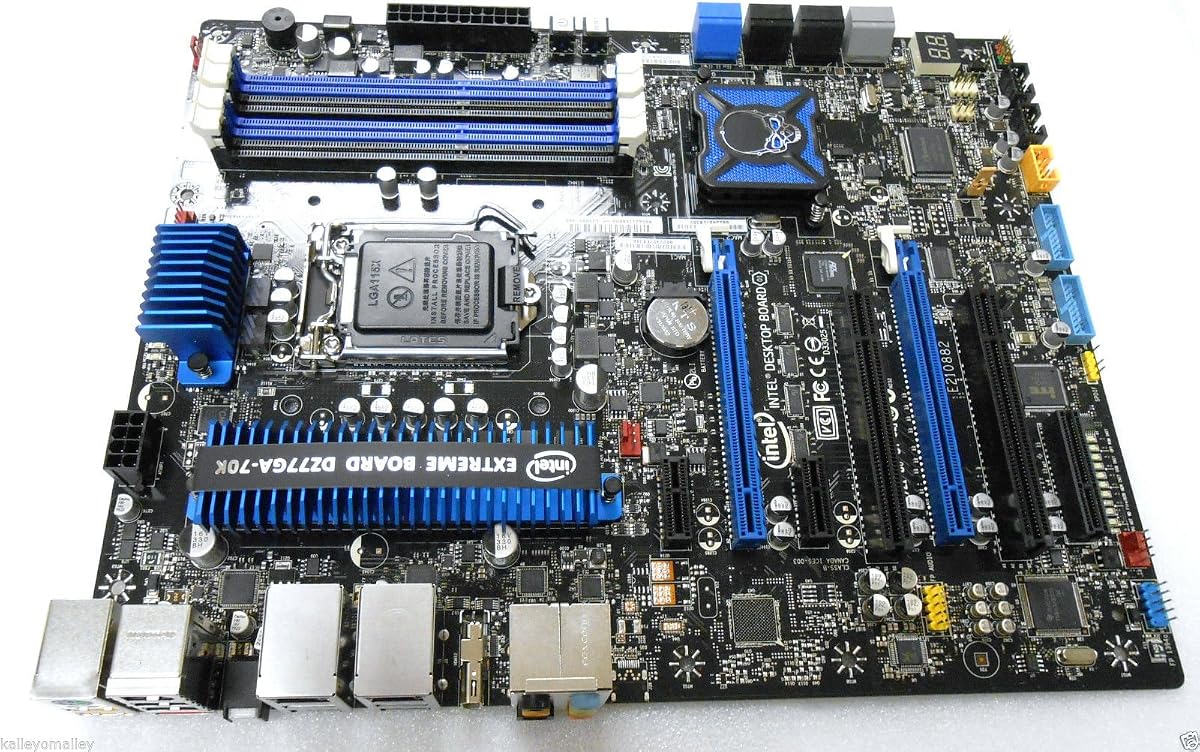
This is an official Intel board known for stability and clean design. Dual Gigabit LAN provides redundancy or link aggregation for network heavy tasks.
We may earn a commission when you buy through this link, at no additional cost to you.
Firewire support is rare and valuable for video editors needing legacy gear. SATA 6Gb/s and HDMI ensure modern media output options. Realtek HD Audio provides clear sound without external DACs.
Availability can be scarce but quality is high. The price may vary as it is often a niche product. Ideal for users needing dual LAN or Firewire.
Buy this for professional legacy setups. It is best for media professionals or network admins needing specific ports.
Dual Gigabit LAN allows failover or higher throughput for server and NAS applications.
Firewire port allows connection to older camcorders or audio interfaces directly.
We may earn a commission when you buy through this link, at no additional cost to you.
The P8B75-M/CSM is a micro ATX board perfect for compact builds. It features UEFI BIOS with graphical interface making setup easier.
We may earn a commission when you buy through this link, at no additional cost to you.
USB 3.0 Boost speeds up data transfers to compatible devices. GPU Boost improves integrated graphics performance for light tasks. The B75 chipset balances cost and features well.
It does not support overclocking which limits CPU tuning. Still it offers stability and modern connectivity for general use. Great for office PCs or home media centers.
Choose this for a small reliable PC. It is best for users wanting simplicity without extra costs.
UEFI BIOS provides a visual interface instead of text making configuration easier.
Micro ATX size fits smaller cases suitable for desktop PCs.
We may earn a commission when you buy through this link, at no additional cost to you.
Choosing the right Lga 1155 Motherboard requires checking several key factors to ensure compatibility and performance. Read these details to find a board that matches your needs.
The chipset determines features like overclocking and USB speeds. Z77 supports overclocking while H61 and H77 do not. Check which CPU features you need before buying.
Choose Z77 for CPU tuning or H61 for basic use.
Most boards support DDR3 with capacities up to 16GB or 32GB. Ensure your desired RAM type fits the slots. High capacity helps with multitasking.
Check max memory limits and speeds before installing.
Look for M.2 slots for modern SSDs. Some boards include SATA 6Gb/s while others have older SATA 3Gb/s. This affects boot speed and file access.
Prioritize M.2 support for faster storage speeds.
ATX boards fit standard cases but Flex-ATX or Micro-ATX suits compact builds. Measure your case to ensure the board fits properly.
Select a form factor matching your case size.
Some boards have 100Mbps LAN while others offer Gigabit LAN. Fast internet speeds need Gigabit ports. Dual LAN is available on high end models.
Choose Gigabit LAN for better network performance.
HDMI and VGA outputs allow display connections without a GPU. Integrated graphics require a CPU with graphics support. Ensure your CPU matches video features.
Verify video ports match your monitor requirements.
PCIe x16 slots allow adding graphics cards. x1 slots are for small expansion cards. Check slot counts for your planned hardware.
Ensure enough slots for your GPU and add-ons.
Boards need a PSU to provide power. Some require 24+4pin connectors. Higher power needs demand a strong PSU to avoid instability.
Check power connectors match your power supply unit.
Install the board in the case with standoffs to prevent short circuits. Connect the power cables to the CPU and motherboard connectors securely.
Insert the CPU carefully aligning the triangle marker with the socket. Apply thermal paste and mount the cooler for proper heat dissipation.
Install the RAM in the correct slots and boot the PC to enter BIOS. Update BIOS if needed for CPU compatibility.
These boards support Intel Core i3, i5, i7 of 2nd and 3rd gen. Xeon E3 v2 processors also work well. Ensure your BIOS supports the specific CPU.
No only boards with Z77 chipset support overclocking. H61 and H77 boards do not allow multiplier changes. Check the chipset before buying for overclocking.
Some newer models include M.2 slots while older ones do not. Check product specs carefully for M.2 support before purchasing.
Most boards support up to 16GB or 32GB DDR3 memory. Specific limits depend on the board model and chipset. Check manual for exact max capacity.
Most have HDMI and VGA ports. Some also offer DVI. These require a CPU with integrated graphics to work.
No most boards do not include Wi-Fi. You need to add a USB adapter or PCIe card for wireless.
Yes boards with SATA 6Gb/s support fast SSD speeds. Ensure your board has 6Gb/s ports for best performance.
You will get no video output on board ports. You must use a dedicated graphics card in that case.
These ten Lga 1155 Motherboard options cover budget and premium needs for older Intel CPUs. Each offers different features for various use cases.
Prioritize chipset features like overclocking and memory support when choosing. Ensure compatibility with your CPU and case before purchasing.
Check current prices and stock before buying since models may change. Use this guide to find a reliable board for your project.