
Wireless Gaming Mouse Rechargeable
4.3Editor score
Rechargeable battery design
Silent click buttons included
Three DPI level options
This guide compares the top light up LED mouse options for gaming and work, focusing on lighting effects, ergonomics, DPI settings, and wireless connectivity.
Finding the right light up LED mouse can transform your workspace into a vibrant gaming station or a stylish office setup. These devices combine functionality with aesthetic appeal, offering customizable lighting that matches your mood or desk theme. Whether you prioritize performance, comfort, or visual flair, the market offers diverse choices to suit every need.
We evaluated ten highly rated models based on build quality, lighting versatility, tracking accuracy, and user comfort. Our comparison considers wired and wireless options, silent click features, and battery life for rechargeable units. Each product was assessed for compatibility across various operating systems and its ability to deliver smooth cursor control during extended use.
Every pick includes detailed specs, pros, cons, and real-world usage insights to help you decide quickly. While ratings reflect current user feedback, availability and pricing may fluctuate over time. Check the latest offers before purchasing to ensure you get the best value for your specific requirements and budget constraints.
4.3Editor score

4.6Editor score

4.5Editor score
Here is a side-by-side overview of all ten models, highlighting their key specifications and unique selling points. This table helps you quickly identify which mouse offers the features you need, such as wireless connectivity, silent clicks, or specific DPI ranges.




The BENGOO Gaming Mouse Wired stands out as a top contender for users seeking a balance of performance and style. With a high rating from users, it delivers reliable tracking and a customizable lighting experience. Its ergonomic design ensures comfort during long sessions, while the RGB backlight adds a touch of flair to any desk.
We may earn a commission when you buy through this link, at no additional cost to you.
Key strengths include the four adjustable DPI settings, allowing you to switch speeds effortlessly between gaming and work tasks. The six buttons provide ample functionality for navigation and shortcuts without needing complex software. The skin-friendly material offers a pleasant grip, reducing fatigue even after hours of use.
While it lacks wireless freedom, the wired connection ensures zero latency, which is crucial for competitive gaming. The RGB lighting is bright and noticeable, though it may be distracting in dim environments if not adjusted. Overall, the trade-offs are minimal given the performance and value it provides.
This mouse is ideal for gamers and office workers who want a dependable tool with visual customization. It suits those who prioritize tactile feedback and consistent tracking over portability. If you need a reliable light up LED mouse that won't break the bank, this is a strong recommendation.
The four DPI switches let you toggle between speeds instantly, adapting to different game types or screen resolutions without interrupting your workflow.
Multi-color RGB lights create a dynamic environment, enhancing your setup visually while allowing you to personalize the look to match your style.
We may earn a commission when you buy through this link, at no additional cost to you.
This rechargeable wireless model offers exceptional value for those seeking freedom from cables without sacrificing lighting features. It combines a sturdy build with silent clicks, making it perfect for shared spaces. The battery life is impressive, ensuring you rarely need to recharge during normal use.
We may earn a commission when you buy through this link, at no additional cost to you.
The 2.4G connection provides a stable link up to 10 meters, reducing interference and lag. Silent buttons are a standout feature for office or library use, preventing noise distractions. The ergonomic shape fits well in the hand, supporting extended sessions without strain.
However, the lighting mode can drain the battery faster, so turning it off extends usage time significantly. The DPI range is adequate for general tasks but may lack precision for high-end gaming. Despite these minor limitations, it remains a cost-effective choice for everyday needs.
Ideal for students and office workers, this mouse balances utility with aesthetic appeal. It works well for casual gaming and productivity tasks alike. If you want a quiet, wireless light up LED mouse that fits a tight budget, this option delivers solid performance.
Noiseless clicks ensure you won't disturb colleagues or family members, making this an excellent choice for quiet environments like libraries or home offices.
With a reliable 2.4G connection, you get clutter-free desk usage and smooth cursor movement across various surfaces without worrying about tangled cords.
We may earn a commission when you buy through this link, at no additional cost to you.
This model elevates the standard wired mouse with a premium build quality and striking visual details. The metal chassis adds durability and a unique feel, while the laser carving offers a distinctive look. It supports a wide range of operating systems, including Linux and PS4, making it versatile for diverse setups.
We may earn a commission when you buy through this link, at no additional cost to you.
The four DPI levels go up to 3200, providing precise tracking for detailed tasks or fast-paced games. The breathing LED lights create an immersive atmosphere without being overwhelming. Silent buttons ensure comfort during extended use, and the ergonomic design minimizes hand strain.
While the metal body makes it slightly heavier, it contributes to stability and longevity. The wired limitation means it requires a port, but this ensures consistent performance without battery concerns. These trade-offs are acceptable for users prioritizing build quality and reliability.
Perfect for gamers and designers who need precision and style, this mouse stands out in a crowded market. Its robust construction ensures it withstands daily wear. If you seek a premium light up LED mouse with exceptional durability, this is a top choice.
The metal flanking and chassis provide shockproof durability, ensuring your mouse survives drops and daily wear better than standard plastic models.
High DPI settings allow for accurate cursor movement on various surfaces, enhancing your workflow and gaming experience with responsive tracking.
We may earn a commission when you buy through this link, at no additional cost to you.
HOTLIFE offers a unique dual-mode experience, switching between Bluetooth and 2.4G wireless for maximum flexibility. The slim profile makes it easy to carry in laptop bags, ideal for travelers. Its rechargeable battery and silent clicks add practical value for daily office tasks.
We may earn a commission when you buy through this link, at no additional cost to you.
The dedicated desktop return button enhances productivity by minimizing windows instantly. The LED lighting provides a subtle touch of style without being distracting. Compatible with both Windows and Mac, it adapts well to different ecosystems and device types.
Battery life is shorter than some competitors, lasting around 8 to 10 days per charge. The DPI range is basic, suited for general navigation rather than gaming. Still, its portability and convenience make it a strong option for mobile users.
This mouse is perfect for commuters and professionals who value versatility. The dual connection ensures you stay productive whether at home or on the go. If you need a compact light up LED mouse that travels well, consider this option.
Switching between Bluetooth and USB wireless lets you connect to a wider range of devices without needing extra dongles or cables.
The slim, lightweight design fits easily into bags, making it convenient for travel and use in various environments.
We may earn a commission when you buy through this link, at no additional cost to you.
This wired mouse focuses on utility with six buttons and adjustable DPI levels. The circular breathing lights add a unique visual element that stands out from standard designs. It is compatible with most operating systems and works right out of the box.
We may earn a commission when you buy through this link, at no additional cost to you.
The ergonomic shape supports the palm well, reducing fatigue during long work or gaming sessions. The optical tracking is precise, handling high DPI demands effectively. Users appreciate the simplicity of plug-and-play functionality without extra drivers.
While the cable limits movement, it ensures consistent performance without signal drops. The design is straightforward, lacking some premium features, but it meets essential needs. It is a reliable choice for those who prefer simplicity.
Ideal for gamers and office users who need extra buttons for shortcuts. The high DPI range makes it versatile for different tasks. If you want a functional light up LED mouse without complexity, this model fits the bill.
Six buttons provide quick access to commands, improving efficiency for multitasking and gaming without requiring keyboard shortcuts.
Circular breathing lights create an immersive look, adding style to your desk setup while maintaining a professional appearance.
We may earn a commission when you buy through this link, at no additional cost to you.
VersionTECH delivers a wireless experience with silent clicks that are gentle on the ears. The RGB breathing light adds a vibrant touch to gaming setups without overwhelming the senses. It connects reliably via 2.4G wireless technology for smooth cursor control.
We may earn a commission when you buy through this link, at no additional cost to you.
The rechargeable battery eliminates the hassle of replacing cells, and the auto-sleep feature conserves power during idle times. The ergonomic shape fits comfortably, reducing strain. It works across Windows, Mac, and Linux systems seamlessly.
While lighting mode reduces battery life, turning it off extends usage. The DPI range is sufficient for general tasks but may lack for for competitive play. Still, the silence and wireless freedom are compelling features.
Perfect for shared workspaces or quiet environments where noise is a concern. The rechargeable design adds long-term value. If you prioritize quiet operation and wireless freedom in a light up LED mouse, this is a solid pick.
Noiseless buttons ensure you can click freely without disturbing others, making this ideal for late-night work or library sessions.
A stable 2.4G connection offers freedom from wires, allowing you to work or game anywhere within a reasonable range.
We may earn a commission when you buy through this link, at no additional cost to you.
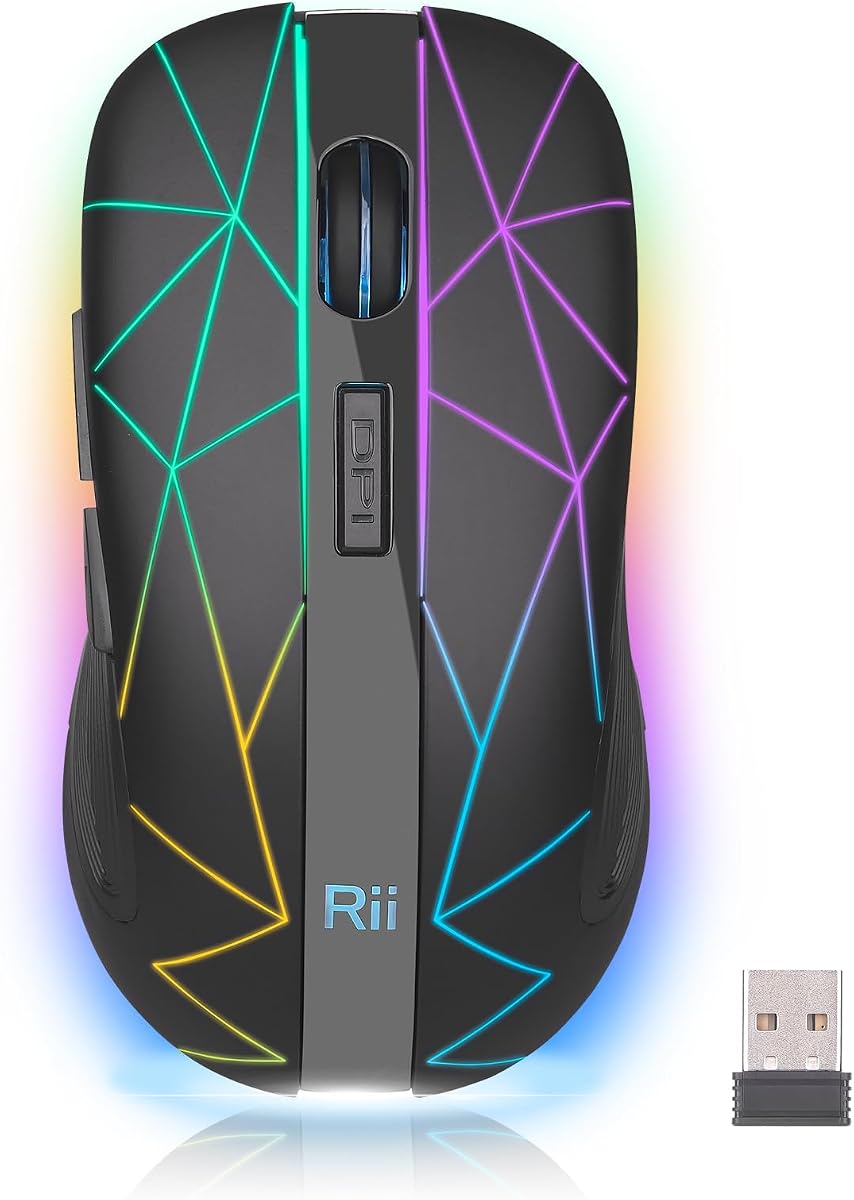
The Rii Wireless Mouse is designed for portability, fitting easily into bags for travel. Its colorful LED changes add fun to your desk setup. The ergonomic shape ensures comfort despite its small footprint, making it suitable for on-the-go use.
We may earn a commission when you buy through this link, at no additional cost to you.
The 2.4GHz connection is reliable and stable across various devices. Battery life is extended through intelligent sleep modes that activate after inactivity. It supports Windows and Mac, ensuring broad compatibility for different users.
While it may feel small for larger hands, its lightweight build is a major advantage. The lighting is random and cheerful, though not customizable. It is a practical choice for those needing a travel-friendly option.
Ideal for travelers and students who need a mouse that packs easily. The wireless freedom and rechargeable battery reduce hassle. If you want a compact light up LED mouse that moves with you, this model works well.
Its small dimensions and smooth control make it perfect for laptop bags, ensuring you stay productive anywhere without bulk.
Intelligent sleep modes extend battery life significantly, reducing charging frequency and keeping your device ready for use.
We may earn a commission when you buy through this link, at no additional cost to you.
TENMOS M2 emphasizes comfort with an ergonomic shape and skin-friendly materials. The soft LED light creates a pleasant ambiance without harsh glare. Silent clicks ensure a peaceful environment, making it great for offices or home use.
We may earn a commission when you buy through this link, at no additional cost to you.
The 2.4G wireless connection provides stable tracking up to 10 meters. You can use it while charging, offering uninterrupted workflow. The rechargeable battery supports long-term use without needing replacements.
While lighting options are simple, they offer a soothing effect. The lack of a dedicated DPI switch means speed changes are manual or handled by software. It remains a reliable tool for general tasks and casual gaming.
Best for users prioritizing comfort and quiet operation. The rechargeable feature adds convenience for daily use. If you seek a comfortable light up LED mouse with soft lighting, this is a worthy contender.
Smooth skin-friendly materials and ergonomic contours ensure your hand stays relaxed, reducing fatigue during extended use.
Advanced wireless technology delivers lag-free performance, ensuring your cursor moves smoothly across any surface.
We may earn a commission when you buy through this link, at no additional cost to you.
The V7 model stands out with its rainbow breathing light, adding a unique visual flair to your setup. Silent clicks keep the environment quiet, perfect for study or work. It connects reliably via 2.4G wireless for smooth operation.
We may earn a commission when you buy through this link, at no additional cost to you.
The auto-sleep feature after 10 minutes helps conserve battery life significantly. Users report it wakes up instantly, ensuring no lag when needed. The ergonomic design fits well, reducing hand strain during use.
While it lacks advanced features, it delivers core functionality effectively. The lighting is a highlight, offering a colorful touch. It is a practical choice for those wanting style and quiet performance.
Ideal for casual users who appreciate visual appeal. The wireless freedom adds convenience for daily tasks. If you want a light up LED mouse with a rainbow effect and silent clicks, this fits the bill.
Colorful breathing lights create a dynamic look, enhancing your workspace vibe without needing complex customization.
Auto-sleep modes help extend battery life, ensuring your mouse remains ready for use without frequent charging.
We may earn a commission when you buy through this link, at no additional cost to you.
Guiheng offers dual-mode connectivity for versatility across Bluetooth and wireless setups. The 7-color LED lights add vibrant style to your desk. Silent buttons ensure comfort and quietness, while ergonomic design supports long use.
We may earn a commission when you buy through this link, at no additional cost to you.
The six buttons provide efficient access to tasks, improving workflow. Power-saving features extend battery life effectively. It is compatible with Windows and Mac, making it adaptable for different users.
While lighting mode consumes power, turning it off helps. The dual connection means you can switch devices easily. It is a strong option for multi-device households or offices.
Ideal for tech users who need seamless switching between devices. The combination of features offers great utility. If you want a light up LED mouse with dual connectivity, this is a practical choice.
Support for both Bluetooth and 2.4G ensures you can connect to various devices seamlessly without extra hardware.
Six buttons streamline workflows, allowing quick access to functions without needing keyboard shortcuts.
We may earn a commission when you buy through this link, at no additional cost to you.
Selecting the right light up LED mouse involves balancing visual appeal with practical performance. Consider how you use your computer most often and which features will enhance your experience.
Decide between wired and wireless options. Wired mice offer consistent performance without battery concerns, while wireless models provide freedom and reduce desk clutter. Some wireless mice also offer Bluetooth for dual connectivity.
Choose wired for gaming precision or wireless for portability.
DPI affects cursor speed and accuracy. Higher DPI is better for gaming or large screens, while lower DPI suits detailed tasks. Look for adjustable DPI settings to switch speeds on the fly.
Ensure the mouse has at least three adjustable DPI levels.
Comfort is vital for long sessions. Choose a mouse that fits your hand size and grip style. Ergonomic shapes reduce strain and prevent fatigue over time.
Prioritize models with contoured designs and soft materials.
LED lighting adds style but may drain battery in wireless models. Check if lights can be turned off to save power. Different patterns like breathing or rainbow effects suit personal tastes.
Select lighting options that match your workspace needs.
For rechargeable wireless mice, battery duration varies. Some last days on a single charge, while others need frequent recharging. Consider how often you can plug in your device.
Opt for models with smart power-saving modes to extend usage.
Extra buttons can boost productivity for shortcuts or navigation. Ensure the buttons are easily accessible and programmable. Silent clicks are preferred for quiet environments.
Choose a layout that fits your workflow requirements.
Verify the mouse works with your operating system. Most support Windows and Mac, but some offer Linux or console compatibility. Plug-and-play setups simplify installation.
Confirm support for your specific devices before buying.
Materials impact durability and feel. Metal chassis offer ruggedness, while plastic keeps weight low. Check reviews for reliability and longevity claims.
Invest in models with positive feedback on build.
Place the mouse on a smooth, flat surface to ensure accurate tracking. Avoid reflective surfaces like glass which can confuse the sensor and reduce performance.
For wireless models, ensure the USB receiver is securely plugged in or pair via Bluetooth as instructed. Charge the battery fully before first use to maximize battery life.
Clean the mouse regularly with a soft, dry cloth to remove dust and oils. Avoid using harsh chemicals that could damage the LED lighting or coating.
Yes, keeping LED lights on in wireless models will reduce battery duration. Most mice allow you to turn off the lighting via a switch to conserve power. If you plan to use the mouse for long periods without charging, consider disabling the lights when not needed.
Most models listed support macOS, though some may have limited software features compared to Windows. Check product specifications to confirm OS compatibility before purchasing. Plug-and-play functionality works for basic usage without drivers.
Wired options provide the most consistent performance for competitive gaming due to zero latency. Wireless models with high-quality receivers also work well for casual gaming. Ensure the DPI range and sensor quality match your game's requirements.
Many listed models are plug-and-play without needing drivers. Some brands may offer apps for advanced lighting or button customization. Check the product page for software availability if you need deeper control.
Most models have a dedicated DPI button, often located above the scroll wheel. Pressing it cycles through preset speed settings. Refer to the user manual for specific button locations and available DPI levels.
Wireless mice with rechargeable batteries can last from several days to weeks depending on usage and lighting. Turning off LEDs and enabling sleep modes extends life. Expect around 10 to 25 days with moderate use.
Silent click mice are ideal for shared workspaces as they reduce noise disturbance. They maintain the same functionality as standard mice. If you value a quiet environment, this feature adds significant value to your purchase.
Bluetooth-enabled mice connect to tablets and phones supporting OTG or standard Bluetooth. Check device compatibility lists provided by the manufacturer. USB receivers require adapter support for devices lacking USB ports.
Our top picks include the BENGOO Gaming Mouse for overall value, the rechargeable wireless option for budget buyers, and the rugged wired model for durability. Each offers unique lighting and performance traits.
Prioritize connection type, ergonomics, and DPI based on your daily tasks. Silent clicks and battery life matter greatly for office settings, while precision and responsiveness are key for gaming.
Prices and availability fluctuate, so check current listings before buying. Compare features against your needs to find the light up LED mouse that best suits your style and workflow.